Join us at FabCon Atlanta from March 16 - 20, 2026, for the ultimate Fabric, Power BI, AI and SQL community-led event. Save $200 with code FABCOMM.
Register now!The Power BI Data Visualization World Championships is back! Get ahead of the game and start preparing now! Learn more
hi there,
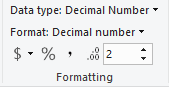
i would like to show decimal numbers in the below gauge chart. i have already formated the measure as decimal number but it is still not showing up in the chart. any suggestions would be greatly appreciated.
thanks,
Grace
Solved! Go to Solution.
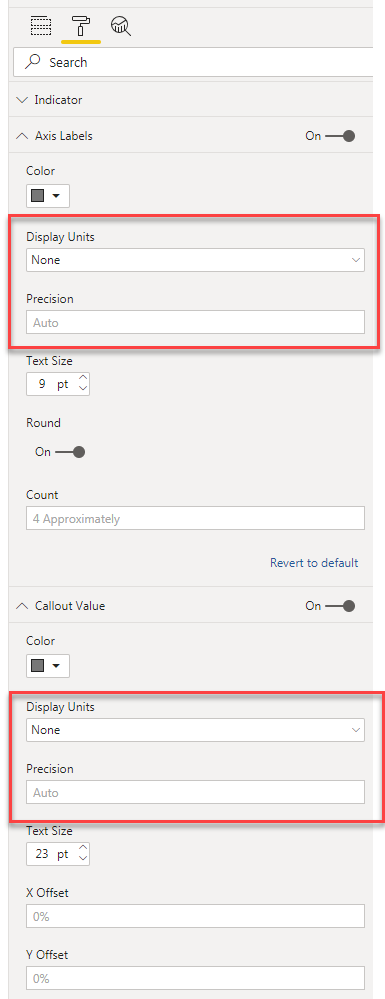
1. In order to expand the millions to actual value - Go to format -> axis labels -> make 'Display Units' to 'None'
2. To display decimals - force the Precision to 'Auto'
Follow the same steps for 'Callout Values' in Format tab to reflect similar formatting for the needle.
Attached is a screenshot for reference.
Did I answer your question? Mark my post as a solution!
1. In order to expand the millions to actual value - Go to format -> axis labels -> make 'Display Units' to 'None'
2. To display decimals - force the Precision to 'Auto'
Follow the same steps for 'Callout Values' in Format tab to reflect similar formatting for the needle.
Attached is a screenshot for reference.
Did I answer your question? Mark my post as a solution!
Hi @Anonymous ,
This is a custom gauge chart, right?
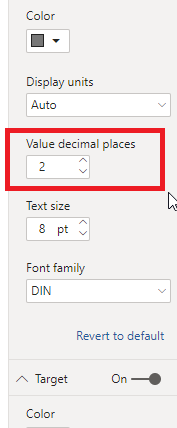
From the format pane you can find this:
The chart is called Tachometer. there is no decimal options in the format panel.
The Power BI Data Visualization World Championships is back! Get ahead of the game and start preparing now!
| User | Count |
|---|---|
| 38 | |
| 38 | |
| 37 | |
| 28 | |
| 28 |
| User | Count |
|---|---|
| 124 | |
| 89 | |
| 73 | |
| 66 | |
| 65 |