We've captured the moments from FabCon & SQLCon that everyone is talking about, and we are bringing them to the community, live and on-demand. Starts on April 14th. Register now
Hello,
I must have done something to my icons in Model View and now my table icons are extremely tiny... i cannot even read them. does anyone know how i can restore the table icons to full size?
Thanks,
Sal
Solved! Go to Solution.
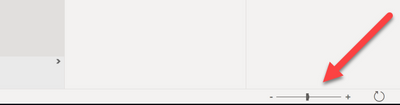
In the bottom right corner of the model tab, is a slider. You may inadvertently moved this.
Simply slide it to the right to get your desired size.
Hope this helps
In the bottom right corner of the model tab, is a slider. You may inadvertently moved this.
Simply slide it to the right to get your desired size.
Hope this helps
Thank you. I am sufficiently embarrassed now.
Hi, @srubano
Ctrl + Mouse wheel scroll can also cause zoom in/out in Model view.
Best Regards,
Community Support Team _ Eason
No worries...Most of us have been there. I'm sure there will be plenty more moments to come.
Best Regards,
If you have recently started exploring Fabric, we'd love to hear how it's going. Your feedback can help with product improvements.
A new Power BI DataViz World Championship is coming this June! Don't miss out on submitting your entry.
Share feedback directly with Fabric product managers, participate in targeted research studies and influence the Fabric roadmap.
| User | Count |
|---|---|
| 53 | |
| 38 | |
| 33 | |
| 17 | |
| 17 |
| User | Count |
|---|---|
| 67 | |
| 62 | |
| 38 | |
| 34 | |
| 22 |