
Get certified for free when you join Fabric Data Days 2026 and dive into Fabric, Power BI, SQL, AI, and other essential data skills.
Join nowTry your skills in the Power BI Dataviz World Championship! Round one ends June 26. Join now
I am connecting to Dataverse using Get Data -> Dataverse where I select the tables I need. That part works like a charm and is nice and easy.
I need to use the column regardingObjectTypeCode from the appointment table. However, the column is not included in the query (I have also tried the activitypointer table).
Is it possible to add the column to the query using the Advanced Editor or any other way?
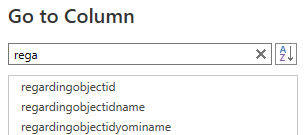
These are the only 'regarding' columns that are included in the query:
I found another solution, where I check if the regardingobjectid ID exists in another table. It gives me the result I'm looking for.
Hi @Nielf ,
In Power Query, if you can load the column in another query, you can use the Merge Queries under the Home ribbon.
About why your columns are missing, I searched below similar solved iuuse, you can have a referece.
Column not appearing in query editor? - Microsoft Power BI Community
Missing Dataverse import columns - Power Platform Community
Column Missing when importing Salesforce Data as a... - Microsoft Power BI Community
Best Regards,
Community Support Team _ kalyj
If this post helps, then please consider Accept it as the solution to help the other members find it more quickly.
Don't miss out on Data Days, June 15 through August 7. Learn Fabric, Power BI, SQL, AI and more.
Check out the May 2026 Power BI update to learn about new features.
| User | Count |
|---|---|
| 23 | |
| 19 | |
| 19 | |
| 17 | |
| 11 |
| User | Count |
|---|---|
| 57 | |
| 55 | |
| 41 | |
| 40 | |
| 30 |