cancel
Showing results for 
Search instead for 
Did you mean: 

The Power BI Data Visualization World Championships is back! Get ahead of the game and start preparing now! Learn more

Reply
PaulDBrown
Community Champion
Community Champion

Min/Average/ Max column Chart: an "unstacked" stacked chart?

Hello,


I'm trying to create a "stacked" chart where each value is displayed individually, but don't aggregate. In other words, if I'm trying to display a minimum, average and max value, each is displayed against the corresponding axis  and as part of the maximum value: ie they don't all add up to a total. The visual would look something like this:
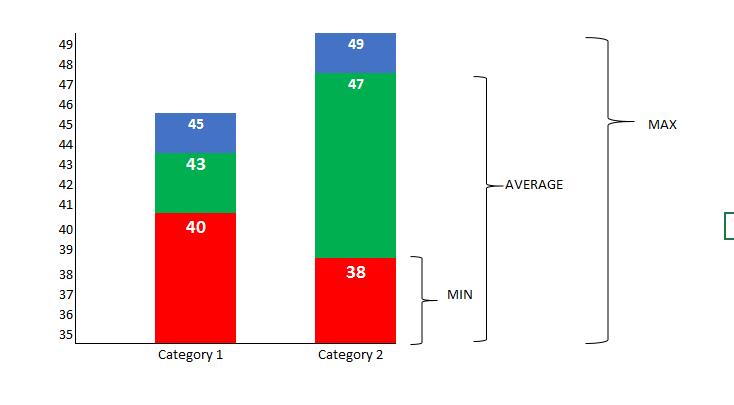
 

MINAVEMAX.PNG

It is similar to the Stock Chart visual (but I need a category on the x-axis and not a date). I tried both the custom visuals "Candlestick" and "Box and Whisker" but can't get them to display what I need.


Any ideas?

(EDITED: Apart from creating new measures which are the difference between them to stack them up that way, which wouldn't allow to display the absolute value for each)


Thanks!


Paul


Did I answer your question? Mark my post as a solution!
In doing so, you are also helping me. Thank you!

Proud to be a Super User!
Paul on Linkedin.


1 ACCEPTED SOLUTION
v-sihou-msft
Microsoft Employee
Microsoft Employee

@PaulDBrown


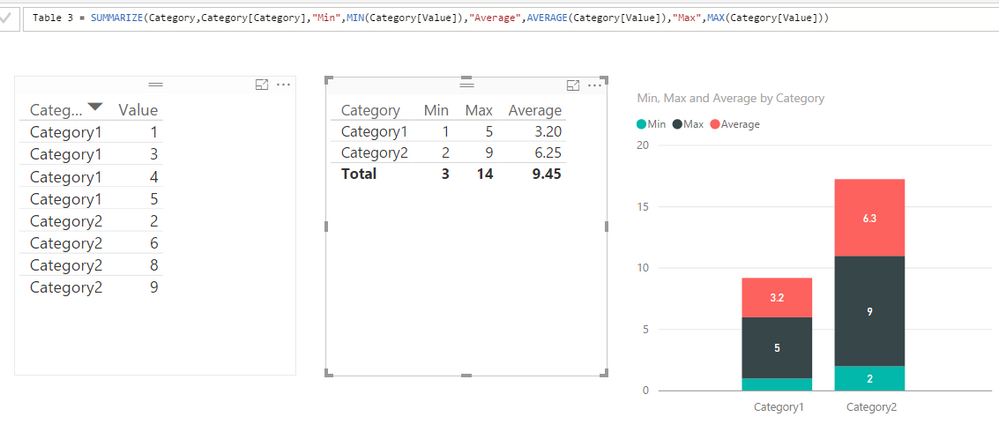
In this scenario, you just need to create a calculated table to summarize the min, max and average into columns.


Table =
SUMMARIZE (
    Category,
    Category[Category],
    "Min", MIN ( Category[Value] ),
    "Average", AVERAGE ( Category[Value] ),
    "Max", MAX ( Category[Value] )
)

76.PNG


Regards,

View solution in original post

3 REPLIES 3
v-sihou-msft
Microsoft Employee
Microsoft Employee

@PaulDBrown


In this scenario, you just need to create a calculated table to summarize the min, max and average into columns.


Table =
SUMMARIZE (
    Category,
    Category[Category],
    "Min", MIN ( Category[Value] ),
    "Average", AVERAGE ( Category[Value] ),
    "Max", MAX ( Category[Value] )
)

76.PNG


Regards,

Anonymous
Not applicable

Hello, 


I just tried the solution, but it still aggregated the at the axis level and it is not different from the normal stacked chart. I have provided the visual below.

Capture1.JPGI created the column using the code provided, but the visual I can also achieve by repeating the same filed and selecting it as minimum, average, and maximum respectively. 


Thanks for your efforts.


@v-sihou-msft


Thank you Simon!! That's exactly what I needed!


Did I answer your question? Mark my post as a solution!
In doing so, you are also helping me. Thank you!

Proud to be a Super User!
Paul on Linkedin.


Helpful resources

Announcements
Power BI DataViz World Championships

Power BI Dataviz World Championships

The Power BI Data Visualization World Championships is back! Get ahead of the game and start preparing now!

December 2025 Power BI Update Carousel

Power BI Monthly Update - December 2025

Check out the December 2025 Power BI Holiday Recap!

FabCon Atlanta 2026 carousel

FabCon Atlanta 2026

Join us at FabCon Atlanta, March 16-20, for the ultimate Fabric, Power BI, AI and SQL community-led event. Save $200 with code FABCOMM.