
cancel
Showing results for 
Search instead for 
Did you mean: 

The Power BI Data Visualization World Championships is back! Get ahead of the game and start preparing now! Learn more

Reply
aksharacoomar
Helper I
Helper I

Mimic Excel Pivot table in PowerBI

Hi all,


I am building an Actual vs. Plan report on PowerBI which we currently have on Excel. Although I have most of the things I need in the right form, I do have some trouble areas pertaining the weeks, my report must include the following date hierarchy - Year, Quarter, Month, Month Name + Week # and Date. I do have a calendar table built in using DAX. 


My trouble areas are below: 

1. 454 Calendar. My company uses a 454 Calendar and I need to break my data down by month name and week # (eg: Oct Week2). How can apply a 454 calendar to my data? Below is a snip of my Excel report the weeks need to be broken out that way. 


Excel Report.png

2. The subtotals do not show the Month name - How can I add that? When the month is expanded, the name of the month is visible but when I contract it, I see all the totals but I do not see the name of the month. 


PB .png


Thank you in advance! 

3 REPLIES 3
Anonymous
Not applicable

Hi @aksharacoomar 

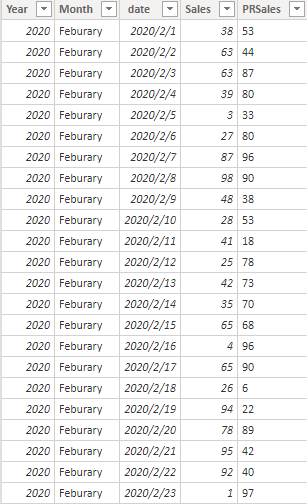
I build two kinds of data models and both of them works well.

Data model1:

1.png

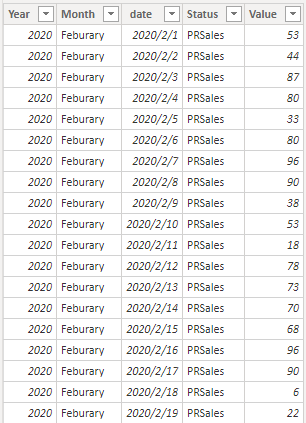
data model2:

2.png

Result:3.png

Could you show me your data model and tell me more details about how did you build you matrix visual?

Or you can share your pbix with me by your Onedrive for Business.


Best Regards,

Rico Zhou


If this post helps, then please consider Accept it as the solution to help the other members find it more quickly. 

edhans
Super User
Super User

Are you sure? 

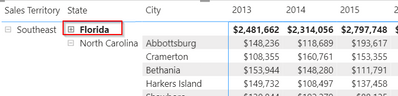
edhans_0-1603496015162.png

Get rid of that black backround and see if your data looks ok. It might just be the title is black and the font is as well. When I collapse a subcategory in a matrix, it shows the totals and the name of that category (State in this example)


Did I answer your question? Mark my post as a solution!
Did my answers help arrive at a solution? Give it a kudos by clicking the Thumbs Up!

DAX is for Analysis. Power Query is for Data Modeling


Proud to be a Super User!

MCSA: BI Reporting
lbendlin
Super User
Super User

Either simplify the ask, or continue to use Excel.

Helpful resources

Announcements
Power BI DataViz World Championships

Power BI Dataviz World Championships

The Power BI Data Visualization World Championships is back! Get ahead of the game and start preparing now!

December 2025 Power BI Update Carousel

Power BI Monthly Update - December 2025

Check out the December 2025 Power BI Holiday Recap!

FabCon Atlanta 2026 carousel

FabCon Atlanta 2026

Join us at FabCon Atlanta, March 16-20, for the ultimate Fabric, Power BI, AI and SQL community-led event. Save $200 with code FABCOMM.

Users online (4,217)