cancel
Showing results for 
Search instead for 
Did you mean: 

The Power BI Data Visualization World Championships is back! Get ahead of the game and start preparing now! Learn more

Reply
kilaj1
New Member

Microsoft Project Web App

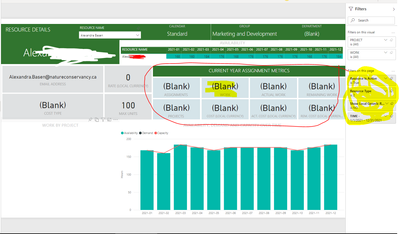
Im working with the Microsoft Project Web App and PWA and we are runnign into an issue where certain fields are empty and we cant see what in the PWA file needs to be filled out.  I tried looking at the tables in teh abck end but im nto too familiar with them to map PWA entries to the PowerBI dashboard tables/visuals.  for example resource details, teh filter is referign to "resource type" of 2, I dont see this options anyware in MS project.

kilaj1_0-1624049799760.png


is there an easier way to find out these mappings?

3 REPLIES 3
Anonymous
Not applicable

Hi,


I'm not sure if this what you are asking but if you assign resources from your enterprise resource pool to specific tasks with work assigned then most of these boxes will populate. costs will populate if you add costs to projects or milestones/tasks in the project. I'm not an expert on the actual mapping but this is what I observed with my situation. 


Hope this helps a little.


JT

v-xiaotang
Community Support
Community Support

Hi @kilaj1 

"I dont see this options anyware in MS project."

-

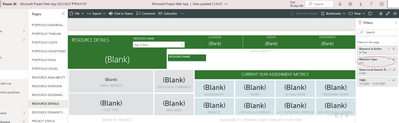
not sure if I understand correctly, do you mean you can't see the option in Microsoft Project Web App on Power BI Service?

vxiaotang_1-1624271293012.png


Best Regards,

Community Support Team _ Tang

If this post helps, please consider Accept it as the solution to help the other members find it more quickly.


Thanks for the reply.


So the visuals in the BI dashboard map to fields in the MS project (PWA) file.  Ive been trying to find out exactly which filed in MS project maps to the visuals. I thought I could just look at the tables on the backend but they are not really clear.

Helpful resources

Announcements
Power BI DataViz World Championships

Power BI Dataviz World Championships

The Power BI Data Visualization World Championships is back! Get ahead of the game and start preparing now!

December 2025 Power BI Update Carousel

Power BI Monthly Update - December 2025

Check out the December 2025 Power BI Holiday Recap!

FabCon Atlanta 2026 carousel

FabCon Atlanta 2026

Join us at FabCon Atlanta, March 16-20, for the ultimate Fabric, Power BI, AI and SQL community-led event. Save $200 with code FABCOMM.

Top Solution Authors