Learn from the best! Meet the four finalists headed to the FINALS of the Power BI Dataviz World Championships! Register now
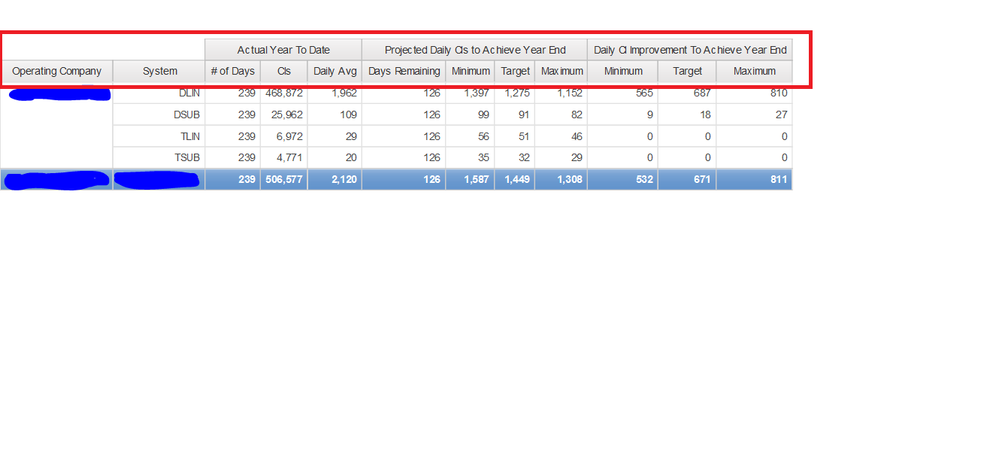
Is this possible in Power BI.
I have a similar requirement, is it possible to create this in power BI?
Hi ajohn1,
Similar case for your reference: https://community.powerbi.com/t5/Desktop/New-Matrix-Visual-Hierarchy-Side-by-Side/td-p/247668
Regards,
Jimmy Tao
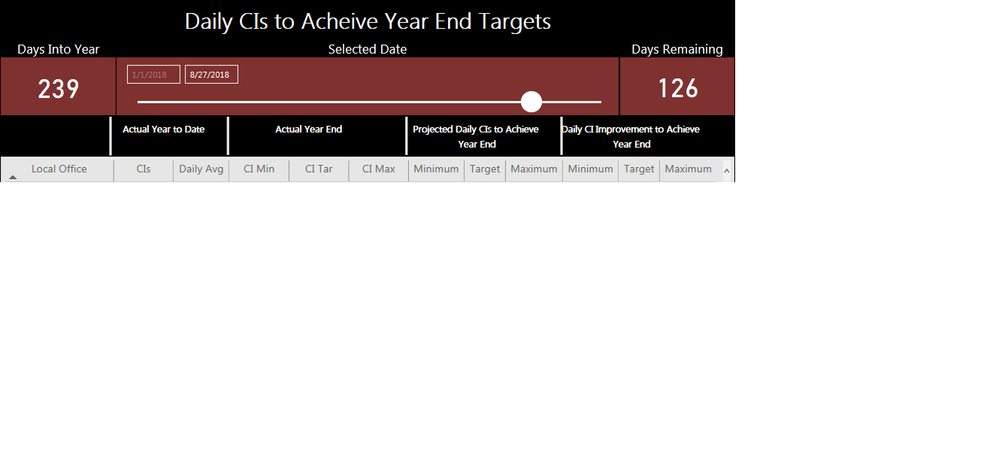
This does not help with what I'm trying to do. That feature is for rows which I understand. I need something to group columns. This is what I'm having to do right now. A bunch of text boxes and shapes to make it look neat. However, when i upload it, they change locations.
The custom visual Table Sorter does exactly what I need with its Stacked Columns feature. I would use it but I'm not able to turn off the rank, the colors, the weighted value, or the bar for the column amount. If you take a look at that visual you will see exactly what I'm looking for. So my question is, does Power BI's own Matrix or table have that feature. Thanks in advance.
| User | Count |
|---|---|
| 59 | |
| 47 | |
| 31 | |
| 18 | |
| 17 |
| User | Count |
|---|---|
| 77 | |
| 66 | |
| 46 | |
| 22 | |
| 22 |