Join us at FabCon Atlanta from March 16 - 20, 2026, for the ultimate Fabric, Power BI, AI and SQL community-led event. Save $200 with code FABCOMM.
Register now!Vote for your favorite vizzies from the Power BI Dataviz World Championship submissions. Vote now!
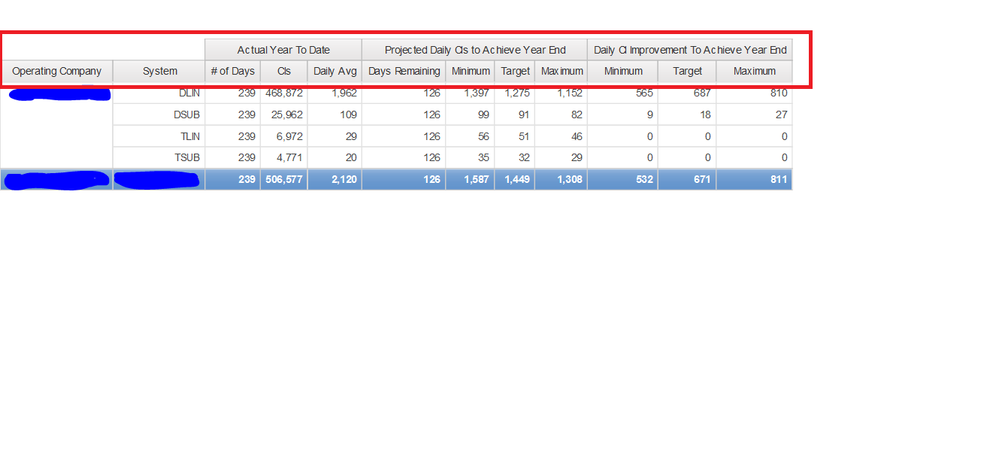
Is this possible in Power BI.
I have a similar requirement, is it possible to create this in power BI?
Hi ajohn1,
Similar case for your reference: https://community.powerbi.com/t5/Desktop/New-Matrix-Visual-Hierarchy-Side-by-Side/td-p/247668
Regards,
Jimmy Tao
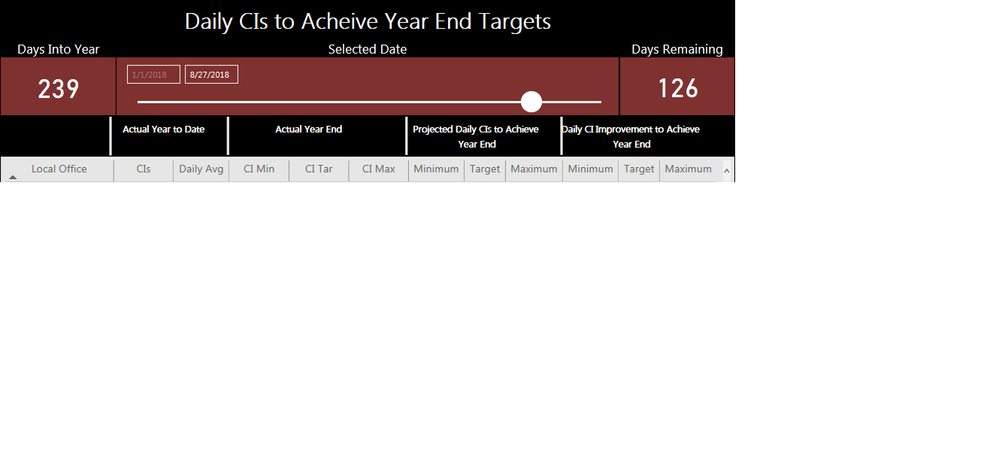
This does not help with what I'm trying to do. That feature is for rows which I understand. I need something to group columns. This is what I'm having to do right now. A bunch of text boxes and shapes to make it look neat. However, when i upload it, they change locations.
The custom visual Table Sorter does exactly what I need with its Stacked Columns feature. I would use it but I'm not able to turn off the rank, the colors, the weighted value, or the bar for the column amount. If you take a look at that visual you will see exactly what I'm looking for. So my question is, does Power BI's own Matrix or table have that feature. Thanks in advance.
Vote for your favorite vizzies from the Power BI World Championship submissions!
If you love stickers, then you will definitely want to check out our Community Sticker Challenge!
Check out the January 2026 Power BI update to learn about new features.
| User | Count |
|---|---|
| 56 | |
| 52 | |
| 45 | |
| 17 | |
| 16 |
| User | Count |
|---|---|
| 108 | |
| 107 | |
| 39 | |
| 33 | |
| 25 |