Join us at FabCon Atlanta from March 16 - 20, 2026, for the ultimate Fabric, Power BI, AI and SQL community-led event. Save $200 with code FABCOMM.
Register now!The Power BI Data Visualization World Championships is back! Get ahead of the game and start preparing now! Learn more
Dear
i have excel table contains Item number, Department and Location having thousands of rows. Department and Location column contains merged cell as shownn:
i need prepare data for power bi, in the format:
how can i achieve this above in Power bi/ Excel ??
Solved! Go to Solution.
Hi @Anonymous ,
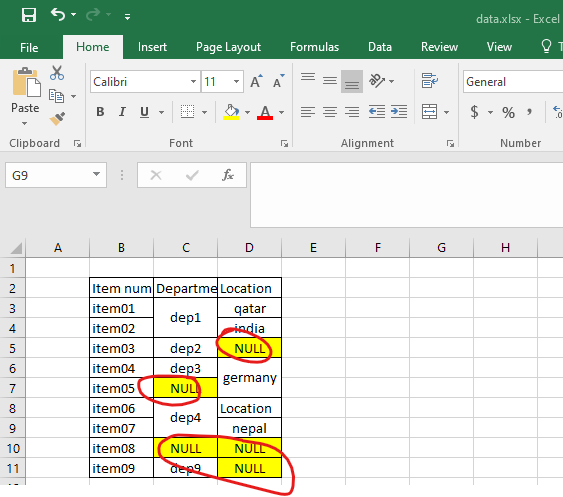
First, you can replace the empty values in excel cells with the special string(For example: NULL) in your source excel file just as below screenshot. Power BI will keep the value for the first row of the merged cell and the rest ones will be null when you load the data with merged cell. So we need to deal with these empty values first in excel file...
Then we can use Fill down feature in Power Query Editor to fill the values for the "left ones" in merge cell...
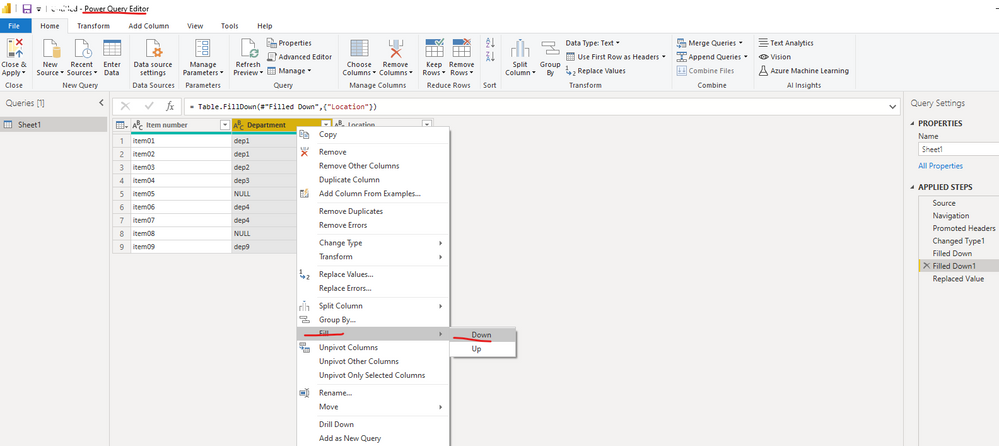
Fill down
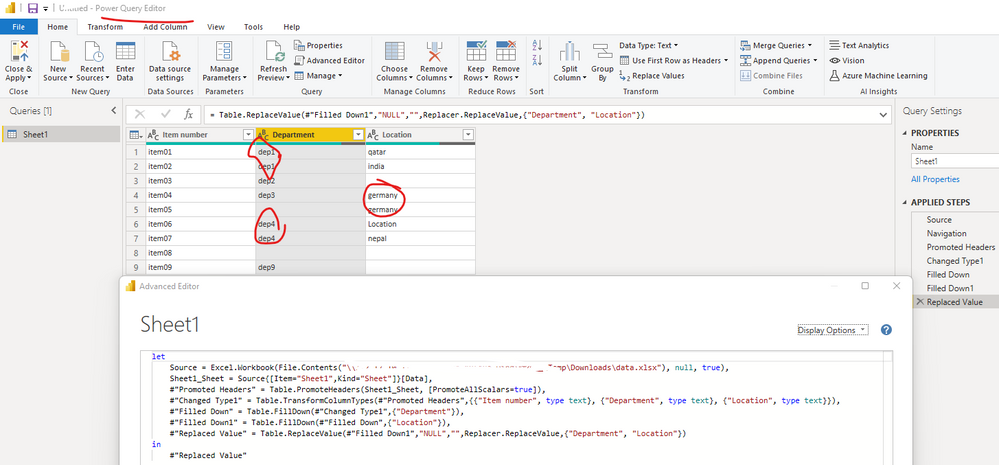
The full applied codes as follow:
let
Source = Excel.Workbook(File.Contents("\your directory\data.xlsx"), null, true),
Sheet1_Sheet = Source{[Item="Sheet1",Kind="Sheet"]}[Data],
#"Promoted Headers" = Table.PromoteHeaders(Sheet1_Sheet, [PromoteAllScalars=true]),
#"Changed Type1" = Table.TransformColumnTypes(#"Promoted Headers",{{"Item number", type text}, {"Department", type text}, {"Location", type text}}),
#"Filled Down" = Table.FillDown(#"Changed Type1",{"Department"}),
#"Filled Down1" = Table.FillDown(#"Filled Down",{"Location"}),
#"Replaced Value" = Table.ReplaceValue(#"Filled Down1","NULL","",Replacer.ReplaceValue,{"Department", "Location"})
in
#"Replaced Value"
Best Regards
Hi @Anonymous ,
First, you can replace the empty values in excel cells with the special string(For example: NULL) in your source excel file just as below screenshot. Power BI will keep the value for the first row of the merged cell and the rest ones will be null when you load the data with merged cell. So we need to deal with these empty values first in excel file...
Then we can use Fill down feature in Power Query Editor to fill the values for the "left ones" in merge cell...
Fill down
The full applied codes as follow:
let
Source = Excel.Workbook(File.Contents("\your directory\data.xlsx"), null, true),
Sheet1_Sheet = Source{[Item="Sheet1",Kind="Sheet"]}[Data],
#"Promoted Headers" = Table.PromoteHeaders(Sheet1_Sheet, [PromoteAllScalars=true]),
#"Changed Type1" = Table.TransformColumnTypes(#"Promoted Headers",{{"Item number", type text}, {"Department", type text}, {"Location", type text}}),
#"Filled Down" = Table.FillDown(#"Changed Type1",{"Department"}),
#"Filled Down1" = Table.FillDown(#"Filled Down",{"Location"}),
#"Replaced Value" = Table.ReplaceValue(#"Filled Down1","NULL","",Replacer.ReplaceValue,{"Department", "Location"})
in
#"Replaced Value"
Best Regards
To the best of my knowledge (some searching included), you can't do it with escel or Power BI, as tables unmerge those cells.
Some VBA scripts are availble, but your data also contains "legitimate" blanks, so that eliminates that option.
Check out the November 2025 Power BI update to learn about new features.
Advance your Data & AI career with 50 days of live learning, contests, hands-on challenges, study groups & certifications and more!
| User | Count |
|---|---|
| 58 | |
| 45 | |
| 41 | |
| 21 | |
| 18 |