Join us at FabCon Atlanta from March 16 - 20, 2026, for the ultimate Fabric, Power BI, AI and SQL community-led event. Save $200 with code FABCOMM.
Register now!The Power BI Data Visualization World Championships is back! It's time to submit your entry. Live now!
Hi All,
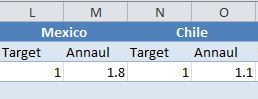
I want to merge two cells to have one column Header (not the values in 2 columns) using Power BI. I have the rawdata in excel that has the column header merged together but when I bring the data in power bi desktop, table doesnt look like same anymore - I want to have the result like the picture below (Mexico as the column Header and have Target and Annual as two columns under it)-
Appreciate your help
Solved! Go to Solution.
Hi @Anonymous ,
Give a try with Matrix visualization instead of Table Visual.
Thanks,
Tejaswi
Hi @Anonymous ,
Give a try with Matrix visualization instead of Table Visual.
Thanks,
Tejaswi
The Power BI Data Visualization World Championships is back! It's time to submit your entry.
Check out the January 2026 Power BI update to learn about new features.
| User | Count |
|---|---|
| 61 | |
| 48 | |
| 35 | |
| 25 | |
| 23 |
| User | Count |
|---|---|
| 134 | |
| 110 | |
| 59 | |
| 39 | |
| 32 |