Join us at FabCon Atlanta from March 16 - 20, 2026, for the ultimate Fabric, Power BI, AI and SQL community-led event. Save $200 with code FABCOMM.
Register now!The Power BI Data Visualization World Championships is back! Get ahead of the game and start preparing now! Learn more
Hello,
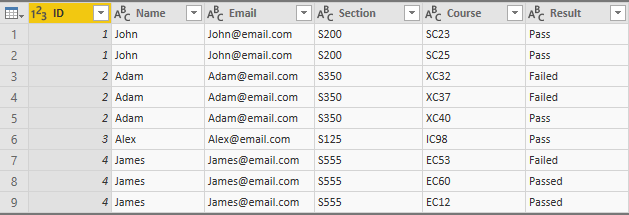
I have table that contains many rows for each Person, I want to merge these rows together so each person has only one row seperating the rows value using a delmiter.
If the the cell contains duplication it suppose to hide it and show the values with no duplication.
Original Table:
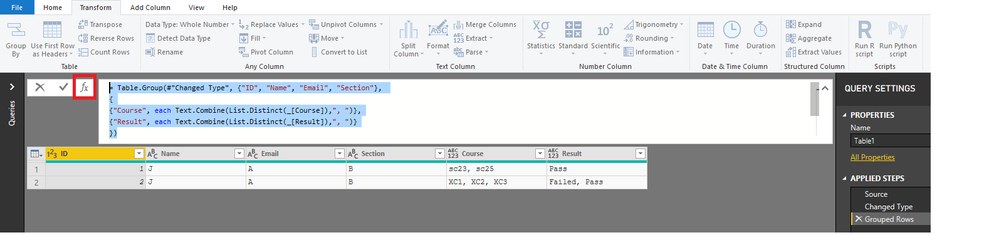
Desired Table:
Thank you and appreicate your help!
Solved! Go to Solution.
Hi @aa_KF
Try adding this step from the Query Editor.
See sample file as well
= Table.Group(#"Changed Type", {"ID", "Name", "Email", "Section"},
{
{"Course", each Text.Combine(List.Distinct(_[Course]),", ")},
{"Result", each Text.Combine(List.Distinct(_[Result]),", ")}
})
Hi @aa_KF
Try adding this step from the Query Editor.
See sample file as well
= Table.Group(#"Changed Type", {"ID", "Name", "Email", "Section"},
{
{"Course", each Text.Combine(List.Distinct(_[Course]),", ")},
{"Result", each Text.Combine(List.Distinct(_[Result]),", ")}
})
I have the same issue:
Here is my code based off the resolution above:
= Table.Group (#"Removed Columns", {"ISSUE_KEY"},
{
{"TEST", each Text.Combine(List.Distinct(_[TEST]),", ")}
})
However, I get an error "Expression.Error: The column 'TEST' of the table wasn't found.
But it is on my table
The Power BI Data Visualization World Championships is back! Get ahead of the game and start preparing now!
Check out the November 2025 Power BI update to learn about new features.
| User | Count |
|---|---|
| 59 | |
| 43 | |
| 42 | |
| 23 | |
| 17 |
| User | Count |
|---|---|
| 190 | |
| 122 | |
| 96 | |
| 66 | |
| 47 |