cancel
Showing results for 
Search instead for 
Did you mean: 

The Power BI Data Visualization World Championships is back! Get ahead of the game and start preparing now! Learn more

Reply
richard961116
Frequent Visitor

Merge product id based on time range/timestamps from another table

Hello all, 

I am trying to figure out how to merge product ID based on time ranges from another tables. 

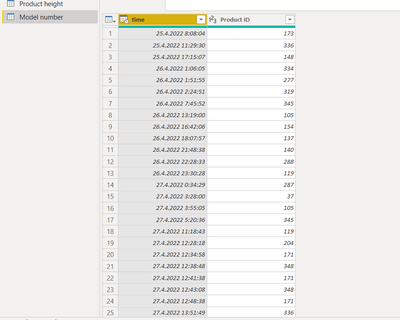
I have 4 tables. One table consists of Product IDs and timestamps when the specific product was produced. So for example product ID 173 was produced from 25. 4. 2022 8:08:04 until 25.4.200 11:29:30 when the Product ID 336 started. 


richard961116_3-1652168767443.png


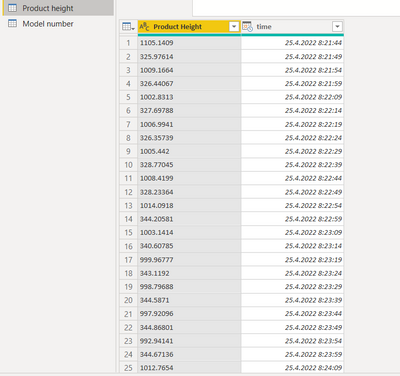
In the other tables I have some metrics measurements, their values and timestamps which are updating every 5 secs. So all of these timestamps should have Product ID 173 based on the table above. 

richard961116_2-1652168631564.png


What I want to solve is how to recognize the product ID based on the time ranges in the measurements tables. Is it somehow possible to realize? 
Thank you so much for your help.  

1 ACCEPTED SOLUTION
Anonymous
Not applicable

Hi @richard961116 ,


You could add two calculated columns to get the start and end time for a [Product ID] on Model number table:

start_ =
CALCULATE (
    MIN ( 'model number'[time] ),
    FILTER (
        'model number',
        'model number'[product ID] = EARLIER ( 'model number'[product ID] )
    )
)
end_ =
CALCULATE (
    MAX ( 'model number'[time] ),
    FILTER (
        'model number',
        'model number'[product ID] = EARLIER ( 'model number'[product ID] )
    )
)

 Then add [product ID] to the Product height table:

Product_ID =
CALCULATE (
    MAX ( 'model number'[Product ID] ),
    FILTER (
        'model number',
        'Product height'[time] >= 'model number'[start_]
            && 'Product height'[time] <= 'model number'[end_]
    )
)


Best Regards,

Jay

View solution in original post

3 REPLIES 3
Anonymous
Not applicable

Hi @richard961116 ,


You could add two calculated columns to get the start and end time for a [Product ID] on Model number table:

start_ =
CALCULATE (
    MIN ( 'model number'[time] ),
    FILTER (
        'model number',
        'model number'[product ID] = EARLIER ( 'model number'[product ID] )
    )
)
end_ =
CALCULATE (
    MAX ( 'model number'[time] ),
    FILTER (
        'model number',
        'model number'[product ID] = EARLIER ( 'model number'[product ID] )
    )
)

 Then add [product ID] to the Product height table:

Product_ID =
CALCULATE (
    MAX ( 'model number'[Product ID] ),
    FILTER (
        'model number',
        'Product height'[time] >= 'model number'[start_]
            && 'Product height'[time] <= 'model number'[end_]
    )
)


Best Regards,

Jay

amitchandak
Super User
Super User

@richard961116 , In DAx Column in Table 1


End Time = MinX(filter(Table, [product id] = earlier([product id]) && [Time] > earlier([Time]) ),[Time])


Product Height = maxx(filter(Table2, Table[product id] = (Table2[product id]) && [End Time] > (Table2[Time]) && Table[Time] <= (Table2[Time]) ),Table2[Product Height]) 

Share with Power BI Enthusiasts: Full Power BI Video (20 Hours) YouTube
Microsoft Fabric Series 60+ Videos YouTube
Microsoft Fabric Hindi End to End YouTube

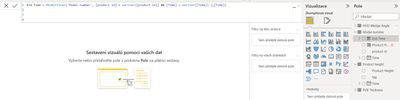
@amitchandak thank you for your response. For the first column it works. 


richard961116_0-1652188402725.png

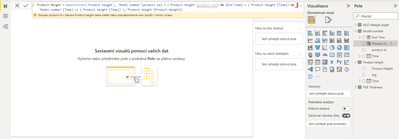
But for the another one, it can't find product id in the 'Product height' table because there are no relations between them and I'm not sure how to solve it. 


richard961116_1-1652188497905.png


Helpful resources

Announcements
Power BI DataViz World Championships

Power BI Dataviz World Championships

The Power BI Data Visualization World Championships is back! Get ahead of the game and start preparing now!

December 2025 Power BI Update Carousel

Power BI Monthly Update - December 2025

Check out the December 2025 Power BI Holiday Recap!

FabCon Atlanta 2026 carousel

FabCon Atlanta 2026

Join us at FabCon Atlanta, March 16-20, for the ultimate Fabric, Power BI, AI and SQL community-led event. Save $200 with code FABCOMM.