cancel
Showing results for 
Search instead for 
Did you mean: 

The Power BI Data Visualization World Championships is back! It's time to submit your entry. Live now!

Reply
Anonymous
Not applicable

Merge issue

Hello, 


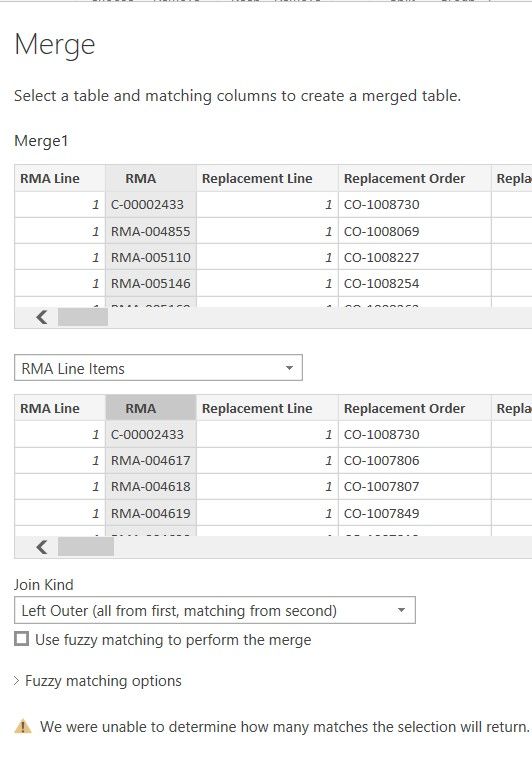
I can't seem to fix this issue, below.   I am positive that both fields are of the same type.   Any ideas what could be causing this?    Anything to do with the order of query editor steps?  


merge.jpg

4 REPLIES 4
Anonymous
Not applicable

Hi @Anonymous ,


The information you provided is not enough, I can only find a topic with same issue with you, hope it helps.

https://community.powerbi.com/t5/Desktop/Merge-error-quot-we-were-unable-to-determine-how-many-matches/m-p/278584


Best Regards,

Jay

GlauberCaires
Advocate I
Advocate I

Hi,

Did you check if there is any null value in column or the data type is "ABC123" or the values in column arent distinct?

amitchandak
Super User
Super User

@Anonymous , Is this many to many join. If it giving OK button you can go ahead

Share with Power BI Enthusiasts: Full Power BI Video (20 Hours) YouTube
Microsoft Fabric Series 60+ Videos YouTube
Microsoft Fabric Hindi End to End YouTube
Anonymous
Not applicable

No, on the Problem Codes table, the RMA_and_RMALine column is unique values.  

Helpful resources

Announcements
Power BI DataViz World Championships

Power BI Dataviz World Championships

The Power BI Data Visualization World Championships is back! It's time to submit your entry.

January Power BI Update Carousel

Power BI Monthly Update - January 2026

Check out the January 2026 Power BI update to learn about new features.

FabCon Atlanta 2026 carousel

FabCon Atlanta 2026

Join us at FabCon Atlanta, March 16-20, for the ultimate Fabric, Power BI, AI and SQL community-led event. Save $200 with code FABCOMM.