Join us in Barcelona for FabCon and SQLCon, September 28 - October 1, 2026.
This is best Fabric, Power BI, SQL and AI community event. How do we know? The last event sold out! Save €200 with code FABCMTY200.
Register now- Power BI forums
- Get Help with Power BI
- Desktop
- Service
- Report Server
- Power Query
- Mobile Apps
- Developer
- DAX Commands and Tips
- Custom Visuals Development Discussion
- Health and Life Sciences
- Power BI Spanish forums
- Translated Spanish Desktop
- Training and Consulting
- Instructor Led Training
- Dashboard in a Day for Women, by Women
- Galleries
- Data Stories Gallery
- Themes Gallery
- Contests Gallery
- QuickViz Gallery
- Quick Measures Gallery
- Visual Calculations Gallery
- Notebook Gallery
- Translytical Task Flow Gallery
- TMDL Gallery
- R Script Showcase
- Webinars and Video Gallery
- Ideas
- Custom Visuals Ideas (read-only)
- Issues
- Issues
- Events
- Upcoming Events
A new Data Days event is coming soon! This time we’re going bigger than ever. Fabric, Power BI, SQL, AI and more. Don't miss out.
- Power BI forums
- Forums
- Get Help with Power BI
- Desktop
- Merge column in Power Query
- Subscribe to RSS Feed
- Mark Topic as New
- Mark Topic as Read
- Float this Topic for Current User
- Bookmark
- Subscribe
- Printer Friendly Page


- Mark as New
- Bookmark
- Subscribe
- Mute
- Subscribe to RSS Feed
- Permalink
- Report Inappropriate Content
Merge column in Power Query
My table has around 500K rows with the following structure:
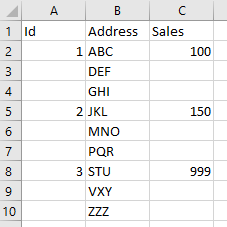
I want to merge the Address column.
Can anyone help?
Thanks!
Solved! Go to Solution.


- Mark as New
- Bookmark
- Subscribe
- Mute
- Subscribe to RSS Feed
- Permalink
- Report Inappropriate Content
Try this in Power Query. The Source step will be your data source. I used a comma delimiter in the GroupAddress step; you can use any delimiter.
let
  Source = Table.FromRows(
    Json.Document(
      Binary.Decompress(
        Binary.FromText(
          "i45WMlTSUXJ0cgaShgYGSrE60UpApourG5CE8dw9PGE8IyDDy9sHpNoUrtrXzx9JdUBgEIxnDGQEh4QCSUtLS5h8WEQkkuqoqCgwLxYA",
          BinaryEncoding.Base64
        ),
        Compression.Deflate
      )
    ),
    let
      _t = ((type nullable text) meta [Serialized.Text = true])
    in
      type table [Id = _t, Address = _t, Sales = _t]
  ),
  ChangeType = Table.TransformColumnTypes(
    Source,
    {{"Id", Int64.Type}, {"Address", type text}, {"Sales", Int64.Type}}
  ),
  FillDownId = Table.FillDown(ChangeType, {"Id"}),
  GroupAddress = Table.Group(
    FillDownId,
    {"Id"},
    {{"Combined Address", each Text.Combine([Address], ", "), type text}}
  ),
  TableAmount = Table.SelectRows(
    Table.SelectColumns(ChangeType, {"Id", "Sales"}),
    each ([Id] <> null)
  ),
  TableJoin = Table.NestedJoin(
    TableAmount,
    {"Id"},
    GroupAddress,
    {"Id"},
    "TableAddress",
    JoinKind.Inner
  ),
  ExpandTable = Table.ExpandTableColumn(
    TableJoin,
    "TableAddress",
    {"Combined Address"},
    {"Combined Address"}
  )
in
  ExpandTable

Did I answer your question? Mark my post as a solution!
Proud to be a Super User!


- Mark as New
- Bookmark
- Subscribe
- Mute
- Subscribe to RSS Feed
- Permalink
- Report Inappropriate Content
@DataInsights not trying to step on your toes, but in this solution the Join can be avoided altogther and this can optimize performnace dramatically on a large tbl
let
  Source = Table.FromRows(
    Json.Document(
      Binary.Decompress(
        Binary.FromText(
          "i45WMlTSUXJ0cgaShgYGSrE60UpApourG5CE8dw9PGE8IyDDy9sHpNoUrtrXzx9JdUBgEIxnDGQEh4QCSUtLS5h8WEQkkuqoqCgwLxYA",
          BinaryEncoding.Base64
        ),
        Compression.Deflate
      )
    ),
    let
      _t = ((type nullable text) meta [Serialized.Text = true])
    in
      type table [Id = _t, Address = _t, Sales = _t]
  ),
  ChangeType = Table.TransformColumnTypes(
    Source,
    {{"Id", Int64.Type}, {"Address", type text}, {"Sales", Int64.Type}}
  ),
  FillDownId = Table.FillDown(ChangeType, {"Id"}),
  GroupAddress = Table.Group(
    FillDownId,
    {"Id"},
    {{"Combined Address", each Text.Combine([Address], ", "), type text},{"max", each List.Max([Sales]), type nullable number}}
  )
in
    GroupAddress
========================
Did I answer your question? Mark my post as a solution!
Proud to be a Super User
My Custom Visualization Projects
• Plotting Live Sound: Live Sound
• Beautiful News: Women in Parliament, Energy Mix, Shrinking Armies
• Visual Capitalist: Working Hrs
• Others: Easing Graph, Animated Calendar
MayViz Submissions
• Week 1: View
• Week 2: View
• Week 3: View
========================
- Mark as New
- Bookmark
- Subscribe
- Mute
- Subscribe to RSS Feed
- Permalink
- Report Inappropriate Content
- Mark as New
- Bookmark
- Subscribe
- Mute
- Subscribe to RSS Feed
- Permalink
- Report Inappropriate Content
@DataInsights not trying to step on your toes, but in this solution the Join can be avoided altogther and this can optimize performnace dramatically on a large tbl
let
  Source = Table.FromRows(
    Json.Document(
      Binary.Decompress(
        Binary.FromText(
          "i45WMlTSUXJ0cgaShgYGSrE60UpApourG5CE8dw9PGE8IyDDy9sHpNoUrtrXzx9JdUBgEIxnDGQEh4QCSUtLS5h8WEQkkuqoqCgwLxYA",
          BinaryEncoding.Base64
        ),
        Compression.Deflate
      )
    ),
    let
      _t = ((type nullable text) meta [Serialized.Text = true])
    in
      type table [Id = _t, Address = _t, Sales = _t]
  ),
  ChangeType = Table.TransformColumnTypes(
    Source,
    {{"Id", Int64.Type}, {"Address", type text}, {"Sales", Int64.Type}}
  ),
  FillDownId = Table.FillDown(ChangeType, {"Id"}),
  GroupAddress = Table.Group(
    FillDownId,
    {"Id"},
    {{"Combined Address", each Text.Combine([Address], ", "), type text},{"max", each List.Max([Sales]), type nullable number}}
  )
in
    GroupAddress
========================
Did I answer your question? Mark my post as a solution!
Proud to be a Super User
My Custom Visualization Projects
• Plotting Live Sound: Live Sound
• Beautiful News: Women in Parliament, Energy Mix, Shrinking Armies
• Visual Capitalist: Working Hrs
• Others: Easing Graph, Animated Calendar
MayViz Submissions
• Week 1: View
• Week 2: View
• Week 3: View
========================
- Mark as New
- Bookmark
- Subscribe
- Mute
- Subscribe to RSS Feed
- Permalink
- Report Inappropriate Content
I like your solution. Thanks for sharing! 🙂
Did I answer your question? Mark my post as a solution!
Proud to be a Super User!
- Mark as New
- Bookmark
- Subscribe
- Mute
- Subscribe to RSS Feed
- Permalink
- Report Inappropriate Content
Try this in Power Query. The Source step will be your data source. I used a comma delimiter in the GroupAddress step; you can use any delimiter.
let
  Source = Table.FromRows(
    Json.Document(
      Binary.Decompress(
        Binary.FromText(
          "i45WMlTSUXJ0cgaShgYGSrE60UpApourG5CE8dw9PGE8IyDDy9sHpNoUrtrXzx9JdUBgEIxnDGQEh4QCSUtLS5h8WEQkkuqoqCgwLxYA",
          BinaryEncoding.Base64
        ),
        Compression.Deflate
      )
    ),
    let
      _t = ((type nullable text) meta [Serialized.Text = true])
    in
      type table [Id = _t, Address = _t, Sales = _t]
  ),
  ChangeType = Table.TransformColumnTypes(
    Source,
    {{"Id", Int64.Type}, {"Address", type text}, {"Sales", Int64.Type}}
  ),
  FillDownId = Table.FillDown(ChangeType, {"Id"}),
  GroupAddress = Table.Group(
    FillDownId,
    {"Id"},
    {{"Combined Address", each Text.Combine([Address], ", "), type text}}
  ),
  TableAmount = Table.SelectRows(
    Table.SelectColumns(ChangeType, {"Id", "Sales"}),
    each ([Id] <> null)
  ),
  TableJoin = Table.NestedJoin(
    TableAmount,
    {"Id"},
    GroupAddress,
    {"Id"},
    "TableAddress",
    JoinKind.Inner
  ),
  ExpandTable = Table.ExpandTableColumn(
    TableJoin,
    "TableAddress",
    {"Combined Address"},
    {"Combined Address"}
  )
in
  ExpandTable
Did I answer your question? Mark my post as a solution!
Proud to be a Super User!

Helpful resources

Power BI Monthly Update - May 2026
Check out the May 2026 Power BI update to learn about new features.

Data Days 2026 coming soon!
Sign up to receive a private message when registration opens and key events begin.

New to Fabric Survey
If you have recently started exploring Fabric, we'd love to hear how it's going. Your feedback can help with product improvements.

Power BI DataViz World Championships - June 2026
A new Power BI DataViz World Championship is coming this June! Don't miss out on submitting your entry.

| User | Count |
|---|---|
| 31 | |
| 25 | |
| 25 | |
| 22 | |
| 14 |


| User | Count |
|---|---|
| 61 | |
| 49 | |
| 25 | |
| 20 | |
| 20 |


