cancel
Showing results for 
Search instead for 
Did you mean: 

The Power BI Data Visualization World Championships is back! Get ahead of the game and start preparing now! Learn more

Reply
Mat42
Resolver I
Resolver I

Merge Table Rows

This is either going to be dead simple or not possible. I've searched and can't find quite what I need.


I have a dataset with repeating entries, a bit like this:


WorkstrandProjectOverall Project StatusProgress MarkersPercent Complete
AHR RestructureOngoingAll staff to be migrated onto Office 36555%
AHR RestructureOngoingDesktops to be replaced with laptops30%
AHR RestructureOngoingDesks to be replaced with treadmills87%
AHR RestructureOngoingElderly staff members to be replaced with robots90%
AHR RestructureOngoingBuilding to be refit with motion sensors25%
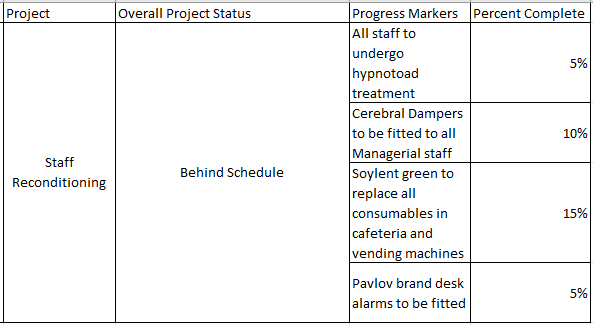
BStaff ReconditioningBehind ScheduleAll staff to undergo hypnotoad treatment5%
BStaff ReconditioningBehind ScheduleCerebral Dampers to be fitted to all Managerial staff10%
BStaff ReconditioningBehind ScheduleSoylent green to replace all consumables in cafeteria and vending machines15%
BStaff ReconditioningBehind SchedulePavlov brand desk alarms to be fitted5%
AMoat InstallationCompleteSurrounding buildings demolished100%
AMoat InstallationCompleteCircular trench dug around remaining building100%
AMoat InstallationCompleteTrench filled with water and alligators100%


I'll add a slicer for Workstrand and I'd like to be able to pull the data into the report as a table so that it looks something like this:


Slicer Option A:
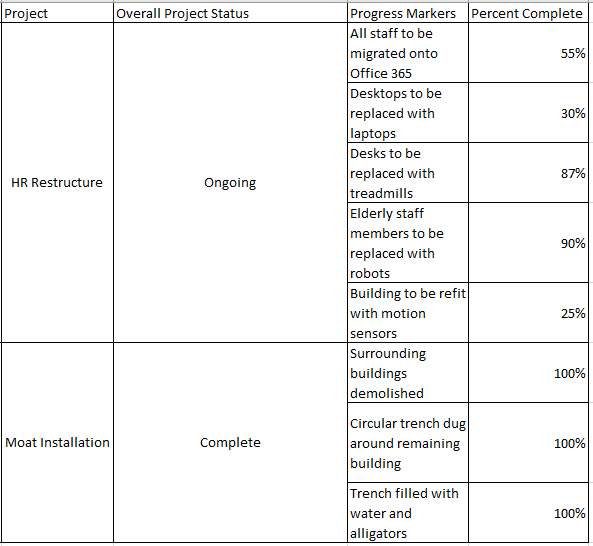
Table Example A.png


Slicer Option B:

Table Example B.png


Is this possible?

1 ACCEPTED SOLUTION
PaulDBrown
Community Champion
Community Champion

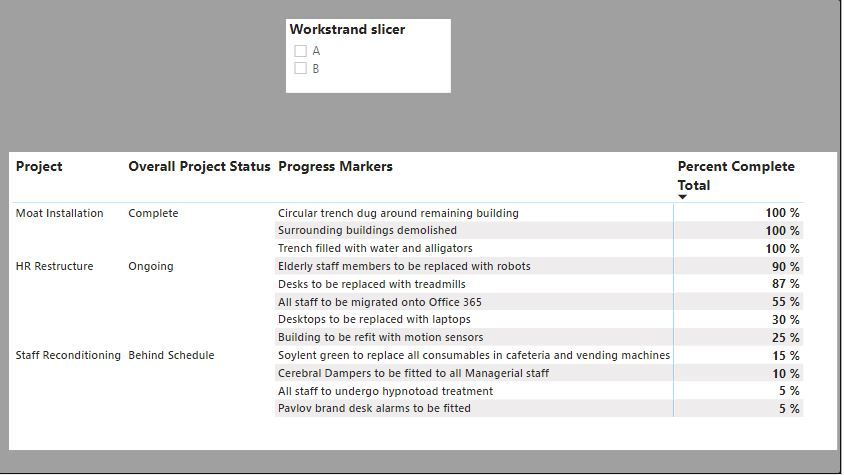
With that dataset. all you need to do is create a matrix visual, add the "Project", "Overall project status" and "Progress markers" fields to the row bucket, add a measure for the sum of the percent complete column to the values bucket. In the formatting pane, under "Row headers", deselect the options "stepped layout" and "+/- icons". Right click on one of the rows in the matrix and select "expand all". Create a slicer using the "Workstrand" field:
result.JPG


Matrix layout.gif


Did I answer your question? Mark my post as a solution!
In doing so, you are also helping me. Thank you!

Proud to be a Super User!
Paul on Linkedin.


View solution in original post

2 REPLIES 2
PaulDBrown
Community Champion
Community Champion

With that dataset. all you need to do is create a matrix visual, add the "Project", "Overall project status" and "Progress markers" fields to the row bucket, add a measure for the sum of the percent complete column to the values bucket. In the formatting pane, under "Row headers", deselect the options "stepped layout" and "+/- icons". Right click on one of the rows in the matrix and select "expand all". Create a slicer using the "Workstrand" field:
result.JPG


Matrix layout.gif


Did I answer your question? Mark my post as a solution!
In doing so, you are also helping me. Thank you!

Proud to be a Super User!
Paul on Linkedin.


@PaulDBrown That is excellent, thanks a lot. It's exactly what I needed.


I had no idea that was possible.

Helpful resources

Announcements
Power BI DataViz World Championships

Power BI Dataviz World Championships

The Power BI Data Visualization World Championships is back! Get ahead of the game and start preparing now!

December 2025 Power BI Update Carousel

Power BI Monthly Update - December 2025

Check out the December 2025 Power BI Holiday Recap!

FabCon Atlanta 2026 carousel

FabCon Atlanta 2026

Join us at FabCon Atlanta, March 16-20, for the ultimate Fabric, Power BI, AI and SQL community-led event. Save $200 with code FABCOMM.