cancel
Showing results for 
Search instead for 
Did you mean: 

The Power BI Data Visualization World Championships is back! It's time to submit your entry. Live now!

Reply
Federica_18
Regular Visitor

Merge Queries

Hi,

I have two tables of 11,246,448 rows and 24 columns. One containing the real values and the other containing the expected values. In order to create an overlaid line chart consisting in both real and expected data I created a query merge but at the moment of closing and applying the load it does not give me any result. I was wondering if it is possible to explain me why this happens. Could it be a license problem? I have the free trial version of Power BI Desktop Premium


Kind regards,

Federica

2 ACCEPTED SOLUTIONS
selimovd
Super User
Super User

Hey @Federica_18 ,


can you show us the chart and how you put in the fields?

How do you differentiate between real and expected values? This must be two different values.


You could also have done that with 2 fact tables and the proper dimension tables.


Best regards

Denis

View solution in original post

Hey @Federica_18 ,


you could let it as two separate tables and use a date table that you connect with both:

Power Bi for Beginners: How to create a Date Table in Power Bi - Softcrylic


Then you just have to put the date of the dimensional date table in the graphic and the values from the 2 fact tables and you got your result.


For the "merge", I don't think you need to do a merge in Power Query. You should try the append as puts one table below the other table. Try that one:

selimovd_0-1623143956808.png


If you need any help please let me know.
If I answered your question I would be happy if you could mark my post as a solution ✔️ and give it a thumbs up 👍
 
Best regards
Denis
 

View solution in original post

3 REPLIES 3
selimovd
Super User
Super User

Hey @Federica_18 ,


can you show us the chart and how you put in the fields?

How do you differentiate between real and expected values? This must be two different values.


You could also have done that with 2 fact tables and the proper dimension tables.


Best regards

Denis

Hi @selimovd , 


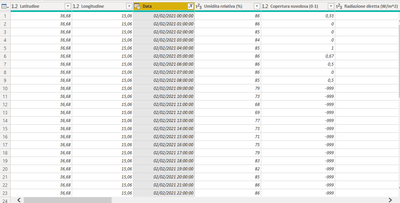
This is the table containing the real values:


Federica_18_2-1623141653927.png


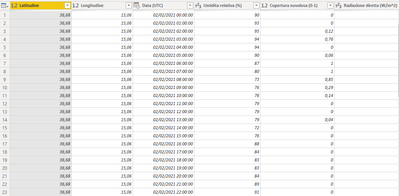
I have columns containing latitude, longitude, date and time of day, temperature, humidity etc. For each coordinate I have measurements made for 31 days at all hours of the day.

The same thing for the table containing the expected values:

Federica_18_3-1623141760540.png


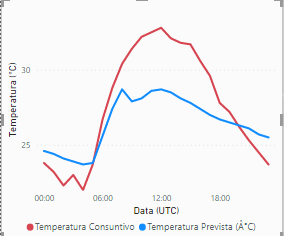
Moreover, I thought it could be useful to create a query merge and make a graphs in the following way:

Federica_18_4-1623142002194.png

x-axis: date and time of day;

y-axis: measured values (e.g. temperature)

Red line: actual temperature
Blue line: expected temperature

The problem is that when I merge queries, the load fails. Is there another way to make this chart without joining the two tables?


Thank you for your time

Federica

Hey @Federica_18 ,


you could let it as two separate tables and use a date table that you connect with both:

Power Bi for Beginners: How to create a Date Table in Power Bi - Softcrylic


Then you just have to put the date of the dimensional date table in the graphic and the values from the 2 fact tables and you got your result.


For the "merge", I don't think you need to do a merge in Power Query. You should try the append as puts one table below the other table. Try that one:

selimovd_0-1623143956808.png


If you need any help please let me know.
If I answered your question I would be happy if you could mark my post as a solution ✔️ and give it a thumbs up 👍
 
Best regards
Denis
 

Helpful resources

Announcements
Power BI DataViz World Championships

Power BI Dataviz World Championships

The Power BI Data Visualization World Championships is back! It's time to submit your entry.

January Power BI Update Carousel

Power BI Monthly Update - January 2026

Check out the January 2026 Power BI update to learn about new features.

FabCon Atlanta 2026 carousel

FabCon Atlanta 2026

Join us at FabCon Atlanta, March 16-20, for the ultimate Fabric, Power BI, AI and SQL community-led event. Save $200 with code FABCOMM.