
cancel
Showing results for 
Search instead for 
Did you mean: 

Data Days is here! Join us now for 60+ days of learning, challenges, and connection. Learn more

Reply
Wesleyvanv
Advocate I
Advocate I

Merge Queries - Refresh issue

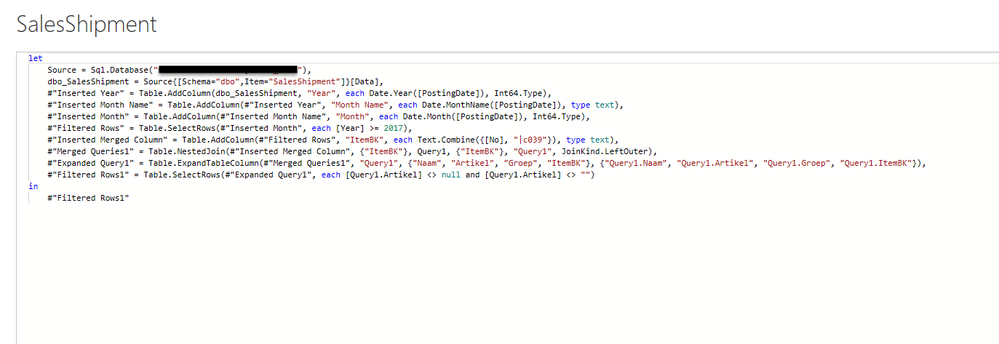
Hi All, I have performed a merge query on my salesshipment table. After the merge I have filtered on the items on which the merge was done. I have counted the rows and I have 6832 rows of these specific items. I would expect only these rows are imported, but when applying my changes the refresh is still loading my whole salesshipment table of more than 1M rows. Please find below my advanced editor statement. What have I done wrong? Thanks Weslequery1.pngrefresh.pngsalesshipment.png

1 ACCEPTED SOLUTION
v-chuncz-msft
Community Support
Community Support

@Wesleyvanv 


You may take a look at the post below.

https://community.powerbi.com/t5/Desktop/Query-Folding-Documentation/m-p/359796#M162306

Community Support Team _ Sam Zha
If this post helps, then please consider Accept it as the solution to help the other members find it more quickly.

View solution in original post

1 REPLY 1
v-chuncz-msft
Community Support
Community Support

@Wesleyvanv 


You may take a look at the post below.

https://community.powerbi.com/t5/Desktop/Query-Folding-Documentation/m-p/359796#M162306

Community Support Team _ Sam Zha
If this post helps, then please consider Accept it as the solution to help the other members find it more quickly.

Helpful resources

Announcements
Fabric Data Days is here Carousel

Fabric Data Days 2026

Don't miss out on Data Days, June 15 through August 7. Learn Fabric, Power BI, SQL, AI and more.

May Power BI Update Carousel

Power BI Monthly Update - May 2026

Check out the May 2026 Power BI update to learn about new features.

Power BI DataViz World Championships carousel

Power BI DataViz World Championships - June 2026

A new Power BI DataViz World Championship is coming this June! Don't miss out on submitting your entry.