Hello there,
I am trying to Merge two tables. Table 1 "US_Det_Cust_Ledg" (fig. 1) has been filtered a couple of times and Grouped By [Cust Ledger Entry No] (fig. 2) which is the foreign key linking it to Table 2 "US_Cust_Ledg_Entry"[Entry No_] (fig. 3).
I am trying to do "US_Det_Cust_Ledg" Left Outer Join "US_Cust_Ledg_Entry" where [Cust Ledger Entry No] = [Entry No_] (fig. 4). I have confirmed by exporting to Excel that all rows in each table have matching IDs. However, after this merge I end up with several null values coming through (fig. 5). I'm thinking it might have to do with the Group By previously performed in "US_Det_Cust_Ledg", but I don't really know.
What am I doing wrong here? Screenshots and code below.
Thank you in advance!
Fig. 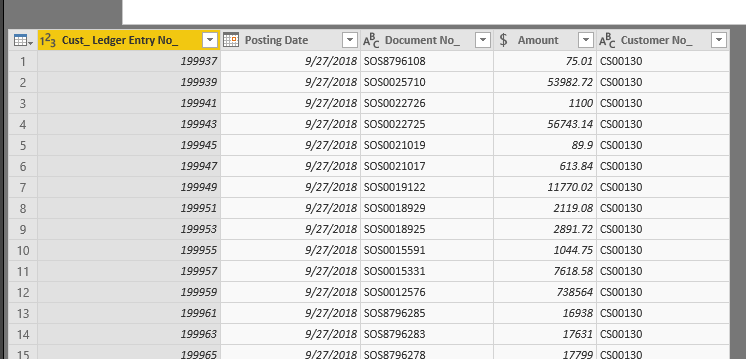 Fig 1. US_Det_Cust_Ledg (Original)
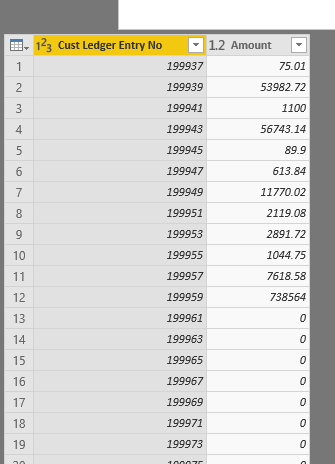 Fig. 2 US_Det_Cust_Ledg (Grouped)
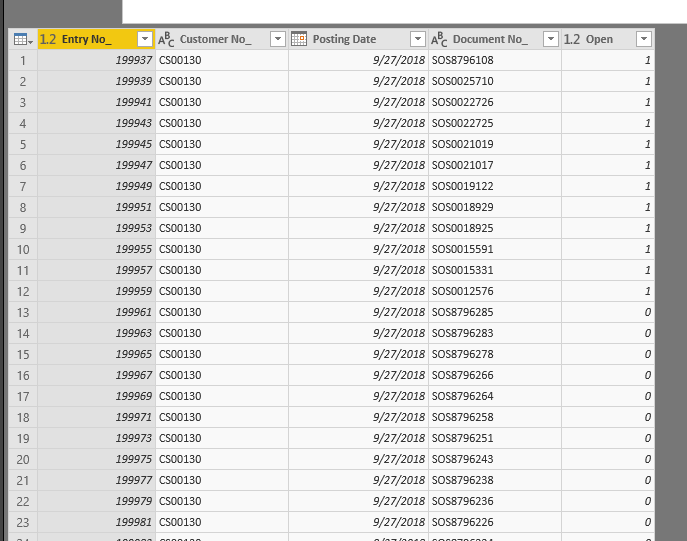 Fig. 3 US_Cust_Ledg_Entry
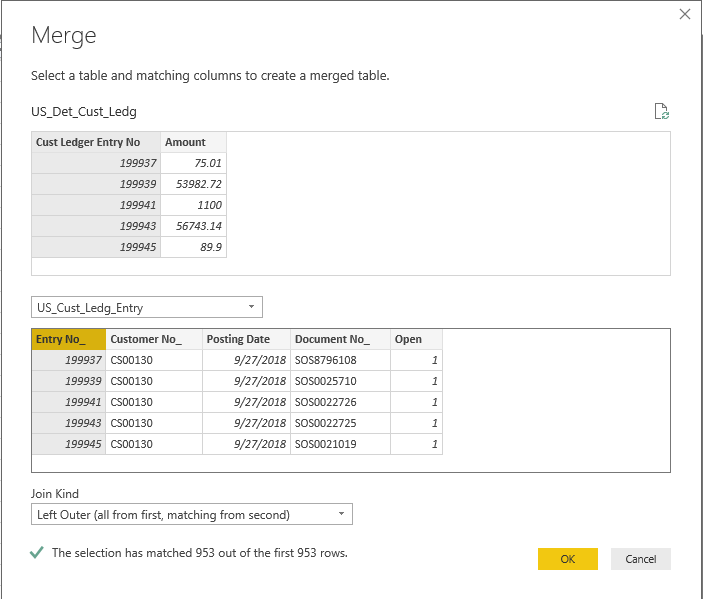 Fig. 4 Merge (Left Outer)
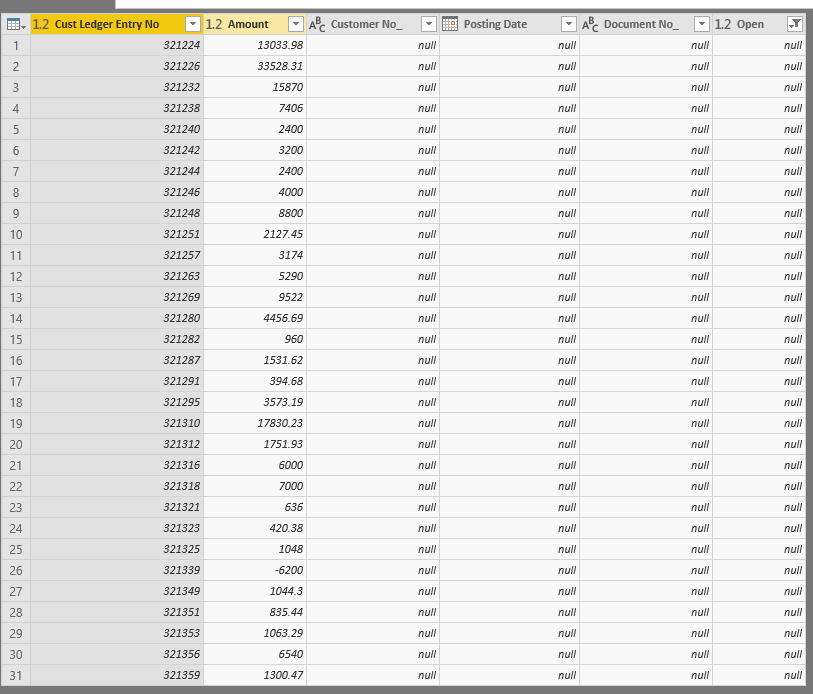 Fig 5. null Values Returned
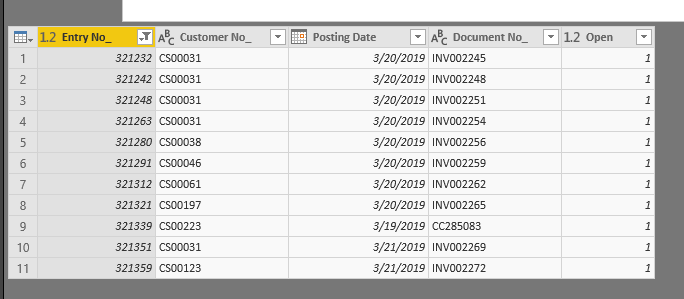 Fig 6. Proof of Matching Values
let
    Source = #"SQL4: STRENE_NAV2017_PROD",
    #"Filtered Rows" = Table.SelectRows(Source, each Text.Contains([Name.2], "Detailed Cust_ ")),
    #"dbo_Strad Oilfield Services Inc_$Detailed Cust_ Ledg_ Entry" = #"Filtered Rows"{[Schema="dbo",Item="Strad Oilfield Services Inc_$Detailed Cust_ Ledg_ Entry"]}[Data],
    #"Removed Other Columns" = Table.SelectColumns(#"dbo_Strad Oilfield Services Inc_$Detailed Cust_ Ledg_ Entry",{"Cust_ Ledger Entry No_", "Posting Date", "Document No_", "Amount", "Customer No_"}),
    #"Changed Type" = Table.TransformColumnTypes(#"Removed Other Columns",{{"Posting Date", type date}, {"Amount", Currency.Type}}),
    #"Renamed Columns" = Table.RenameColumns(#"Changed Type",{{"Cust_ Ledger Entry No_", "Cust Ledger Entry No"}}),
    #"Added INCLUDE" = Table.AddColumn(#"Renamed Columns", "Include", each if [Posting Date] > #"Report Date" then "False" else "True"),
    #"Filter Include = True" = Table.SelectRows(#"Added INCLUDE", each [Include] = "True"),
    #"Grouped Rows by Cust Ledger Entry No" = Table.Group(#"Filter Include = True", {"Cust Ledger Entry No"}, {{"Amount", each List.Sum([Amount]), type number}}),
    #"Filter Amount <> 0" = Table.SelectRows(#"Grouped Rows by Cust Ledger Entry No", each [Amount] <> 0),
    #"Changed Type1" = Table.TransformColumnTypes(#"Filter Amount <> 0",{{"Cust Ledger Entry No", type number}}),
    #"Merged Queries" = Table.NestedJoin(#"Changed Type1",{"Cust Ledger Entry No"},US_Cust_Ledg_Entry,{"Entry No_"},"US_Cust_Ledg_Entry",JoinKind.LeftOuter),
    #"Expanded US_Cust_Ledg_Entry" = Table.ExpandTableColumn(#"Merged Queries", "US_Cust_Ledg_Entry", {"Customer No_", "Posting Date", "Document No_", "Open"}, {"Customer No_", "Posting Date", "Document No_", "Open"}),
    #"Filtered Rows1" = Table.SelectRows(#"Expanded US_Cust_Ledg_Entry", each ([Open] = null))
in
    #"Filtered Rows1"
Fig. 7 Code for US_Det_Cust_Ledg


