cancel
Showing results for 
Search instead for 
Did you mean: 

The Power BI Data Visualization World Championships is back! It's time to submit your entry. Live now!

Reply
HYirang
New Member

Merge/Combine rows

I would like to combine several rows having same Key index like below. ID will be a unique ID of a product.


Table 'weird'

IDCategoryCate_ValueSizeColorPrice
ASize100100nullnull
AColorBluenullBluenull
APrice5000nullnull5000


For your informaiton, the original data set is first 3 columns. and i tried to solve the issue, I added 3 custom columns for each Category.

The result I want to make is like below. What I want is similar with remove duplicate. but all data of column should be reserved.

IDCategoryCate_ValueSizeColorPrice
Aanythinganything100Blue5000


For your understaing, please see the detail situation and my final goal.

1. first, I know the original data is suck. but I can't change it as it is loaded from online which I can't edit.

2. There are serveral other tables having unique ID like below

Table 'Normal'

IDBuyerProducerCreated
AOliviaKevin10-Jul


3. I can make some relation and report like below using 'Normal' table.

Producer - Color

Created date - Size

Sum of products per producer

sold Qty to Olivia by Kevin

etc...


But I can't get the result between the attributes in table 'weird'.

- Total numbers of speific color per speicifc size.

- Sum of the price for specific size or color


hope you understand this.

ny small hints can help.


3 REPLIES 3
v-easonf-msft
Community Support
Community Support

Hi , @HYirang 

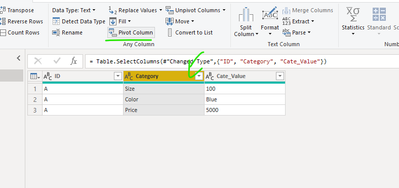
You don't need to  added 3 custom columns for each Category.

Just select the column "Category" and use the function pivot column

1.png

2.PNG


Best Regards,
Community Support Team _ Eason
If this post helps, then please consider Accept it as the solution to help the other members find it more quickly.


amitchandak
Super User
Super User

@HYirang , this needs some data shaping. I think transpose and pivot/unpivot etc

https://radacad.com/pivot-and-unpivot-with-power-bi
Transpose : https://yodalearning.com/tutorials/power-query-helps-transposing-data/


Share with Power BI Enthusiasts: Full Power BI Video (20 Hours) YouTube
Microsoft Fabric Series 60+ Videos YouTube
Microsoft Fabric Hindi End to End YouTube
mahoneypat
Microsoft Employee
Microsoft Employee

You can use this M query approach to prep your data for a better model.  I put your example "weird" data in, kept the first 3 columns, and then unpivot (w/o aggregation) to get your desired result.  With that table, you can easily make relationships with your other "normal" tables on the ID column and do basic SUM() and COUNT() type measures.


To see the steps, just paste this M code into a blank query, click on Advanced Editor and replace the text there with this:


let
Source = Table.FromRows(Json.Document(Binary.Decompress(Binary.FromText("i45WclTSUQrOrEoFUoYGBnAyrzQnB0bF6kCUOefn5BcBaaec0lSEEmQeTGVAUWYySNDUAMMwqGBsLAA=", BinaryEncoding.Base64), Compression.Deflate)), let _t = ((type nullable text) meta [Serialized.Text = true]) in type table [ID = _t, Category = _t, Cate_Value = _t, Size = _t, Color = _t, Price = _t]),
#"Changed Type" = Table.TransformColumnTypes(Source,{{"ID", type text}, {"Category", type text}, {"Cate_Value", type text}, {"Size", Int64.Type}, {"Color", type text}, {"Price", Int64.Type}}),
#"Removed Other Columns" = Table.SelectColumns(#"Changed Type",{"ID", "Category", "Cate_Value"}),
#"Pivoted Column" = Table.Pivot(#"Removed Other Columns", List.Distinct(#"Removed Other Columns"[Category]), "Category", "Cate_Value")
in
#"Pivoted Column"


If this works for you, please mark it as solution.  Kudos are appreciated too.  Please let me know if not.

Regards,

Pat


Did I answer your question? Mark my post as a solution! Kudos are also appreciated!

To learn more about Power BI, follow me on Twitter or subscribe on YouTube.


@mahoneypa HoosierBI on YouTube


Helpful resources

Announcements
Power BI DataViz World Championships

Power BI Dataviz World Championships

The Power BI Data Visualization World Championships is back! It's time to submit your entry.

January Power BI Update Carousel

Power BI Monthly Update - January 2026

Check out the January 2026 Power BI update to learn about new features.

FabCon Atlanta 2026 carousel

FabCon Atlanta 2026

Join us at FabCon Atlanta, March 16-20, for the ultimate Fabric, Power BI, AI and SQL community-led event. Save $200 with code FABCOMM.