This time we’re going bigger than ever. Fabric, Power BI, SQL, AI and more. We're covering it all. You won't want to miss it.
Learn moreLevel up your Power BI skills this month - build one visual each week and tell better stories with data! Get started
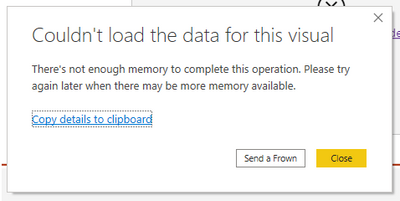
Hi folks! I am using a matrix to display gross margin % (a calculated measure) by quarter for the top N number of products ranked by total revenue. N is a user selected value between 1 and 25. I am getting the following error on the matrix when trying to display the above information. When I change the matrix to a table of any other kind of visual I do not get the memory problem although choosing a table as the visual requires about 20 seconds to refresh.
How can I make the Matrix work for me or reduce the memory required to poulate it? I have already minimized my data table as much as possible.
Thanks!
Hi @Frenchtom811 ,
Could you please share your PBIX file without sensitive data? Because it may have something to do with your model or the measures you created.
Best Regards,
Winniz
Hi @Frenchtom811, are you able to screenshot your data model? What's the size of the table involved in columns/rows?
Hi @mattw , do you mean a screen grab of the dashboard? If yes I can do that but I need to hide proprietary info first.
Hi @Frenchtom811 , yeah that's fair enough about your data privacy. The more information you can safely give, the better as the issue you're encountering can be very specific to each data model and source.
Check out the April 2026 Power BI update to learn about new features.
Sign up to receive a private message when registration opens and key events begin.
If you have recently started exploring Fabric, we'd love to hear how it's going. Your feedback can help with product improvements.
| User | Count |
|---|---|
| 35 | |
| 27 | |
| 26 | |
| 22 | |
| 18 |
| User | Count |
|---|---|
| 66 | |
| 36 | |
| 32 | |
| 26 | |
| 23 |