cancel
Showing results for 
Search instead for 
Did you mean: 

The Power BI Data Visualization World Championships is back! Get ahead of the game and start preparing now! Learn more

Reply
Anonymous
Not applicable

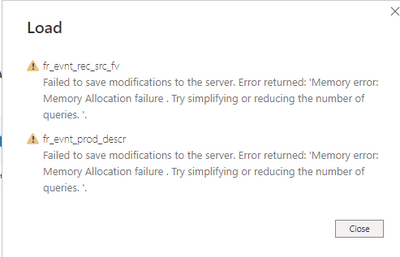
Memory error: Memory allocation failure.

Have sufficient storage in system still getting this error.Error.PNG

1 ACCEPTED SOLUTION
nvprasad
Solution Sage
Solution Sage

Hi,

If you know the table which is causing the error then try to remove unneccessary columns & push any transfomraiotns to the database instead of performing transformations in PowerQuery Editor.


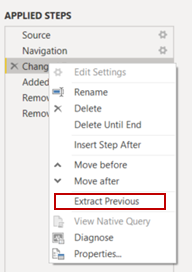
If you done above steps, still if you getting error, then split query into mutliple queries then refresh the report.

nvprasad_0-1663061239563.png


Appreciate a Kudos! ‌‌
If this helps and resolves the issue, please mark it as a Solution! ‌‌

Regards,
N V Durga Prasad

Did I answer your question? Mark my post as a solution! Appreciate your Kudos.
Follow me on LinkedIn.

View solution in original post

5 REPLIES 5
nvprasad
Solution Sage
Solution Sage

Hi,

If you know the table which is causing the error then try to remove unneccessary columns & push any transfomraiotns to the database instead of performing transformations in PowerQuery Editor.


If you done above steps, still if you getting error, then split query into mutliple queries then refresh the report.

nvprasad_0-1663061239563.png


Appreciate a Kudos! ‌‌
If this helps and resolves the issue, please mark it as a Solution! ‌‌

Regards,
N V Durga Prasad

Did I answer your question? Mark my post as a solution! Appreciate your Kudos.
Follow me on LinkedIn.
Anonymous
Not applicable

While loading data, i am getting this error


Try to load 1 table at a time so you can see which table is the most heavy one, so you can try to fix the query

Anonymous
Not applicable

fr_evnt_rec_src_fv has more records 

ReneMoawad
Resolver III
Resolver III

Hi @Anonymous ,


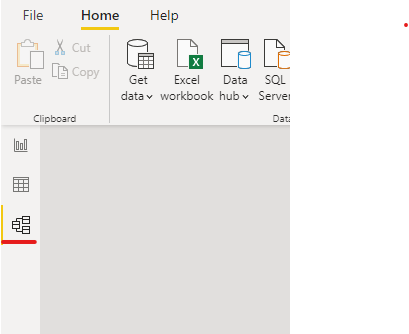
You need to go to the Model page

Screenshot 2022-09-13 123521.png


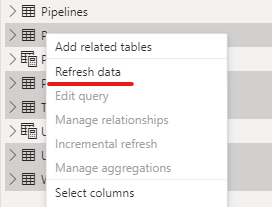
Select couple of tables and refresh them, than do the same for the remaining tables (Make sure you don't select the Calculated Tables, they will be refreshed automatically after you refresh the tables)

Screenshot 2022-09-13 123319.png

Helpful resources

Announcements
Power BI DataViz World Championships

Power BI Dataviz World Championships

The Power BI Data Visualization World Championships is back! Get ahead of the game and start preparing now!

December 2025 Power BI Update Carousel

Power BI Monthly Update - December 2025

Check out the December 2025 Power BI Holiday Recap!

FabCon Atlanta 2026 carousel

FabCon Atlanta 2026

Join us at FabCon Atlanta, March 16-20, for the ultimate Fabric, Power BI, AI and SQL community-led event. Save $200 with code FABCOMM.