Get Fabric certified for FREE!
Don't miss your chance to take the Fabric Data Engineer (DP-700) exam on us!
Learn more- Power BI forums
- Get Help with Power BI
- Desktop
- Service
- Report Server
- Power Query
- Mobile Apps
- Developer
- DAX Commands and Tips
- Custom Visuals Development Discussion
- Health and Life Sciences
- Power BI Spanish forums
- Translated Spanish Desktop
- Training and Consulting
- Instructor Led Training
- Dashboard in a Day for Women, by Women
- Galleries
- Data Stories Gallery
- Themes Gallery
- Contests Gallery
- QuickViz Gallery
- Quick Measures Gallery
- Visual Calculations Gallery
- Notebook Gallery
- Translytical Task Flow Gallery
- TMDL Gallery
- R Script Showcase
- Webinars and Video Gallery
- Ideas
- Custom Visuals Ideas (read-only)
- Issues
- Issues
- Events
- Upcoming Events
Next up in the FabCon + SQLCon recap series: The roadmap for Microsoft SQL and Maximizing Developer experiences in Fabric. All sessions are available on-demand after the live show. Register now
- Power BI forums
- Forums
- Get Help with Power BI
- Desktop
- Re: Memory Issue For Pareto Calculation
- Subscribe to RSS Feed
- Mark Topic as New
- Mark Topic as Read
- Float this Topic for Current User
- Bookmark
- Subscribe
- Printer Friendly Page

- Mark as New
- Bookmark
- Subscribe
- Mute
- Subscribe to RSS Feed
- Permalink
- Report Inappropriate Content
Memory Issue For Pareto Calculation
Hi All,
I am trying to do a Pareto Calculation. My source of data is excel having row counts of 1,274,444. But the cumulative sum is not working due to a memory issue. I tried a couple of times but eventually after waiting for 15-20 mins it gives me an out of memory error.
My RAM(in VDI) is 6 GB . I have even tried increasing the Power BI Cache size to 6 GB from the default size. But it did not work. Any idea how this could be resolved?
Its a cumulative sum of spend for vendors. The DAX is below


- Mark as New
- Bookmark
- Subscribe
- Mute
- Subscribe to RSS Feed
- Permalink
- Report Inappropriate Content
@Anonymous based on 1.2 million rows it should work fine. If you can share sample data and expected result, will able to write a DAX for you. Looking at your DAX, not sure what you are trying to achieve.
Subscribe to the @PowerBIHowTo YT channel for an upcoming video on List and Record functions in Power Query!!
Learn Power BI and Fabric - subscribe to our YT channel - Click here: @PowerBIHowTo
If my solution proved useful, I'd be delighted to receive Kudos. When you put effort into asking a question, it's equally thoughtful to acknowledge and give Kudos to the individual who helped you solve the problem. It's a small gesture that shows appreciation and encouragement! ❤
Did I answer your question? Mark my post as a solution. Proud to be a Super User! Appreciate your Kudos 🙂
Feel free to email me with any of your BI needs.
- Mark as New
- Bookmark
- Subscribe
- Mute
- Subscribe to RSS Feed
- Permalink
- Report Inappropriate Content
Hi Parry,
Below is the sample data. The vendor parent column has duplicate data. As it has vendor childs. I want a cumulative spend of all the vendor parent. I have provided another table below of what is expected. And then finally a cumulative percentage.
I have given just 3 columns on which I want the calculations. However the excel has many other columns and the rowcount is almost 2M as mentioned in my previous post.
Sample Data:
| Supplier - Vendor Parent | Supplier Vendor Child | Spend |
| ABC | ABC 1 | 15423 |
| ABC | ABC 2 | 2345 |
| MAGNETS | Magnets1 | 77.988767 |
| MAGNETS | Magnets2 | 56767 |
| UNICORN | UNICORN1 | 2459 |
| UNICORN | UNICORN2 | 15236 |
| UNICORN | UNICORN3 | 2133 |
| Unclassified | Unclassified | 15423 |
| ATH AO | ATH AO | 2345 |
| Te Zheng Xing | Te Zheng Xing A | 77.988767 |
| Te Zheng Xing | Te Zheng Xing B | 56767 |
| Te Zheng Xing | Te Zheng Xing C | 2459 |
| Te Zheng Xing | Te Zheng Xing D | 15236 |
| Premier Press | Premier Press1 | 2133 |
| Premier Press | Premier Press1 | 1345 |
Expected Result
| Vendor Parent | Cumulative Spend | Cumulative Spend % |
| ABC | 17768 | 17786/190226.9 |
| MAGNETS | 56844.9 | 56844.9/190226.9 |
| UNICORN | 19828 | |
| Unclassified | 15423 | |
| ATH AO | 2345 | |
| Te Zheng Xing | 74539.9 | |
| Premier Press | 3478 |
Hope I am able to explain it clearly.
Many Thanks
Regards
Ankhi
- Mark as New
- Bookmark
- Subscribe
- Mute
- Subscribe to RSS Feed
- Permalink
- Report Inappropriate Content
@Anonymous I guess this is what you are looking for

Subscribe to the @PowerBIHowTo YT channel for an upcoming video on List and Record functions in Power Query!!
Learn Power BI and Fabric - subscribe to our YT channel - Click here: @PowerBIHowTo
If my solution proved useful, I'd be delighted to receive Kudos. When you put effort into asking a question, it's equally thoughtful to acknowledge and give Kudos to the individual who helped you solve the problem. It's a small gesture that shows appreciation and encouragement! ❤
Did I answer your question? Mark my post as a solution. Proud to be a Super User! Appreciate your Kudos 🙂
Feel free to email me with any of your BI needs.
- Mark as New
- Bookmark
- Subscribe
- Mute
- Subscribe to RSS Feed
- Permalink
- Report Inappropriate Content
Hi Parry,
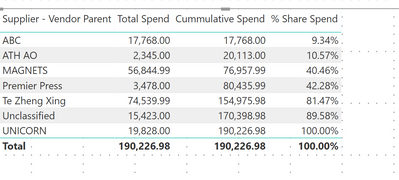
So sorry , my expected result is below. The cumulative spend is spend of vendor 1, then vendor 1 + vendor 2, vendor 1 + vendor2 + vendor 3 etc..
| Vendor Parent | Spend | Cumulative Spend | Cumulative Spend % |
| ABC | 17768 | 17768 | 17786/190226.9 |
| MAGNETS | 56844.9 | 74612 | 74612/190226.9 |
| UNICORN | 19828 | 94440 | 94440/190226. |
| Unclassified | 15423 | 109863 | |
| ATH AO | 2345 | 112208 | |
| Te Zheng Xing | 74539.9 | 186748 | |
| Premier Press | 3478 | 190220 |
- Mark as New
- Bookmark
- Subscribe
- Mute
- Subscribe to RSS Feed
- Permalink
- Report Inappropriate Content
@Anonymous that is easy but do we want to keep the same sort order for parent?
Subscribe to the @PowerBIHowTo YT channel for an upcoming video on List and Record functions in Power Query!!
Learn Power BI and Fabric - subscribe to our YT channel - Click here: @PowerBIHowTo
If my solution proved useful, I'd be delighted to receive Kudos. When you put effort into asking a question, it's equally thoughtful to acknowledge and give Kudos to the individual who helped you solve the problem. It's a small gesture that shows appreciation and encouragement! ❤
Did I answer your question? Mark my post as a solution. Proud to be a Super User! Appreciate your Kudos 🙂
Feel free to email me with any of your BI needs.
- Mark as New
- Bookmark
- Subscribe
- Mute
- Subscribe to RSS Feed
- Permalink
- Report Inappropriate Content
@Anonymous here is how it looks like if sorted by parent vendor
Subscribe to the @PowerBIHowTo YT channel for an upcoming video on List and Record functions in Power Query!!
Learn Power BI and Fabric - subscribe to our YT channel - Click here: @PowerBIHowTo
If my solution proved useful, I'd be delighted to receive Kudos. When you put effort into asking a question, it's equally thoughtful to acknowledge and give Kudos to the individual who helped you solve the problem. It's a small gesture that shows appreciation and encouragement! ❤
Did I answer your question? Mark my post as a solution. Proud to be a Super User! Appreciate your Kudos 🙂
Feel free to email me with any of your BI needs.
- Mark as New
- Bookmark
- Subscribe
- Mute
- Subscribe to RSS Feed
- Permalink
- Report Inappropriate Content
when i pull it in the graph the vendors will be shown in descending order by Spend. I mean the vendor with the highest spend 1st and then decreasing. On x axis it will be vendor and i want to have the cumulative spend % as a line
Helpful resources

New to Fabric Survey
If you have recently started exploring Fabric, we'd love to hear how it's going. Your feedback can help with product improvements.

Power BI DataViz World Championships - June 2026
A new Power BI DataViz World Championship is coming this June! Don't miss out on submitting your entry.

Join our Fabric User Panel
Share feedback directly with Fabric product managers, participate in targeted research studies and influence the Fabric roadmap.

Power BI Community Update - March 2026
Check out the March 2026 Power BI update to learn about new features.

| User | Count |
|---|---|
| 50 | |
| 44 | |
| 42 | |
| 18 | |
| 18 |


| User | Count |
|---|---|
| 69 | |
| 68 | |
| 32 | |
| 32 | |
| 32 |


