FabCon is coming to Atlanta
Join us at FabCon Atlanta from March 16 - 20, 2026, for the ultimate Fabric, Power BI, AI and SQL community-led event. Save $200 with code FABCOMM.
Register now!- Power BI forums
- Get Help with Power BI
- Desktop
- Service
- Report Server
- Power Query
- Mobile Apps
- Developer
- DAX Commands and Tips
- Custom Visuals Development Discussion
- Health and Life Sciences
- Power BI Spanish forums
- Translated Spanish Desktop
- Training and Consulting
- Instructor Led Training
- Dashboard in a Day for Women, by Women
- Galleries
- Data Stories Gallery
- Themes Gallery
- Contests Gallery
- QuickViz Gallery
- Quick Measures Gallery
- Visual Calculations Gallery
- Notebook Gallery
- Translytical Task Flow Gallery
- TMDL Gallery
- R Script Showcase
- Webinars and Video Gallery
- Ideas
- Custom Visuals Ideas (read-only)
- Issues
- Issues
- Events
- Upcoming Events
The Power BI Data Visualization World Championships is back! Get ahead of the game and start preparing now! Learn more
- Power BI forums
- Forums
- Get Help with Power BI
- Desktop
- Re: Member retention
- Subscribe to RSS Feed
- Mark Topic as New
- Mark Topic as Read
- Float this Topic for Current User
- Bookmark
- Subscribe
- Printer Friendly Page

- Mark as New
- Bookmark
- Subscribe
- Mute
- Subscribe to RSS Feed
- Permalink
- Report Inappropriate Content
Member retention
Hi All,
I am trying to put together a report that shows member retention year on year. I hoping to make this spliceable by a range of other variables in the data.
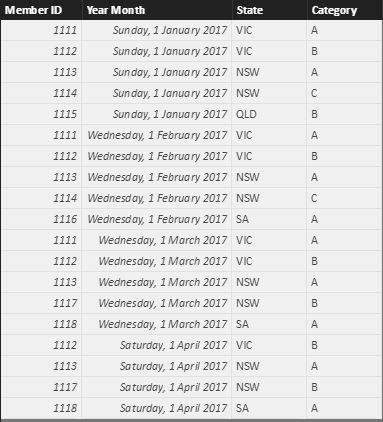
The data is formed at the end of each month and simply lists all members with their ID number for all months. Is there a way to compare the members in a given month and determine what percentage were members 12 months prior? ie: proportion of members in April 2017 who were also members in April 2016?
Ideally I would be able to choose the year end month that I want to measure retention for, but maybe that's not possible.
Here is a sample of the data.
I am still relatively new to Powerbi, so any help would be greatly appreciated.
Thanks
Solved! Go to Solution.


- Mark as New
- Bookmark
- Subscribe
- Mute
- Subscribe to RSS Feed
- Permalink
- Report Inappropriate Content
@Trengroove wrote:
Hi All,
I am trying to put together a report that shows member retention year on year. I hoping to make this spliceable by a range of other variables in the data.
The data is formed at the end of each month and simply lists all members with their ID number for all months. Is there a way to compare the members in a given month and determine what percentage were members 12 months prior? ie: proportion of members in April 2017 who were also members in April 2016?
Ideally I would be able to choose the year end month that I want to measure retention for, but maybe that's not possible.
Here is a sample of the data.
I am still relatively new to Powerbi, so any help would be greatly appreciated.
Thanks
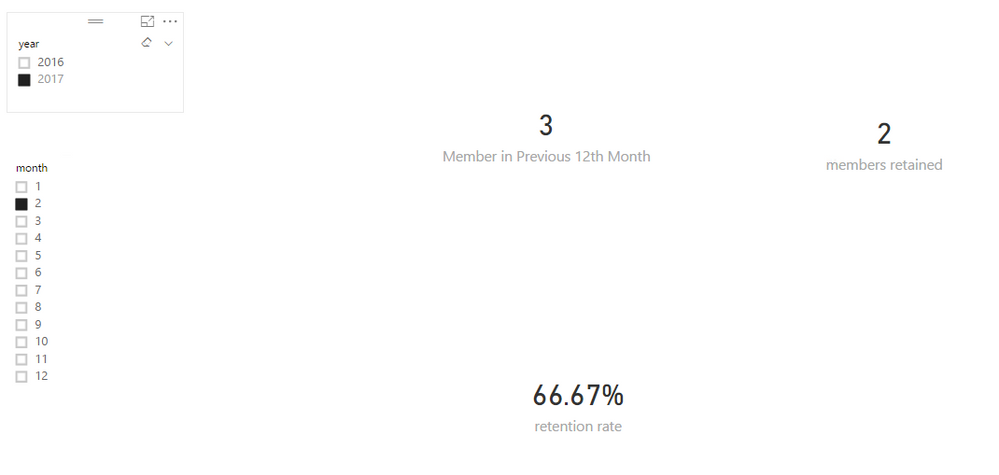
With the calendar table from @GilbertQ, you can create 3 measures as below. See more details in the attached pbix.
Member in Previous 12th Month =
CALCULATE (
    DISTINCTCOUNT ( 'yourTable'[MemberID] ),
    SAMEPERIODLASTYEAR ( dimdate[Date] )
)
members retained =
VAR membersInPrevious12Month =
    CALCULATETABLE ( 'yourTable', SAMEPERIODLASTYEAR ( dimdate[Date] ) )
RETURN
    CALCULATE (
        DISTINCTCOUNT ( 'yourTable'[MemberID] ),
        FILTER (
            'yourTable',
            CONTAINS (
                membersInPrevious12Month,
                'yourTable'[MemberID], 'yourTable'[MemberID]
            )
        )
    )
retention rate = [members retained]/[Member in Previous 12th Month]
- Mark as New
- Bookmark
- Subscribe
- Mute
- Subscribe to RSS Feed
- Permalink
- Report Inappropriate Content
@Trengroove wrote:
Hi All,
I am trying to put together a report that shows member retention year on year. I hoping to make this spliceable by a range of other variables in the data.
The data is formed at the end of each month and simply lists all members with their ID number for all months. Is there a way to compare the members in a given month and determine what percentage were members 12 months prior? ie: proportion of members in April 2017 who were also members in April 2016?
Ideally I would be able to choose the year end month that I want to measure retention for, but maybe that's not possible.
Here is a sample of the data.
I am still relatively new to Powerbi, so any help would be greatly appreciated.
Thanks
With the calendar table from @GilbertQ, you can create 3 measures as below. See more details in the attached pbix.
Member in Previous 12th Month =
CALCULATE (
    DISTINCTCOUNT ( 'yourTable'[MemberID] ),
    SAMEPERIODLASTYEAR ( dimdate[Date] )
)
members retained =
VAR membersInPrevious12Month =
    CALCULATETABLE ( 'yourTable', SAMEPERIODLASTYEAR ( dimdate[Date] ) )
RETURN
    CALCULATE (
        DISTINCTCOUNT ( 'yourTable'[MemberID] ),
        FILTER (
            'yourTable',
            CONTAINS (
                membersInPrevious12Month,
                'yourTable'[MemberID], 'yourTable'[MemberID]
            )
        )
    )
retention rate = [members retained]/[Member in Previous 12th Month]

- Mark as New
- Bookmark
- Subscribe
- Mute
- Subscribe to RSS Feed
- Permalink
- Report Inappropriate Content
What about month over month member retention?


- Mark as New
- Bookmark
- Subscribe
- Mute
- Subscribe to RSS Feed
- Permalink
- Report Inappropriate Content
Hi @ike1860,
Share a dataset and show the expected result.
Regards,
Ashish Mathur
http://www.ashishmathur.com
https://www.linkedin.com/in/excelenthusiasts/
- Mark as New
- Bookmark
- Subscribe
- Mute
- Subscribe to RSS Feed
- Permalink
- Report Inappropriate Content
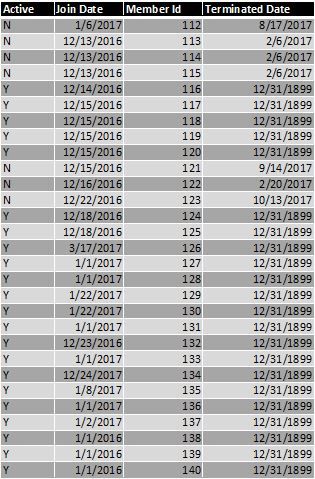
In the terminated date column 12/31/1899 is the default date value entered by our database when the date is not entered.
I'm trying to calculate and show monthly retention either as a cohort or best visual.
Thanks!
- Mark as New
- Bookmark
- Subscribe
- Mute
- Subscribe to RSS Feed
- Permalink
- Report Inappropriate Content
Hi,
Share the link from where i can download your sample data. In a simple Table, please show the expected result.
Regards,
Ashish Mathur
http://www.ashishmathur.com
https://www.linkedin.com/in/excelenthusiasts/
- Mark as New
- Bookmark
- Subscribe
- Mute
- Subscribe to RSS Feed
- Permalink
- Report Inappropriate Content
wrote:Hi,
Share the link from where i can download your sample data. In a simple Table, please show the expected result.
Below is a link to sample data
- Mark as New
- Bookmark
- Subscribe
- Mute
- Subscribe to RSS Feed
- Permalink
- Report Inappropriate Content
Hi,
On another tab in the same workbook, in a simple table, show your expected result.
Regards,
Ashish Mathur
http://www.ashishmathur.com
https://www.linkedin.com/in/excelenthusiasts/
- Mark as New
- Bookmark
- Subscribe
- Mute
- Subscribe to RSS Feed
- Permalink
- Report Inappropriate Content
wrote:Hi,
On another tab in the same workbook, in a simple table, show your expected result.
Here you go
- Mark as New
- Bookmark
- Subscribe
- Mute
- Subscribe to RSS Feed
- Permalink
- Report Inappropriate Content
Hi,
I cannot download the file from there.
Regards,
Ashish Mathur
http://www.ashishmathur.com
https://www.linkedin.com/in/excelenthusiasts/
- Mark as New
- Bookmark
- Subscribe
- Mute
- Subscribe to RSS Feed
- Permalink
- Report Inappropriate Content
Sorry about that. Try this one.
- Mark as New
- Bookmark
- Subscribe
- Mute
- Subscribe to RSS Feed
- Permalink
- Report Inappropriate Content
Hi,
As requested in my previous message, please show the expected result on sheet2.
Regards,
Ashish Mathur
http://www.ashishmathur.com
https://www.linkedin.com/in/excelenthusiasts/
- Mark as New
- Bookmark
- Subscribe
- Mute
- Subscribe to RSS Feed
- Permalink
- Report Inappropriate Content
- Mark as New
- Bookmark
- Subscribe
- Mute
- Subscribe to RSS Feed
- Permalink
- Report Inappropriate Content
Sheet 2 just has column headers. The values in columns are blank. Please tell me exactly what numbers you are expecting there so that i can verify my solution.
Regards,
Ashish Mathur
http://www.ashishmathur.com
https://www.linkedin.com/in/excelenthusiasts/

- Mark as New
- Bookmark
- Subscribe
- Mute
- Subscribe to RSS Feed
- Permalink
- Report Inappropriate Content
Hi @Trengroove
What you could do is to first create a Date table.
This table will then allow you to use the native or build in Time Intelligence functions in Power BI.
For your example the DAX measure that you would want to create would be SAMEPERIODLASTYEAR, which would then go back to the previous period for last year.
In order to create the date table you could copy this blog post below.

Helpful resources

Power BI Dataviz World Championships
The Power BI Data Visualization World Championships is back! Get ahead of the game and start preparing now!

Power BI Monthly Update - December 2025
Check out the December 2025 Power BI Holiday Recap!

FabCon Atlanta 2026
Join us at FabCon Atlanta, March 16-20, for the ultimate Fabric, Power BI, AI and SQL community-led event. Save $200 with code FABCOMM.

| User | Count |
|---|---|
| 39 | |
| 37 | |
| 33 | |
| 32 | |
| 29 |


| User | Count |
|---|---|
| 133 | |
| 88 | |
| 85 | |
| 68 | |
| 64 |


