Join us at FabCon Atlanta from March 16 - 20, 2026, for the ultimate Fabric, Power BI, AI and SQL community-led event. Save $200 with code FABCOMM.
Register now!The Power BI Data Visualization World Championships is back! It's time to submit your entry. Live now!
I am having a hard time calculating the median of a direct query sql table. Usually I would do a column on Power query but I can't use median calculation on power query editor.
I would like to calculate the Median for each Part Number and then subtract the calculated median from each operation ID to find the cost difference.
I have the following Table:
ID PN COST
1 A 20
2 B 30
3 A 40
4 B 40
5 A 50
6 B 50
and would like the result as:
ID PN COST COST-MEDIAN
1 A 20 20-40 = -20
2 B 25 25-30 = -5
3 A 40 40-40 = 0
4 B 30 30-30 = 0
5 A 50 50-40 = 10
6 B 50 50-30 = 20
Thank you!
Solved! Go to Solution.
hi, @soldanr
After my research, you can do these as below:
Step1:
Add a measure for Median by MEDIAN Function
Median = CALCULATE(MEDIAN(Table1[Cost]),ALLEXCEPT(Table1,Table1[PN]))
Step2:
Add a measure for COST-MEDIAN
COST-MEDIAN = SUMX(Table1,CALCULATE(SUM(Table1[Cost]))-[Median])
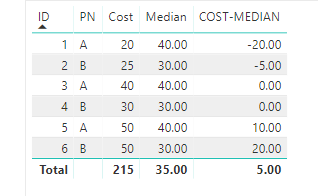
Result:
here is pbix, please try it.
https://www.dropbox.com/s/7gam0a8mb3gyuuf/Median%20DirectQuery%20calculation.pbix?dl=0
Best Regards,
Lin
hi, @soldanr
After my research, you can do these as below:
Step1:
Add a measure for Median by MEDIAN Function
Median = CALCULATE(MEDIAN(Table1[Cost]),ALLEXCEPT(Table1,Table1[PN]))
Step2:
Add a measure for COST-MEDIAN
COST-MEDIAN = SUMX(Table1,CALCULATE(SUM(Table1[Cost]))-[Median])
Result:
here is pbix, please try it.
https://www.dropbox.com/s/7gam0a8mb3gyuuf/Median%20DirectQuery%20calculation.pbix?dl=0
Best Regards,
Lin
That was perfect! Thank you very much.
The Power BI Data Visualization World Championships is back! It's time to submit your entry.
| User | Count |
|---|---|
| 50 | |
| 43 | |
| 36 | |
| 33 | |
| 30 |
| User | Count |
|---|---|
| 138 | |
| 120 | |
| 60 | |
| 59 | |
| 56 |