FabCon is coming to Atlanta
Join us at FabCon Atlanta from March 16 - 20, 2026, for the ultimate Fabric, Power BI, AI and SQL community-led event. Save $200 with code FABCOMM.
Register now!- Power BI forums
- Get Help with Power BI
- Desktop
- Service
- Report Server
- Power Query
- Mobile Apps
- Developer
- DAX Commands and Tips
- Custom Visuals Development Discussion
- Health and Life Sciences
- Power BI Spanish forums
- Translated Spanish Desktop
- Training and Consulting
- Instructor Led Training
- Dashboard in a Day for Women, by Women
- Galleries
- Data Stories Gallery
- Themes Gallery
- Contests Gallery
- QuickViz Gallery
- Quick Measures Gallery
- Visual Calculations Gallery
- Notebook Gallery
- Translytical Task Flow Gallery
- TMDL Gallery
- R Script Showcase
- Webinars and Video Gallery
- Ideas
- Custom Visuals Ideas (read-only)
- Issues
- Issues
- Events
- Upcoming Events
Get Fabric Certified for FREE during Fabric Data Days. Don't miss your chance! Request now
- Power BI forums
- Forums
- Get Help with Power BI
- Desktop
- Re: Median DAX on a Filtered Value not working
- Subscribe to RSS Feed
- Mark Topic as New
- Mark Topic as Read
- Float this Topic for Current User
- Bookmark
- Subscribe
- Printer Friendly Page


- Mark as New
- Bookmark
- Subscribe
- Mute
- Subscribe to RSS Feed
- Permalink
- Report Inappropriate Content
Median DAX on a Filtered Value not working
Hi all,
I have a very large set of data (nearly a million rows) and I am using filters in the dashboard to get it to show a table of just the data I need to show. ( I need the filter in the dashboard to users can do this themselves)
In this instance the 3 colums I have picked out and filtered are "Provider" "Course Name" "Student Numbers".
For the Example I have a filter on "Course Name" to show just Economics and a filter on "Provider" as there is 1 provider I don't wan to count.
Now I have this table in the report with 12 providers and the number of students at each doing Economics.. What I need I want to show now is the Median number of students for ONLY the courses selected in the table on a card visual.. I have added the Medium Value onto a bar chart with the same filters and that works, however creating a DAX Measure using MEDIAN(Table[Student Numbers]) doesn't work, it retuns Value of 1.
Any ideas where i'm going wrong?
Solved! Go to Solution.


- Mark as New
- Bookmark
- Subscribe
- Mute
- Subscribe to RSS Feed
- Permalink
- Report Inappropriate Content
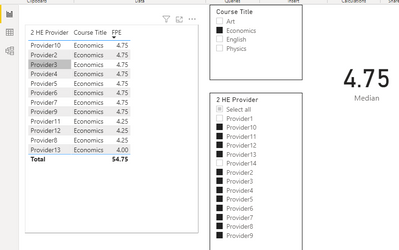
Hi @sarah2_williams ,
Please do this.
Median =
MEDIANX(
    SUMMARIZE(
        'Econ sample 2',
        [2 HE Provider], [Course Title],
        "__Sum FPE", SUM('Econ sample 2'[FPE])
    ),
    [__Sum FPE]
)
Best regards,
Lionel Chen
If this post helps, then please consider Accept it as the solution to help the other members find it more quickly.


- Mark as New
- Bookmark
- Subscribe
- Mute
- Subscribe to RSS Feed
- Permalink
- Report Inappropriate Content
Please try this measure expression. It first makes a virtual table with the # of students in every selected combination of class and provider, and then takes the median of that new virtual column.
New Median =
VAR summary =
ADDCOLUMNS (
SUMMARIZE (
'Econ sample 2',
'Econ sample 2'[2 HE Provider],
'Econ sample 2'[Course Title]
),
"@students",
CALCULATE (
COUNT ( 'Econ sample 2'[Student] )
)
)
RETURN
MEDIANX (
summary,
[@students]
)
Regards,
Pat
Did I answer your question? Mark my post as a solution! Kudos are also appreciated!
To learn more about Power BI, follow me on Twitter or subscribe on YouTube.
@mahoneypa HoosierBI on YouTube


- Mark as New
- Bookmark
- Subscribe
- Mute
- Subscribe to RSS Feed
- Permalink
- Report Inappropriate Content
@sarah2_williams ,Can you share sample data and sample output in table format? Or a sample pbix after removing sensitive data.
- Mark as New
- Bookmark
- Subscribe
- Mute
- Subscribe to RSS Feed
- Permalink
- Report Inappropriate Content
- Mark as New
- Bookmark
- Subscribe
- Mute
- Subscribe to RSS Feed
- Permalink
- Report Inappropriate Content
Hi @sarah2_williams ,
Please do this.
Median =
MEDIANX(
    SUMMARIZE(
        'Econ sample 2',
        [2 HE Provider], [Course Title],
        "__Sum FPE", SUM('Econ sample 2'[FPE])
    ),
    [__Sum FPE]
)
Best regards,
Lionel Chen
If this post helps, then please consider Accept it as the solution to help the other members find it more quickly.
- Mark as New
- Bookmark
- Subscribe
- Mute
- Subscribe to RSS Feed
- Permalink
- Report Inappropriate Content
@v-lionel-msft Thanks!
Would the DAX be similar if I wanted to look for the upper and lower Percentiles?
- Mark as New
- Bookmark
- Subscribe
- Mute
- Subscribe to RSS Feed
- Permalink
- Report Inappropriate Content
Hi @amitchandak
Can you access the below:
https://1drv.ms/u/s!AgqFHfAlcE6nhD8ARKdbuX77wTJw?e=s5jEfW
This is a very basic example of how my data is, how I want to use filters in the report and how I want median to be displayed.
Thanks
- Mark as New
- Bookmark
- Subscribe
- Mute
- Subscribe to RSS Feed
- Permalink
- Report Inappropriate Content
HI,
Thank you for replying.. when trying to create a sample data set - which is much much smaller, it works fine. So I am a bit stuck, I will try another way to sed you the information
thanks
sarah

Helpful resources

Power BI Monthly Update - November 2025
Check out the November 2025 Power BI update to learn about new features.

Fabric Data Days
Advance your Data & AI career with 50 days of live learning, contests, hands-on challenges, study groups & certifications and more!

FabCon Atlanta 2026
Join us at FabCon Atlanta, March 16-20, for the ultimate Fabric, Power BI, AI and SQL community-led event. Save $200 with code FABCOMM.


