This time we’re going bigger than ever. Fabric, Power BI, SQL, AI and more. We're covering it all. You won't want to miss it.
Learn moreJoin the FabCon + SQLCon recap series. Up next: Power BI, Real-Time Intelligence, IQ and AI, and Data Factory take center stage. All sessions are available on-demand after the live show. Register now
I am working to create a number of measures and organize them into folders and subfolders. And I learned how to create those subfolders. But what I can't figure out is how/why the placement of one of my subfolders is not at the bottom of a group.
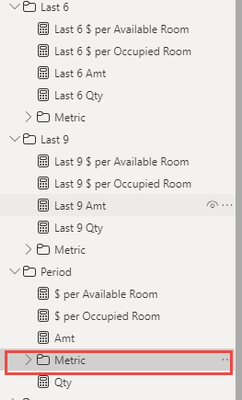
You can see here in the below screen shot, the 'Metric' subfolder for my 'Period' folder is not at the bottom similar to folder/subfolders above it.
Is there any to move the location of the subfolder? Should the location always be at the bottom?
Solved! Go to Solution.
Subfolders are sorted alphabetically with other measures and fields, simply add z_ in the name to make sure they always come last
If I answered your question please accept this reply as the solution
Subfolders are sorted alphabetically with other measures and fields, simply add z_ in the name to make sure they always come last
If I answered your question please accept this reply as the solution
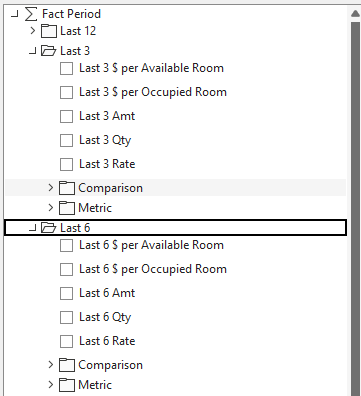
Hmm, It makes sense that it would simply be alphabetical. I'm working to duplicate a data model from by current BI provider.. And when I connect to their datacube, their pivot filters show things like below with the folders below. And I've confirmed their is no leading spaces in front of "Last".
Could it be they are using Tableau and not Power BI?
If the cube is created through a different technology, then the behaviour might be different yes
If my original post answered your question please accept it as the solution 🙂
Check out the April 2026 Power BI update to learn about new features.
If you have recently started exploring Fabric, we'd love to hear how it's going. Your feedback can help with product improvements.
A new Power BI DataViz World Championship is coming this June! Don't miss out on submitting your entry.
| User | Count |
|---|---|
| 37 | |
| 37 | |
| 31 | |
| 22 | |
| 15 |
| User | Count |
|---|---|
| 76 | |
| 59 | |
| 31 | |
| 31 | |
| 25 |