FabCon is coming to Atlanta
Join us at FabCon Atlanta from March 16 - 20, 2026, for the ultimate Fabric, Power BI, AI and SQL community-led event. Save $200 with code FABCOMM.
Register now!- Power BI forums
- Get Help with Power BI
- Desktop
- Service
- Report Server
- Power Query
- Mobile Apps
- Developer
- DAX Commands and Tips
- Custom Visuals Development Discussion
- Health and Life Sciences
- Power BI Spanish forums
- Translated Spanish Desktop
- Training and Consulting
- Instructor Led Training
- Dashboard in a Day for Women, by Women
- Galleries
- Data Stories Gallery
- Themes Gallery
- Contests Gallery
- QuickViz Gallery
- Quick Measures Gallery
- Visual Calculations Gallery
- Notebook Gallery
- Translytical Task Flow Gallery
- TMDL Gallery
- R Script Showcase
- Webinars and Video Gallery
- Ideas
- Custom Visuals Ideas (read-only)
- Issues
- Issues
- Events
- Upcoming Events
Get Fabric Certified for FREE during Fabric Data Days. Don't miss your chance! Request now
- Power BI forums
- Forums
- Get Help with Power BI
- Desktop
- Measure working in Desktop but not after publishin...
- Subscribe to RSS Feed
- Mark Topic as New
- Mark Topic as Read
- Float this Topic for Current User
- Bookmark
- Subscribe
- Printer Friendly Page

- Mark as New
- Bookmark
- Subscribe
- Mute
- Subscribe to RSS Feed
- Permalink
- Report Inappropriate Content
Measure working in Desktop but not after publishing to Service
Hi all,
Need your help in solving why the added measure is working in PowerBI Desktop just fine, but after publishing the report to PowerBI Service, the same measure does not work anymore.
Here's an example of data from the report.
| Date | Date created | Print# | PASS_FAIL |
| Wednesday, 22 July 2020 | 22/07/2020 14.34.48 | 20203003 | 0 |
| Tuesday, 21 July 2020 | 21/07/2020 14.55.10 | 20202008 | 0 |
| Wednesday, 22 July 2020 | 22/07/2020 14.55.20 | 20203010 | 0 |
| Wednesday, 22 July 2020 | 22/07/2020 14.38.22 | 20203004 | 0 |
| Wednesday, 22 July 2020 | 22/07/2020 14.56.54 | 20203011 | 0 |
| Wednesday, 22 July 2020 | 22/07/2020 14.53.44 | 20203009 | 0 |
| Wednesday, 22 July 2020 | 22/07/2020 14.50.49 | 20203008 | 0 |
| Wednesday, 22 July 2020 | 22/07/2020 14.47.33 | 20203007 | 0 |
| Wednesday, 22 July 2020 | 22/07/2020 14.44.48 | 20203006 | 0 |
| Wednesday, 22 July 2020 | 22/07/2020 14.42.03 | 20203005 | 0 |
| Wednesday, 22 July 2020 | 22/07/2020 14.10.54 | 20203002 | 0 |
| Wednesday, 22 July 2020 | 22/07/2020 11.20.46 | 20203001 | 0 |
| Tuesday, 21 July 2020 | 21/07/2020 14.53.32 | 20202007 | 1 |
| Tuesday, 21 July 2020 | 21/07/2020 14.51.22 | 20202006 | 1 |
| Tuesday, 21 July 2020 | 21/07/2020 14.49.45 | 20202005 | 1 |
| Tuesday, 21 July 2020 | 21/07/2020 14.38.50 | 20202004 | 0 |
| Tuesday, 21 July 2020 | 21/07/2020 14.20.10 | 20202003 | 1 |
| Tuesday, 21 July 2020 | 21/07/2020 13.50.47 | 20202002 | 1 |
| Tuesday, 21 July 2020 | 21/07/2020 12.50.47 | 20202001 | 1 |
| Tuesday, 21 July 2020 | 21/07/2020 9.02.20 | 20201008 | 1 |
| Tuesday, 21 July 2020 | 21/07/2020 9.00.52 | 20201007 | 1 |
| Tuesday, 21 July 2020 | 21/07/2020 8.58.32 | 20201006 | 0 |
| Tuesday, 21 July 2020 | 21/07/2020 8.53.53 | 20201005 | 1 |
passed = SUM(AOISummaryData[PASS_FAIL])
total tested = CALCULATE(DISTINCTCOUNT(AOISummaryData[PlcTrackingID]),AOISummaryData[Print#]<>BLANK())
test yield = IF(DIVIDE(AOISummaryData[passed],AOISummaryData[AOI total tested])=0,0,DIVIDE(AOISummaryData[passed],AOISummaryData[AOI total tested]))
And the measure that is not working is the "passed". As you can see the images from the Desktop and Service screenshots.

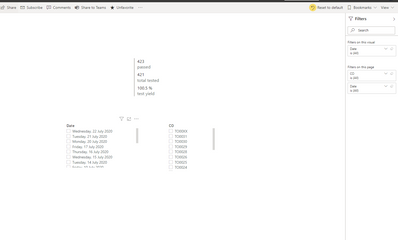
I have tried many things already, like removing the dataset from the service, creating the measures again etc. but so far I have not been able to solve this issue.
Thanks in advance!
BR,
Andy

- Mark as New
- Bookmark
- Subscribe
- Mute
- Subscribe to RSS Feed
- Permalink
- Report Inappropriate Content
@andy0012 I know it's been 5 years, but did you ever resolve this issue? I have the same issue, slightly different perhaps in that the measure works in my environment on the service, but not in the client environment (shows 0 or blank).
- Mark as New
- Bookmark
- Subscribe
- Mute
- Subscribe to RSS Feed
- Permalink
- Report Inappropriate Content
I finally resolved this issue. I'm using DirectQuery and using 3 gauges to display meets/does not meet target. The third gauge was always showing blank.
This was due to a timing issue: the solution was to modify the measure to include all the DAX inside the measure, instead of referring to other measures.


- Mark as New
- Bookmark
- Subscribe
- Mute
- Subscribe to RSS Feed
- Permalink
- Report Inappropriate Content
@andy0012 - There may be some saved filter in the Service, you can reset the report in the Service to default (clear personal filters/bookmarks)
Follow on LinkedIn
@ me in replies or I'll lose your thread!!!
Instead of a Kudo, please vote for this idea
Become an expert!: Enterprise DNA
External Tools: MSHGQM
YouTube Channel!: Microsoft Hates Greg
Latest book!: DAX For Humans
DAX is easy, CALCULATE makes DAX hard...
- Mark as New
- Bookmark
- Subscribe
- Mute
- Subscribe to RSS Feed
- Permalink
- Report Inappropriate Content
Hi Greg_Deckler,
Unfortunately this was not a solution to this issue, did remove any filters in the Service and still the calculated measures won't give correct readings in the Service.
-Andy

- Mark as New
- Bookmark
- Subscribe
- Mute
- Subscribe to RSS Feed
- Permalink
- Report Inappropriate Content
Try Remove "Dataset" in Power BI Service if possible and publish report again.
Also make sure that both reports have same filters applied on it.
Did I answer your question? Mark my post as a solution! Appreciate your Kudos!!
Proud to be a Super User!
- Mark as New
- Bookmark
- Subscribe
- Mute
- Subscribe to RSS Feed
- Permalink
- Report Inappropriate Content
Hi FarhanAhmed,
Thanks for the tip, but these activies I did try already and they did not solve the issue.
-Andy


- Mark as New
- Bookmark
- Subscribe
- Mute
- Subscribe to RSS Feed
- Permalink
- Report Inappropriate Content

Helpful resources

Power BI Monthly Update - November 2025
Check out the November 2025 Power BI update to learn about new features.

Fabric Data Days
Advance your Data & AI career with 50 days of live learning, contests, hands-on challenges, study groups & certifications and more!

FabCon Atlanta 2026
Join us at FabCon Atlanta, March 16-20, for the ultimate Fabric, Power BI, AI and SQL community-led event. Save $200 with code FABCOMM.


