Join us at FabCon Atlanta from March 16 - 20, 2026, for the ultimate Fabric, Power BI, AI and SQL community-led event. Save $200 with code FABCOMM.
Register now!The Power BI Data Visualization World Championships is back! Get ahead of the game and start preparing now! Learn more
Hi.
I'm trying to wrap my head around this one with no success. Hope someone can help me understand what is happening here
I'm using direct query to postgres. I have two tables; order and orderrow. I have a relationship from order(id) -> orderrow(order_id) (one to many). Orderrow has a column "type" with an enum value (0, 1, 2)
I'm trying to display a table visual which would list the orders and have one specific column which would tell whether the order has any rows of type 2. In orderrow table i've created a calculated column; "IsSpecialRow = IF([type] = 2, 1, 0)" and then in order table I have a measure "SpecialRowSum = SUM('orderrow'[IsSpecialRow])". Now, if I add this measure to my table visual it works fine and I get a value 0 or > 0 depending on whether the order has special products.
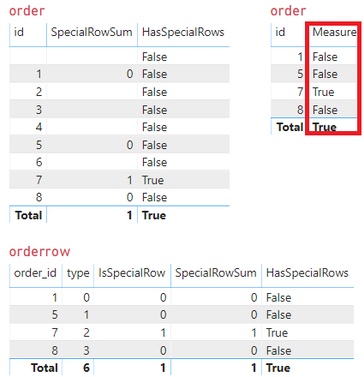
But when I try to make it look a bit nicer for the reader, I try to add this measure "HasSpecialRows = IF([SpecialRowSum]>0, "True", "False") and add that to the table visual it all blows up catastrophically. My orders are shown multiple times in the table, with some columns missing values and some having them. The count of rows shown in the table visual is multiple times what it should be. I'm using a measure for "HasSpecialRows" as the Power BI does not allow measures in calculated columns for direct query.
Could someone explain to me why does this happen? And what would be the correct way to achieve what I'm trying to do?
Solved! Go to Solution.
Hi @Anonymous ,
It is caused by the row context where the measure "HasSpecialRows" is. When put it into the "order" table, it will show based on order(id).
You could try to create a calculated column as Daviejoe suggested. Or you could try the formula below to create a new measure.
Measure =
IF (
MAX ( 'order'[id] ) = MAX ( orderrow[order_id] )
&& MAX ( 'order'[id] ) <> BLANK (),
IF ( SUM ( orderrow[IsSpecialRow] ) > 0, "True", "False" )
)
Best Regards,
Xue Ding
If this post helps, then please consider Accept it as the solution to help the other members find it more quickly.
Hi @Anonymous ,
It is caused by the row context where the measure "HasSpecialRows" is. When put it into the "order" table, it will show based on order(id).
You could try to create a calculated column as Daviejoe suggested. Or you could try the formula below to create a new measure.
Measure =
IF (
MAX ( 'order'[id] ) = MAX ( orderrow[order_id] )
&& MAX ( 'order'[id] ) <> BLANK (),
IF ( SUM ( orderrow[IsSpecialRow] ) > 0, "True", "False" )
)
Best Regards,
Xue Ding
If this post helps, then please consider Accept it as the solution to help the other members find it more quickly.
Hey @Anonymous I had a similar problem.
I created some measures, they also sat in some KPI cards also, I added +0 at the end of the dax to ensure I didn't get a KPI displaying "blank".
I then discovered my tables bloated due to the + 0. I'd get multiple entries in my tables as a result.
I'd try using a calculated column with a Switch statement to return what you want rather than use a measure.
Proud to be a Super User!
The Power BI Data Visualization World Championships is back! Get ahead of the game and start preparing now!
Check out the November 2025 Power BI update to learn about new features.
| User | Count |
|---|---|
| 59 | |
| 46 | |
| 42 | |
| 23 | |
| 18 |
| User | Count |
|---|---|
| 193 | |
| 123 | |
| 99 | |
| 67 | |
| 49 |