cancel
Showing results for 
Search instead for 
Did you mean: 

We've captured the moments from FabCon & SQLCon that everyone is talking about, and we are bringing them to the community, live and on-demand. Starts on April 14th. Register now

Reply
gazz9ar
Frequent Visitor

Measure with multiple dates

Hi again guys, im just getting crazy since i cant solve this problem at work.


I created a report so you can see how it should work

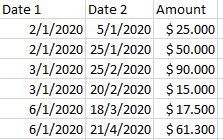
First, the fact table:

exc.jpgNOTE: Date 2 >= Date 1  ALWAYS!

Calendar table:

exc2.jpgenero=January; Also i created a column Range of Days, it evaluates every date and checks if its within a range of days starting from TODAY.


The user can choose a period, for example January 2020,  or January and February 2020.


exc3.jpg


The problem here is this:

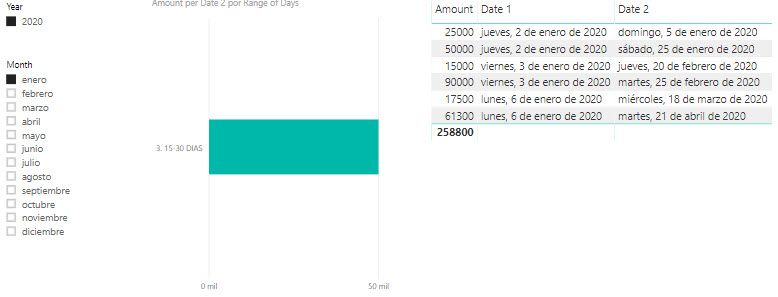
exc4.jpg

+ When i create measures that calculate the total amount for that period selected, it shows the right value but the chart is WRONG.


+When i create the same measure with USERELATIONSHIP(Dates[Date];Fact Table[Date 2]) it shows a WRONG amount value, because it shows SUM of the amount within Date 2.


If more info is needed please let me know.


Thank you!.


gazz9ar

1 ACCEPTED SOLUTION

Hi @gazz9ar ,


Why don't you just create the Range of Days column on the Fact table instead of the calendar table?

Make a relationship between Date1 and Calendar table


In order to simplify you can create it on the query instead of the DAX so it will refresh faster.


Check PBIX file attach.


Regards,

MFelix


Regards

Miguel Félix


Did I answer your question? Mark my post as a solution!

Proud to be a Super User!

Check out my blog: Power BI em Português


View solution in original post

5 REPLIES 5
MFelix
Super User
Super User

Hi @gazz9ar ,


I made a small sample file with your data, believe that this depends on the way you have your dates related.


If you have an active relationship between Date 2 a and Calendar table (or inactive using the USERELATIONSHIP) the values will be correct however the slicers need to be made base on the Calendar table.


What are the Slicer based column?


Regards,

MFelix


Regards

Miguel Félix


Did I answer your question? Mark my post as a solution!

Proud to be a Super User!

Check out my blog: Power BI em Português


Thank you MFelix, thats what i want to solve.


The values are correct with an active relationship on date 2, or using USERELATIONSHIP in my measure, but the user wants to select a period and see the amount splited in a range of days.


Is there any way the slicer doesnt affect the visual, but the visual still shows the amount grouped by Date 2?

Hi @gazz9ar ,


Sorry but I'm not understading the request, you want to select a period based on what column? The filter of the period will filter what information?


Or do you want to have one visual that is impacted by the filter and other that is not?


Regards,

MFelix


Regards

Miguel Félix


Did I answer your question? Mark my post as a solution!

Proud to be a Super User!

Check out my blog: Power BI em Português


It is simple, but i dont know if the visual can show it correctly.


First, you select a period based on Date 1 and you will get a list of records with Amounts and Date 2

Afterwards, i want to group by THOSE dates from Date 2 the sum of the amount.


Hi @gazz9ar ,


Why don't you just create the Range of Days column on the Fact table instead of the calendar table?

Make a relationship between Date1 and Calendar table


In order to simplify you can create it on the query instead of the DAX so it will refresh faster.


Check PBIX file attach.


Regards,

MFelix


Regards

Miguel Félix


Did I answer your question? Mark my post as a solution!

Proud to be a Super User!

Check out my blog: Power BI em Português


Helpful resources

Announcements
New to Fabric survey Carousel

New to Fabric Survey

If you have recently started exploring Fabric, we'd love to hear how it's going. Your feedback can help with product improvements.

Power BI DataViz World Championships carousel

Power BI DataViz World Championships - June 2026

A new Power BI DataViz World Championship is coming this June! Don't miss out on submitting your entry.

Join our Fabric User Panel

Join our Fabric User Panel

Share feedback directly with Fabric product managers, participate in targeted research studies and influence the Fabric roadmap.

March Power BI Update Carousel

Power BI Community Update - March 2026

Check out the March 2026 Power BI update to learn about new features.