Get Fabric or SQL Certified for Free.
Get certified for free when you join Fabric Data Days 2026 and dive into Fabric, Power BI, SQL, AI, and other essential data skills.
Join now- Power BI forums
- Get Help with Power BI
- Desktop
- Service
- Report Server
- Power Query
- Mobile Apps
- Developer
- DAX Commands and Tips
- Custom Visuals Development Discussion
- Health and Life Sciences
- Power BI Spanish forums
- Translated Spanish Desktop
- Training and Consulting
- Instructor Led Training
- Dashboard in a Day for Women, by Women
- Galleries
- Data Stories Gallery
- Themes Gallery
- Contests Gallery
- QuickViz Gallery
- Quick Measures Gallery
- Visual Calculations Gallery
- Notebook Gallery
- Translytical Task Flow Gallery
- TMDL Gallery
- R Script Showcase
- Webinars and Video Gallery
- Ideas
- Custom Visuals Ideas (read-only)
- Issues
- Issues
- Events
- Upcoming Events
Try your skills in the Power BI Dataviz World Championship! Round one ends June 26. Join now
- Power BI forums
- Forums
- Get Help with Power BI
- Desktop
- Re: Measure with multiple dates
- Subscribe to RSS Feed
- Mark Topic as New
- Mark Topic as Read
- Float this Topic for Current User
- Bookmark
- Subscribe
- Printer Friendly Page

- Mark as New
- Bookmark
- Subscribe
- Mute
- Subscribe to RSS Feed
- Permalink
- Report Inappropriate Content
Measure with multiple dates
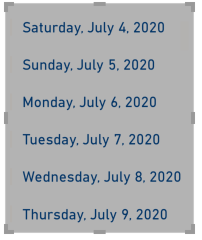
I want to generate the the following dates in a single measure (Yesterday, Today, last week, and This week) such that when i drag this field to a table or card it gives a list of all four as a list without me creating four measures. Thanks
Solved! Go to Solution.


- Mark as New
- Bookmark
- Subscribe
- Mute
- Subscribe to RSS Feed
- Permalink
- Report Inappropriate Content
Not sure if this is what you mean, but you can get a card of those values with this one measure. Note that there are carriage returns in the "return" part.
If this works for you, please mark it as the solution. Kudos are appreciated too. Please let me know if not.
Regards,
Pat
Did I answer your question? Mark my post as a solution! Kudos are also appreciated!
To learn more about Power BI, follow me on Twitter or subscribe on YouTube.
@mahoneypa HoosierBI on YouTube
- Mark as New
- Bookmark
- Subscribe
- Mute
- Subscribe to RSS Feed
- Permalink
- Report Inappropriate Content
- Mark as New
- Bookmark
- Subscribe
- Mute
- Subscribe to RSS Feed
- Permalink
- Report Inappropriate Content
Not sure if this is what you mean, but you can get a card of those values with this one measure. Note that there are carriage returns in the "return" part.
If this works for you, please mark it as the solution. Kudos are appreciated too. Please let me know if not.
Regards,
Pat
Did I answer your question? Mark my post as a solution! Kudos are also appreciated!
To learn more about Power BI, follow me on Twitter or subscribe on YouTube.
@mahoneypa HoosierBI on YouTube
- Mark as New
- Bookmark
- Subscribe
- Mute
- Subscribe to RSS Feed
- Permalink
- Report Inappropriate Content
- Mark as New
- Bookmark
- Subscribe
- Mute
- Subscribe to RSS Feed
- Permalink
- Report Inappropriate Content
Hi @Anonymous,
You can't use the measure to return multiple results, it is a calculated expression based on row contents. (if you did not has any category fields, it can only one result value)
If you want this measure to return four type of calculation results, you need to create a category with these category types(Yesterday, Today, last week, and This week) and add switch function into the measure formula with different categories.
Then you can navigate to different calculation expressions based on current category value.
Measure =
VAR currCate =
    SELECTEDVALUE ( Table[Category] )
RETURN
    SWITCH (
        currCate,
        "Yesterday", 'formula1',
        "Today", 'formula2',
        "last week", 'formula3',
        "This week", 'formula4'
    )
Regards,
Xiaoxin Sheng
- Mark as New
- Bookmark
- Subscribe
- Mute
- Subscribe to RSS Feed
- Permalink
- Report Inappropriate Content
@Anonymous
Thanks for your response. A coule of questions though,
1) When you say categories, do you mean the actual dates for each(Today, yesterday, last week and this week)?
2) So, this is not a question but more of a correction based on my question. There is no date field so I will be using Current day as my date field, possibly Today() formula.
3) Lastly,do i need to create formula1, 2,3 and 4 too?


- Mark as New
- Bookmark
- Subscribe
- Mute
- Subscribe to RSS Feed
- Permalink
- Report Inappropriate Content
@Anonymous , Not very clear.
when we return value we can return a value only. So if you need this you need to have a series
table = generateseries(0,6,1)
measure = calculate(today() -min(Table[Value]))
On the card, this will give today date. when you use series to display it will give 7 days
- Mark as New
- Bookmark
- Subscribe
- Mute
- Subscribe to RSS Feed
- Permalink
- Report Inappropriate Content
I'm sorry if i wasn't clear. I should have mentioned that these respective dates would be generated from an existing date field. In your solution you mentioned that if i display it with a series, it will give 7days. Not sure what you mean by that.
Helpful resources

Data Days 2026
Don't miss out on Data Days, June 15 through August 7. Learn Fabric, Power BI, SQL, AI and more.

Power BI DataViz World Championships - June 2026
A new Power BI DataViz World Championship is coming this June! Don't miss out on submitting your entry.

| User | Count |
|---|---|
| 23 | |
| 21 | |
| 20 | |
| 20 | |
| 11 |


| User | Count |
|---|---|
| 62 | |
| 55 | |
| 47 | |
| 44 | |
| 37 |


