cancel
Showing results for 
Search instead for 
Did you mean: 

The Power BI Data Visualization World Championships is back! Get ahead of the game and start preparing now! Learn more

Reply
I_LOVE_POWER_BI
Helper III
Helper III

Measure with different granularities

Dear Community,


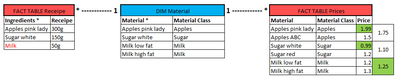
I have a problem using a fake example to try to get to my answer. I create a measure , which is a multiplication between ingredient and price (two fact tables) via a material dimension table. Problem is, the ingredient fact table uses different granularities for the receipe. Therefore, the solid relationship between the fact and the dimension table ignores the higher granularity. Here for better understanding:
 

I_LOVE_POWER_BI_0-1631524834213.png


The "milk" granularity exist in the "DIM Material" table, however the tables are connected via "Material". 


What I need is the following:


Whenever there is a direct match, then use the prices accordingly from the "FACT TABLE Prices", if not, then take the average of the "DIM Material Class", in this case Milk = 1.25 (= the green highlighted cells).


I believe a sort if IF-statement must be used...


I don't know how to realize this...help! Thx!


1 ACCEPTED SOLUTION

Using two SUMX actually solved the problem.

View solution in original post

3 REPLIES 3
amitchandak
Super User
Super User

@I_LOVE_POWER_BI , based on what I got so far


Refer these Meausres 


Avg Price = Average(FactPrice[Price])


Qty = Sum(FactReceipe[Qty]) // excat column I am not sure


total= sumx(Values(Material[Material Group]) , [Avg Price] * [Qty]))

Share with Power BI Enthusiasts: Full Power BI Video (20 Hours) YouTube
Microsoft Fabric Series 60+ Videos YouTube
Microsoft Fabric Hindi End to End YouTube

Thanks! It technically works, however you have to imagine, that the Prices table includes many prices for the different material classes. But normally I want the exact material price to be used, only if the recipe table uses a material group the average shall be used. I updated the screenshot accordingly:


Goal is to use the green marked prices:


I_LOVE_POWER_BI_0-1631524603762.png


Using two SUMX actually solved the problem.

Helpful resources

Announcements
Power BI DataViz World Championships

Power BI Dataviz World Championships

The Power BI Data Visualization World Championships is back! Get ahead of the game and start preparing now!

December 2025 Power BI Update Carousel

Power BI Monthly Update - December 2025

Check out the December 2025 Power BI Holiday Recap!

FabCon Atlanta 2026 carousel

FabCon Atlanta 2026

Join us at FabCon Atlanta, March 16-20, for the ultimate Fabric, Power BI, AI and SQL community-led event. Save $200 with code FABCOMM.