Join us at FabCon Atlanta from March 16 - 20, 2026, for the ultimate Fabric, Power BI, AI and SQL community-led event. Save $200 with code FABCOMM.
Register now!The Power BI Data Visualization World Championships is back! Get ahead of the game and start preparing now! Learn more
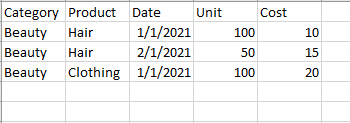
So my data is structured somewhat like this:
I have cost at the more granular Product level, but units are at the higher Category level. I would like to create a measure that divides cost by units.
In a matrix for January 2021, the measure should return 0.3 when looking at the higher Beauty Category - (20+10)/100. But when I drill-down, I'd like to see 0.1 for Hair - 10/100 and 0.2 for Clothing 20/100.
My measure is currently as follows:
CPU Measure = DIVIDE(SUMX('CPU',[Cost]),SUMX('CPU',[Unit]),0)
So the denominator should be as follows:
When Looking at all of 2021 by Category - 150 (100+50)
When looing at Jan 2021 by Category - 100
When looking at Feb 2021 by Category - 50
When looking at Jan 2021 by Product - 100
When looking at Feb 2021 by Product - 50
Solved! Go to Solution.
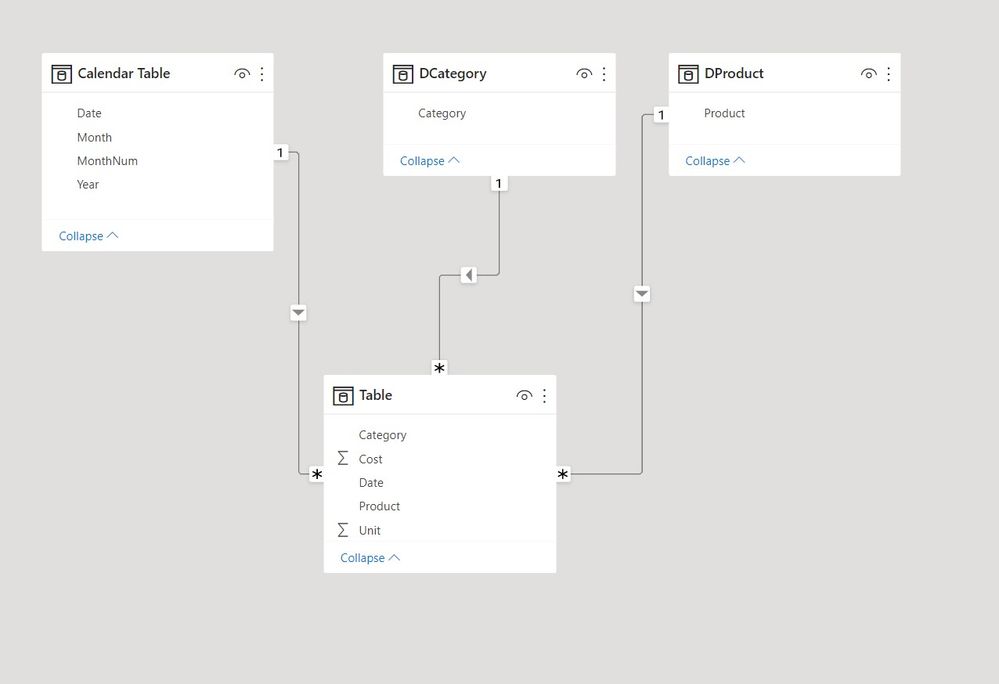
See if this works. I've set up the model with dimension tables as follows:
and with these measures:
Sum Cost =
SUM('Table'[Cost])Sum Units =
SUM('Table'[Unit])Cost by Unit =
VAR _Ave =
AVERAGE ( 'Table'[Unit] )
RETURN
SWITCH (
TRUE (),
ISINSCOPE ( DProduct[Product] ), DIVIDE ( [Sum Cost], [Sum Units] ),
ISINSCOPE ( DCategory[Category] ), DIVIDE ( [Sum Cost], _Ave )
)
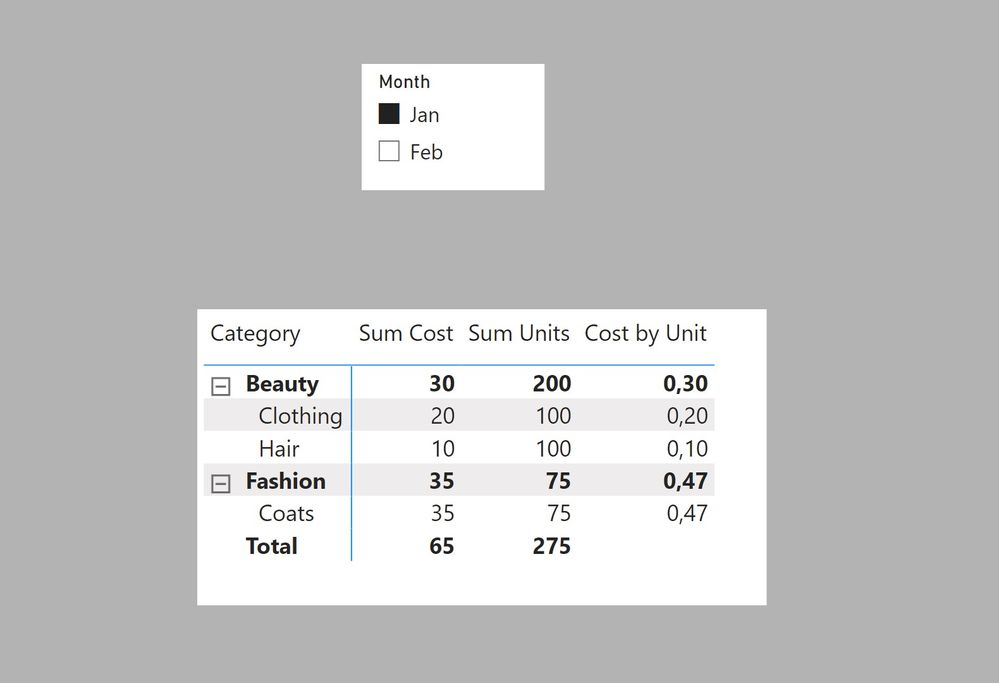
To get
This assumes you are using the average of units per category. If you need a different criteria, you will need to change the calculation in th VAR _Ave
I've attached the sample PBIX file
Proud to be a Super User!
Paul on Linkedin.
See if this works. I've set up the model with dimension tables as follows:
and with these measures:
Sum Cost =
SUM('Table'[Cost])Sum Units =
SUM('Table'[Unit])Cost by Unit =
VAR _Ave =
AVERAGE ( 'Table'[Unit] )
RETURN
SWITCH (
TRUE (),
ISINSCOPE ( DProduct[Product] ), DIVIDE ( [Sum Cost], [Sum Units] ),
ISINSCOPE ( DCategory[Category] ), DIVIDE ( [Sum Cost], _Ave )
)
To get
This assumes you are using the average of units per category. If you need a different criteria, you will need to change the calculation in th VAR _Ave
I've attached the sample PBIX file
Proud to be a Super User!
Paul on Linkedin.
@PowerUser123 , try like
CPU Measure = DIVIDE(SUM('CPU'[Cost]),calculate(SUM('CPU'[Cost]), allexcept('CPU', 'CPU'[Category])))
or
CPU Measure = DIVIDE(SUM('CPU'[Cost]),calculate(SUM('CPU'[Cost]), filter(allselected('CPU'), 'CPU'[Category] = max('CPU'[Category]) )))
Check out the November 2025 Power BI update to learn about new features.
Advance your Data & AI career with 50 days of live learning, contests, hands-on challenges, study groups & certifications and more!
| User | Count |
|---|---|
| 58 | |
| 45 | |
| 40 | |
| 21 | |
| 18 |