FabCon is coming to Atlanta
Join us at FabCon Atlanta from March 16 - 20, 2026, for the ultimate Fabric, Power BI, AI and SQL community-led event. Save $200 with code FABCOMM.
Register now!- Power BI forums
- Get Help with Power BI
- Desktop
- Service
- Report Server
- Power Query
- Mobile Apps
- Developer
- DAX Commands and Tips
- Custom Visuals Development Discussion
- Health and Life Sciences
- Power BI Spanish forums
- Translated Spanish Desktop
- Training and Consulting
- Instructor Led Training
- Dashboard in a Day for Women, by Women
- Galleries
- Data Stories Gallery
- Themes Gallery
- Contests Gallery
- QuickViz Gallery
- Quick Measures Gallery
- Visual Calculations Gallery
- Notebook Gallery
- Translytical Task Flow Gallery
- TMDL Gallery
- R Script Showcase
- Webinars and Video Gallery
- Ideas
- Custom Visuals Ideas (read-only)
- Issues
- Issues
- Events
- Upcoming Events
The Power BI Data Visualization World Championships is back! Get ahead of the game and start preparing now! Learn more
- Power BI forums
- Forums
- Get Help with Power BI
- Desktop
- Measure to show days in the month automatically
- Subscribe to RSS Feed
- Mark Topic as New
- Mark Topic as Read
- Float this Topic for Current User
- Bookmark
- Subscribe
- Printer Friendly Page

- Mark as New
- Bookmark
- Subscribe
- Mute
- Subscribe to RSS Feed
- Permalink
- Report Inappropriate Content
Measure to show days in the month automatically
How can I make a column or measure that will automatically go to the calendar of 2016 and input the number of days in the month. So basically for every row in January I want it to have 31 days for 2016; February I want 29 days for 2016, etc.?
Solved! Go to Solution.


- Mark as New
- Bookmark
- Subscribe
- Mute
- Subscribe to RSS Feed
- Permalink
- Report Inappropriate Content
I assume you have a table as below and another calendar table.
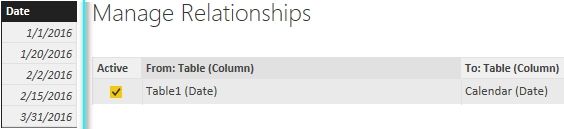
You can create a column in Calendar table and a column in Table1 with following formula to get the result.
YearMonth = YEAR( 'Calendar'[Date] ) * 100 + MONTH( 'Calendar'[Date] )
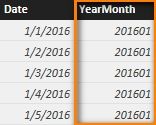
MonthDays =
VAR LastDayThisMonth =
    CALCULATE (
        MAX ( 'Calendar'[Date] ),
        ALLEXCEPT ( 'Calendar', 'Calendar'[YearMonth] )
    )
RETURN
( DAY ( LastDayThisMonth ) )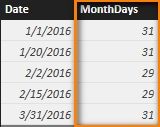
Best Regards,
Herbert
- Mark as New
- Bookmark
- Subscribe
- Mute
- Subscribe to RSS Feed
- Permalink
- Report Inappropriate Content
I assume you have a table as below and another calendar table.
You can create a column in Calendar table and a column in Table1 with following formula to get the result.
YearMonth = YEAR( 'Calendar'[Date] ) * 100 + MONTH( 'Calendar'[Date] )
MonthDays =
VAR LastDayThisMonth =
    CALCULATE (
        MAX ( 'Calendar'[Date] ),
        ALLEXCEPT ( 'Calendar', 'Calendar'[YearMonth] )
    )
RETURN
( DAY ( LastDayThisMonth ) )
Best Regards,
Herbert
- Mark as New
- Bookmark
- Subscribe
- Mute
- Subscribe to RSS Feed
- Permalink
- Report Inappropriate Content
Hi. I tried doing the same thing but all I'm getting is each month has 31 days. How do I fix it?


- Mark as New
- Bookmark
- Subscribe
- Mute
- Subscribe to RSS Feed
- Permalink
- Report Inappropriate Content
So you already have a table with one row for each day, and you want a column to show how many days are in each row's month? The row for 1 Jan 2016 would have a Days In Month column that shows 31, and the row for 2 Jan 2016 would show the same, etc.
If that's the case, there are a few places you could do this. Done as a new column in the data modeling pane, it would be helpful if you have a Start Of Month column or some way to uniquely identify the months. With that in place, the new column would be
Days In Month = CALCULATE(COUNT('DateTable'[DateColumn]), FILTER('DateTable', 'DateTable[StartOfMonth]=EARLIER('DateTable'[StartOfMonth])))
- Mark as New
- Bookmark
- Subscribe
- Mute
- Subscribe to RSS Feed
- Permalink
- Report Inappropriate Content
The simplest way is to use the measure or column in the calendar table as
DaysInTheMonth = Day(LASTDATE('Calendar'[DateKey]))
So each row it will add the the number of days in that year and month.
Try it out.
If this works please accept this as a Solution and also give KUDOS.
Cheers
CheenuSing


- Mark as New
- Bookmark
- Subscribe
- Mute
- Subscribe to RSS Feed
- Permalink
- Report Inappropriate Content
@AndreasA - I use this calculated column:
Total days = DAY(DATE(DateKey[Year],DateKey[Month number]+1,1)-1)
Giles
- Mark as New
- Bookmark
- Subscribe
- Mute
- Subscribe to RSS Feed
- Permalink
- Report Inappropriate Content
This worked perfectly for me! Simple. Thanks.

Helpful resources

Power BI Monthly Update - November 2025
Check out the November 2025 Power BI update to learn about new features.

Fabric Data Days
Advance your Data & AI career with 50 days of live learning, contests, hands-on challenges, study groups & certifications and more!

FabCon Atlanta 2026
Join us at FabCon Atlanta, March 16-20, for the ultimate Fabric, Power BI, AI and SQL community-led event. Save $200 with code FABCOMM.


