Join us at FabCon Atlanta from March 16 - 20, 2026, for the ultimate Fabric, Power BI, AI and SQL community-led event. Save $200 with code FABCOMM.
Register now!The Power BI Data Visualization World Championships is back! Get ahead of the game and start preparing now! Learn more
How can I make a column or measure that will automatically go to the calendar of 2016 and input the number of days in the month. So basically for every row in January I want it to have 31 days for 2016; February I want 29 days for 2016, etc.?
Solved! Go to Solution.
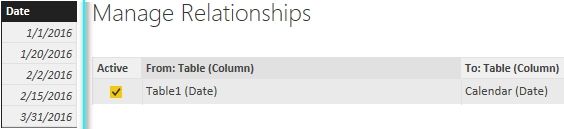
I assume you have a table as below and another calendar table.
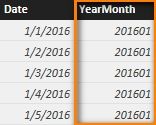
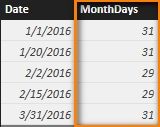
You can create a column in Calendar table and a column in Table1 with following formula to get the result.
YearMonth = YEAR( 'Calendar'[Date] ) * 100 + MONTH( 'Calendar'[Date] )
MonthDays =
VAR LastDayThisMonth =
CALCULATE (
MAX ( 'Calendar'[Date] ),
ALLEXCEPT ( 'Calendar', 'Calendar'[YearMonth] )
)
RETURN
( DAY ( LastDayThisMonth ) )
Best Regards,
Herbert
I assume you have a table as below and another calendar table.
You can create a column in Calendar table and a column in Table1 with following formula to get the result.
YearMonth = YEAR( 'Calendar'[Date] ) * 100 + MONTH( 'Calendar'[Date] )
MonthDays =
VAR LastDayThisMonth =
CALCULATE (
MAX ( 'Calendar'[Date] ),
ALLEXCEPT ( 'Calendar', 'Calendar'[YearMonth] )
)
RETURN
( DAY ( LastDayThisMonth ) )
Best Regards,
Herbert
Hi. I tried doing the same thing but all I'm getting is each month has 31 days. How do I fix it?
So you already have a table with one row for each day, and you want a column to show how many days are in each row's month? The row for 1 Jan 2016 would have a Days In Month column that shows 31, and the row for 2 Jan 2016 would show the same, etc.
If that's the case, there are a few places you could do this. Done as a new column in the data modeling pane, it would be helpful if you have a Start Of Month column or some way to uniquely identify the months. With that in place, the new column would be
Days In Month = CALCULATE(COUNT('DateTable'[DateColumn]), FILTER('DateTable', 'DateTable[StartOfMonth]=EARLIER('DateTable'[StartOfMonth])))
The simplest way is to use the measure or column in the calendar table as
DaysInTheMonth = Day(LASTDATE('Calendar'[DateKey]))
So each row it will add the the number of days in that year and month.
Try it out.
If this works please accept this as a Solution and also give KUDOS.
Cheers
CheenuSing
@AndreasA - I use this calculated column:
Total days = DAY(DATE(DateKey[Year],DateKey[Month number]+1,1)-1)
Giles
This worked perfectly for me! Simple. Thanks.
The Power BI Data Visualization World Championships is back! Get ahead of the game and start preparing now!
Check out the November 2025 Power BI update to learn about new features.
| User | Count |
|---|---|
| 59 | |
| 43 | |
| 42 | |
| 23 | |
| 17 |
| User | Count |
|---|---|
| 190 | |
| 122 | |
| 96 | |
| 66 | |
| 46 |