cancel
Showing results for 
Search instead for 
Did you mean: 

Data Days is here! Join us now for 60+ days of learning, challenges, and connection. Learn more

Reply
Datafruit
Helper I
Helper I

Measure to rank customers per category and date

Hello PBI community,

I would need help to get this measure working. What I'm in need is that I need to assign a rank for a customer per category and datetime value.
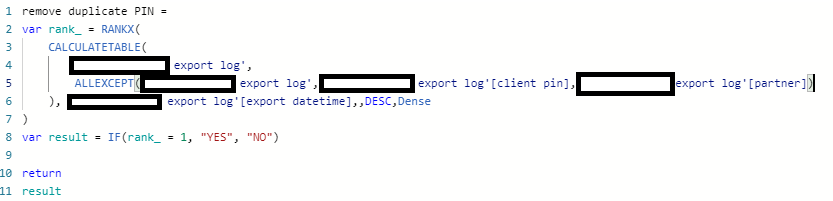
I had a calculated column RANKX working fine, see below:
calc column.png


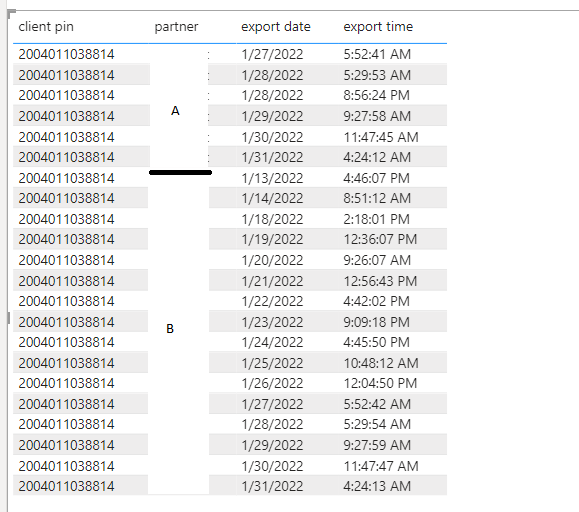
But as users do not want a static ranking, rather a dynamic one, I'm in a pickle with this. The data format can be seen below:
PS! In the pic below I have export date and time separately, but I have a column for the export datetime (see snip above).
table.png
As one customer can be exported multiple times and is exported to partner A and partner B. Depending on the filters (Partner, ClientPIN, date, etc.) I would like to have the ranking. 
So for Jan2022 for this client and partner A rank 1 would be 31 Jan 2022 4:24:12 AM and partner B 31 Jan 2022 4:24:13 AM.

I really hope someone can help me out. Desperate here already!

1 ACCEPTED SOLUTION

Hi @amitchandak 
I tried your measure, but it expanded the selection to the whole table, ignoring the filters. 

I did though, get some help with the measure and ended up using 4 variables and a dummy tables:


Synt measure =
var _0 = NOT(SELECTEDVALUE('Remove duplicates'[Remove duplicates]) = "Yes")
var _1=
CALCULATE(
MAX('export log'[export datetime]),
ALL('export log'[export date] , 'export log'[export time])
)
var _2 = NOT(ISBLANK(_1))
var _3 = IF( MAX ( 'export log'[export datetime] ) = _1 ,"YES", "NO")

return
SWITCH( TRUE(),_0 && _2,"YES",_2,_3)

I created a dummy table to be able to use the values as filters (being able to remove the duplicates based on filter and row context). 
var _2 was used to check that I do not get blank values for var _1. 

Quite tricky and still trying to fully grasp the whole build process behind, but if anyone ever needs something like this, there it is.

View solution in original post

2 REPLIES 2
amitchandak
Super User
Super User

@Datafruit , Try a measure like


Measure =
var _1 = minx(filter(allselected('Export Log'), 'Export Log'[Partner] = max('Export Log'[Partner]) && 'Export Log'[Client_pin] = max('Export Log'[Client_pin]) ), 'Export Log'[Export Date Time])
return
if(max('Export Log'[Export Date Time]) =_1, "Yes", "No")


Share with Power BI Enthusiasts: Full Power BI Video (20 Hours) YouTube
Microsoft Fabric Series 60+ Videos YouTube
Microsoft Fabric Hindi End to End YouTube

Hi @amitchandak 
I tried your measure, but it expanded the selection to the whole table, ignoring the filters. 

I did though, get some help with the measure and ended up using 4 variables and a dummy tables:


Synt measure =
var _0 = NOT(SELECTEDVALUE('Remove duplicates'[Remove duplicates]) = "Yes")
var _1=
CALCULATE(
MAX('export log'[export datetime]),
ALL('export log'[export date] , 'export log'[export time])
)
var _2 = NOT(ISBLANK(_1))
var _3 = IF( MAX ( 'export log'[export datetime] ) = _1 ,"YES", "NO")

return
SWITCH( TRUE(),_0 && _2,"YES",_2,_3)

I created a dummy table to be able to use the values as filters (being able to remove the duplicates based on filter and row context). 
var _2 was used to check that I do not get blank values for var _1. 

Quite tricky and still trying to fully grasp the whole build process behind, but if anyone ever needs something like this, there it is.
Helpful resources

Announcements
Fabric Data Days is here Carousel

Fabric Data Days 2026

Don't miss out on Data Days, June 15 through August 7. Learn Fabric, Power BI, SQL, AI and more.

May Power BI Update Carousel

Power BI Monthly Update - May 2026

Check out the May 2026 Power BI update to learn about new features.

Power BI DataViz World Championships carousel

Power BI DataViz World Championships - June 2026

A new Power BI DataViz World Championship is coming this June! Don't miss out on submitting your entry.