Join us at FabCon Atlanta from March 16 - 20, 2026, for the ultimate Fabric, Power BI, AI and SQL community-led event. Save $200 with code FABCOMM.
Register now!The Power BI Data Visualization World Championships is back! Get ahead of the game and start preparing now! Learn more
Hello,
I want to perform a cumulative distinct count over time using a grouping variable.
My data is
| Id | Status | Date | Flag | PYearMonth |
| 1 | Apples | 1/10/2018 | 0 | 1 |
| 1 | Bananas | 1/20/2018 | 1 | 1 |
| 1 | Grapes | 3/18/2018 | 2 | 3 |
| 2 | Bananas | 2/18/2018 | 1 | 2 |
| 2 | Apples | 4/10/2018 | 2 | 4 |
| 2 | Grapes | 5/10/2018 | 3 | 5 |
| 3 | Grapes | 1/10/2018 | 1 | 1 |
| 3 | Bananas | 3/12/2018 | 2 | 3 |
I want to display the Year+month in the x-axis, the status in the legend and the status of the Id in the end of the month as Y axis.
The chart I want to obtain is:
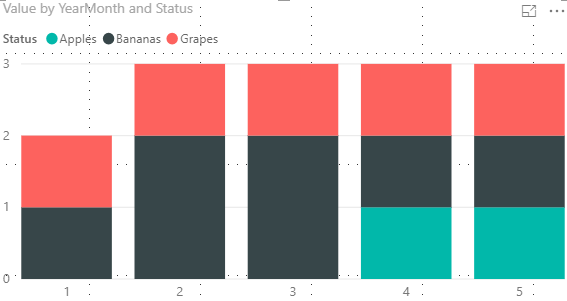
I have tried a few measures but so far I haven't been able to obtain my desired result.
I beleive my closest metric is the one below using an external calendar, however it does fail in the months without measurement:
Measure 3 =
VAR myDate = CALCULATE(MAX('Calendar'[YearMonth]),ALLEXCEPT('Calendar','Calendar'[YearMonth]))
var myTab = SELECTCOLUMNS (
(FILTER(SUMMARIZE('Table1','Calendar'[YearMonth],Table1[Id],Table1[Flag],Table1[Status],"col",CALCULATE(max(Table1[Flag]),ALLEXCEPT('Table1',Table1[Id]),'Table1'[PYearMonth]<=myDate)), [col]=Table1[Flag])),
"aux",Table1[Id]
)
RETURN(
COUNTROWS(myTab)
)Any help is appreciated.
Hi @Anonymous ,
It seems that you want to create the Stacked column chart in Power BI.
I have a little confused about your value field in the Stacked column chart.
If it is convenient, could you explain the logic of your Y -axis in more details so that we could help further on it?
Best Regards,
Cherry
Hello @v-piga-msft ,
As an initial point, the Status variable marks the state changes for each Id over time.
In my Y-axis I want to reflect the number od Ids in a state when the month ends.
For instance,
At month 1 (1/31/2019):
Id 1 has Status Bananas (last obs. 1/20/2018)
Id 2 has no records available
Id 3 has Status Grapes (last obs. 1/10/2018)
At month 2 (2/28/2019):
Id 1 has Status Bananas (last obs. 1/20/2018)
Id 2 has Status Bananas (last obs. 2/18/2018)
Id 3 has Status Grapes (last obs. 1/10/2018)
At month 3 (3/31/2019):
Id 1 has Status Grapes (last obs. 3/18/2018)
Id 2 has Status Bananas (last obs. 2/18/2018)
Id 3 has Status Bananas (last obs. 3/12/2018)
and so on ...
Let me know if you need any further clarification.
Thanks,
Jon
The Power BI Data Visualization World Championships is back! Get ahead of the game and start preparing now!
| User | Count |
|---|---|
| 41 | |
| 39 | |
| 37 | |
| 29 | |
| 24 |
| User | Count |
|---|---|
| 119 | |
| 100 | |
| 72 | |
| 69 | |
| 65 |