Join us at FabCon Atlanta from March 16 - 20, 2026, for the ultimate Fabric, Power BI, AI and SQL community-led event. Save $200 with code FABCOMM.
Register now!The Power BI Data Visualization World Championships is back! Get ahead of the game and start preparing now! Learn more
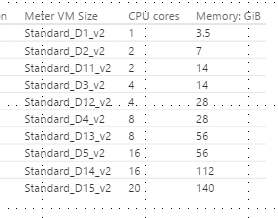
Hoping someone can help, I'm working on a report which has two tables which cannot be joined by relationship. The first is a list of server sizes with CPU cores and memory. The second table is also list of servers with a number of cores and memory (which will have a slicer with just the server names to filter single value).
What I'd like to be able to do is have a filter to strip out the server sizes from the first table which are not relevant. So for example,
if the cores from table 2 is 8 then ,
bring back =>8, then filter those with have memory of =>2
Can anyone advise of a way to do this? I'm struggle to get the meaure to make it work with it not being in a relationship.
Thanks in advanced,
Kind Regards,
Raf
Solved! Go to Solution.
Hi @RafDelgado,
In your second table, create a measure using the following formula.
s = IF(HASONEVALUE(t2[CoreCount]),VALUES(t2[CoreCount]),BLANK())
In your first table, create a measure using the following formula.
checkresult = IF(MAX(t1[CPU cores])>=[s]&&MAX(t1[Memory:GB])>=2,1,0)
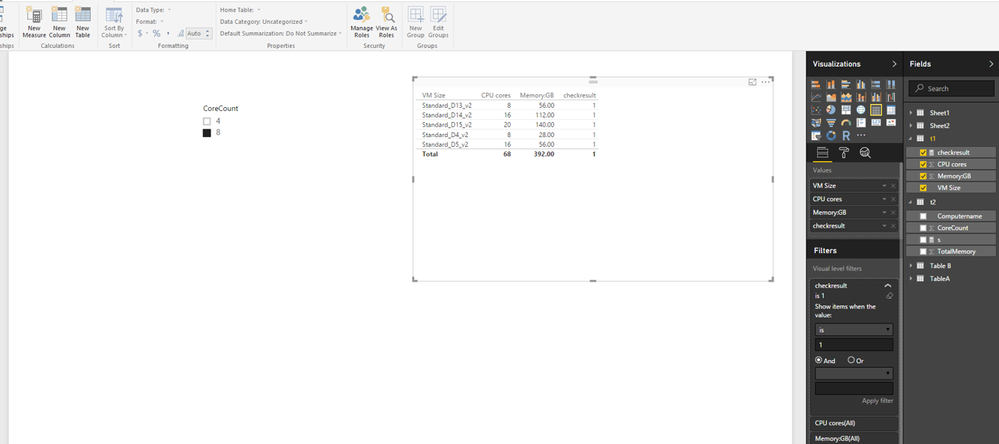
Create a table visual shown in the following screenshot. And create a slicer using CoreCount field of second table.
Set the value of the slicer to 8, then set value of checkresult measure to 1 in visual level filter, you will get expected result.
Thanks,
Lydia Zhang
Hi @RafDelgado,
In your second table, create a measure using the following formula.
s = IF(HASONEVALUE(t2[CoreCount]),VALUES(t2[CoreCount]),BLANK())
In your first table, create a measure using the following formula.
checkresult = IF(MAX(t1[CPU cores])>=[s]&&MAX(t1[Memory:GB])>=2,1,0)
Create a table visual shown in the following screenshot. And create a slicer using CoreCount field of second table.
Set the value of the slicer to 8, then set value of checkresult measure to 1 in visual level filter, you will get expected result.
Thanks,
Lydia Zhang
Hi @Anonymous,
Thank you for replying, this is perfect to get me started, I ended up making the changes in the query editor via a column merge but this is so much better.
Thanks again
,
Raf
The Power BI Data Visualization World Championships is back! Get ahead of the game and start preparing now!
| User | Count |
|---|---|
| 39 | |
| 38 | |
| 38 | |
| 28 | |
| 27 |
| User | Count |
|---|---|
| 124 | |
| 88 | |
| 73 | |
| 66 | |
| 65 |