Join us at FabCon Atlanta from March 16 - 20, 2026, for the ultimate Fabric, Power BI, AI and SQL community-led event. Save $200 with code FABCOMM.
Register now!The Power BI Data Visualization World Championships is back! Get ahead of the game and start preparing now! Learn more
I have a simple model with 3 tables, Sales, Product, Calendar.
Sales has Cols: ProductID, Amount, TransDate & Measure = [Total Sales]
Product has Cols: ProductID, Name
Calendar has Cols: Date, Year/Mo, Year/Qtr, MonthName (etc...)
I want to build a measure that returns the column names selected in a table visual as chosen by the user.
For example, if a user of this dataset builds a 3 column table by dragging out:
Calendar[Year/Mo] | Product[Name] | [Total Sales]
I'd like a measure called [You've Chosen:]. That measure, if dragged out as the 4th column in the table, would return the following text for each row in the resulting table.
"Calendar[Year/Mo], Product[Name]"
In other words, I'd like a dynamic measure of all the Table.ColName used to filter the table in which the measure is deployed. I understand I could write a long measure with all the column names w/ IF (ISFILTERED(col), then (col), but I'd like to do it dynamically.
Thanks in advance.
Solved! Go to Solution.
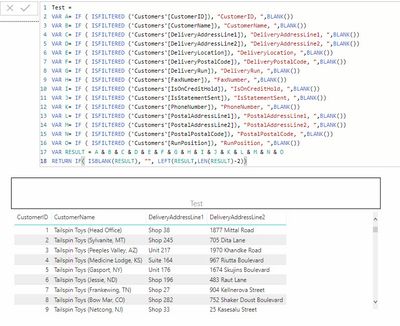
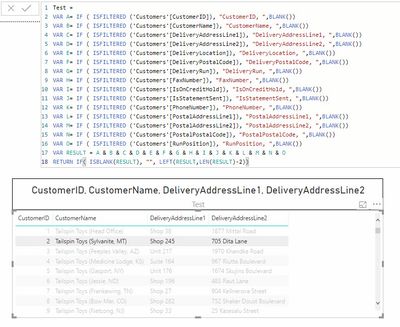
I don't think there is a way @Evogelpohl , even using ISFILTERED. Unless the user selects a row in the table or there are slicers on the columns then the fields are not filtered.
No row selected
With row selected
I don't think there is a way @Evogelpohl , even using ISFILTERED. Unless the user selects a row in the table or there are slicers on the columns then the fields are not filtered.
No row selected
With row selected
Right, I meant to say if a specific value was chosen, then it would switch the ISFILTERED, HASONEVALUE functs to evaluate to true. Thanks, @jdbuchanan71 .
The Power BI Data Visualization World Championships is back! Get ahead of the game and start preparing now!
| User | Count |
|---|---|
| 38 | |
| 38 | |
| 37 | |
| 28 | |
| 28 |
| User | Count |
|---|---|
| 124 | |
| 89 | |
| 73 | |
| 66 | |
| 65 |