Get certified for free when you join Fabric Data Days 2026 and dive into Fabric, Power BI, SQL, AI, and other essential data skills.
Join nowTry your skills in the Power BI Dataviz World Championship! Round one ends June 26. Join now
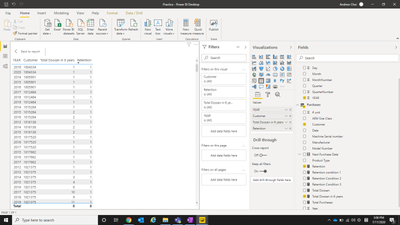
I want to creat a new Measure for a table which should show the total retention in the total row of the table. Can someone help me?
In this layout the new measure should be add next to retention and show the total retention that the customer has.
https://drive.google.com/file/d/1k10VsQ2r3H_-L-3T2k0An9NajyoS0V0z/view?usp=sharing
Hi @Anonymous ,
You could try the following measure:
Retention =
VAR a =
IF (
[Retention condition 1] >= 1
|| [Retention Condition 2] >= 1
|| [Retention Condition 3] >= 1,
1,
0
)
VAR b =
COUNTX ( VALUES ( dCalendar[YEAR] ), a )
RETURN
IF ( ISINSCOPE ( dCalendar[YEAR] ), a, b )
Please try this expression, substituting your actual table and column names
NewMeasure = SUMX(VALUES('Date'[Year]), [Retention])
This should give you the correct result in both your rows and total.
If this works for you, please mark it as the solution. Kudos are appreciated too. Please let me know if not.
Regards,
Pat
To learn more about Power BI, follow me on Twitter or subscribe on YouTube.
I use this function
Don't miss out on Data Days, June 15 through August 7. Learn Fabric, Power BI, SQL, AI and more.
Check out the May 2026 Power BI update to learn about new features.
| User | Count |
|---|---|
| 22 | |
| 22 | |
| 21 | |
| 20 | |
| 12 |
| User | Count |
|---|---|
| 58 | |
| 55 | |
| 41 | |
| 36 | |
| 35 |