cancel
Showing results for 
Search instead for 
Did you mean: 

The Power BI Data Visualization World Championships is back! Get ahead of the game and start preparing now! Learn more

Reply
PhiBu
Helper I
Helper I

Measure should take into account 2 of 3 report filters

Hello all,

I have the following problem. I am trying to create a measure that takes into account 2 of my report filters (date and category) and not a third one (product). The goal is to calculate an average value.


I have already tried different solutions by combinations with FILTER, ALL, ALLEXCEPT, KEEPFILTER, SELECTEDVALUE, but unfortunately I haven't found a solution yet. Do you have any ideas?


Best regards, Philip!


1 ACCEPTED SOLUTION
Anonymous
Not applicable

HI @PhiBu,

I think you can try to write a measure expression to use 'OR' logic to link two filters and apply it to raw table records(you can use the 'all' function to ignore original filter effects at first). 

Measure =
VAR _filter1 =
    VALUES ( Table1[Column1] )
VAR _fitler2 =
    VALUES ( Table2[Column2] )
RETURN
    CALCULATE (
        SUM ( Fact[Amount] ),
        FILTER ( ALL ( Fact ), [column1] IN _filter1 || [column2] IN _filter2 )
    )

Then you can use this on visuals to enable the filter effects.

Notice: for custom filter effects, you need to use unconnected table fields as the filter source.

Regards,

Xiaoxin Sheng

View solution in original post

5 REPLIES 5
Anonymous
Not applicable

HI @PhiBu,

I think you can try to write a measure expression to use 'OR' logic to link two filters and apply it to raw table records(you can use the 'all' function to ignore original filter effects at first). 

Measure =
VAR _filter1 =
    VALUES ( Table1[Column1] )
VAR _fitler2 =
    VALUES ( Table2[Column2] )
RETURN
    CALCULATE (
        SUM ( Fact[Amount] ),
        FILTER ( ALL ( Fact ), [column1] IN _filter1 || [column2] IN _filter2 )
    )

Then you can use this on visuals to enable the filter effects.

Notice: for custom filter effects, you need to use unconnected table fields as the filter source.

Regards,

Xiaoxin Sheng

Jihwan_Kim
Super User
Super User

Hi, 

Try using REMOVEFILTERS function.


Hi, My name is Jihwan Kim.

If this post helps, then please consider accept it as the solution to help other members find it faster, and give a big thumbs up.

Linkedin: https://www.linkedin.com/in/jihwankim1975/


If this post helps, then please consider accepting it as the solution to help other members find it faster, and give a big thumbs up.


Click here to visit my LinkedIn page

Click here to schedule a short Teams meeting to discuss your question.

@Jihwan_Kim thank you for your idea. 

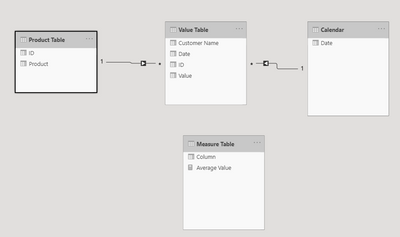
Unfortunately, I haven't found a solution yet or don't know how to use the RemoveFilters function correctly. I have therefore created an example file. But I am not able to attache the file. Therefor I have the following screenshots.

PhiBu_2-1618475323144.png


PhiBu_1-1618475162868.png


Could you take a look at it and give me a tip on how to create the measure? That would be great.

Best regards, 
Philip

sayaliredij
Solution Sage
Solution Sage

Could you try the following measure and check if works?


NewMeasure = CALCULATE ( measure, ALL(Product))


Regards,

Sayali


If this post helps, then please consider Accept it as the solution to help others find it more quickly.


Did I answer your question? Mark my post as a solution!

Proud to be a Super User!


@sayaliredij Thanks for your reply. But I think the ALL function is not the function I need. Maybe in addition to another function.  I described the measure I want to create in more detail above. If you still want to support me :). 

Best regards, Philip

Helpful resources

Announcements
Power BI DataViz World Championships

Power BI Dataviz World Championships

The Power BI Data Visualization World Championships is back! Get ahead of the game and start preparing now!

December 2025 Power BI Update Carousel

Power BI Monthly Update - December 2025

Check out the December 2025 Power BI Holiday Recap!

FabCon Atlanta 2026 carousel

FabCon Atlanta 2026

Join us at FabCon Atlanta, March 16-20, for the ultimate Fabric, Power BI, AI and SQL community-led event. Save $200 with code FABCOMM.