Get Fabric or SQL Certified for Free.
Get certified for free when you join Fabric Data Days 2026 and dive into Fabric, Power BI, SQL, AI, and other essential data skills.
Join now- Power BI forums
- Get Help with Power BI
- Desktop
- Service
- Report Server
- Power Query
- Mobile Apps
- Developer
- DAX Commands and Tips
- Custom Visuals Development Discussion
- Health and Life Sciences
- Power BI Spanish forums
- Translated Spanish Desktop
- Training and Consulting
- Instructor Led Training
- Dashboard in a Day for Women, by Women
- Galleries
- Data Stories Gallery
- Themes Gallery
- Contests Gallery
- QuickViz Gallery
- Quick Measures Gallery
- Visual Calculations Gallery
- Notebook Gallery
- Translytical Task Flow Gallery
- TMDL Gallery
- R Script Showcase
- Webinars and Video Gallery
- Ideas
- Custom Visuals Ideas (read-only)
- Issues
- Issues
- Events
- Upcoming Events
Try your skills in the Power BI Dataviz World Championship! Round one ends June 26. Join now
- Power BI forums
- Forums
- Get Help with Power BI
- Desktop
- Re: Measure returning incorrect value
- Subscribe to RSS Feed
- Mark Topic as New
- Mark Topic as Read
- Float this Topic for Current User
- Bookmark
- Subscribe
- Printer Friendly Page

- Mark as New
- Bookmark
- Subscribe
- Mute
- Subscribe to RSS Feed
- Permalink
- Report Inappropriate Content
Measure returning incorrect value
Hi all,
I have a strange issue, could someone please help me with that.
I have a grid as in the picture below

I need to distinct count of employees with "Overreported in column "Test3" (negative value in column 'project gap")
I have a measure "Overreported Ppl" = CALCULATE(Distinctcount ('Table_Name'[Employee]), FILTER( 'Table_Name', 'Table_Name[Project Gap]<0))
However it returns me employees with positive numbers in 'project gap' column and who are marked as 'Underreported' in test3 column.
I cannot figure this out how come I get something like that? 
Thank you
Solved! Go to Solution.


- Mark as New
- Bookmark
- Subscribe
- Mute
- Subscribe to RSS Feed
- Permalink
- Report Inappropriate Content
You may try the following measure.
Measure =
COUNTROWS (
    FILTER (
        VALUES ( 'Table_Name'[Employee] ),
        CALCULATE ( SUM ( 'Table_Name'[Project Gap] ) < 0 )
    )
)
If this post helps, then please consider Accept it as the solution to help the other members find it more quickly.
- Mark as New
- Bookmark
- Subscribe
- Mute
- Subscribe to RSS Feed
- Permalink
- Report Inappropriate Content
- Mark as New
- Bookmark
- Subscribe
- Mute
- Subscribe to RSS Feed
- Permalink
- Report Inappropriate Content
You may try the following measure.
Measure =
COUNTROWS (
    FILTER (
        VALUES ( 'Table_Name'[Employee] ),
        CALCULATE ( SUM ( 'Table_Name'[Project Gap] ) < 0 )
    )
)
If this post helps, then please consider Accept it as the solution to help the other members find it more quickly.


- Mark as New
- Bookmark
- Subscribe
- Mute
- Subscribe to RSS Feed
- Permalink
- Report Inappropriate Content
Hi ,
you this DAX , this will count emplyee where pr_gap has -ve value.
Overreported People = CALCULATE(DISTINCTCOUNT(valueTest[Employee]),
	                        FILTER(valueTest,
        	                       SIGN(valueTest[Pr_gap])=-1
                	               )
                               )
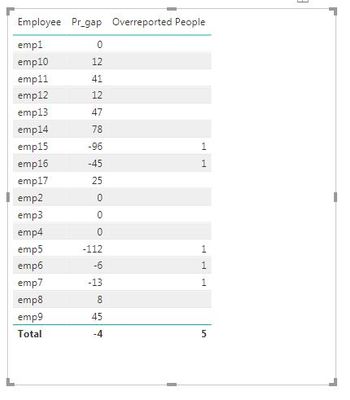
Thanks,
SS
- Mark as New
- Bookmark
- Subscribe
- Mute
- Subscribe to RSS Feed
- Permalink
- Report Inappropriate Content
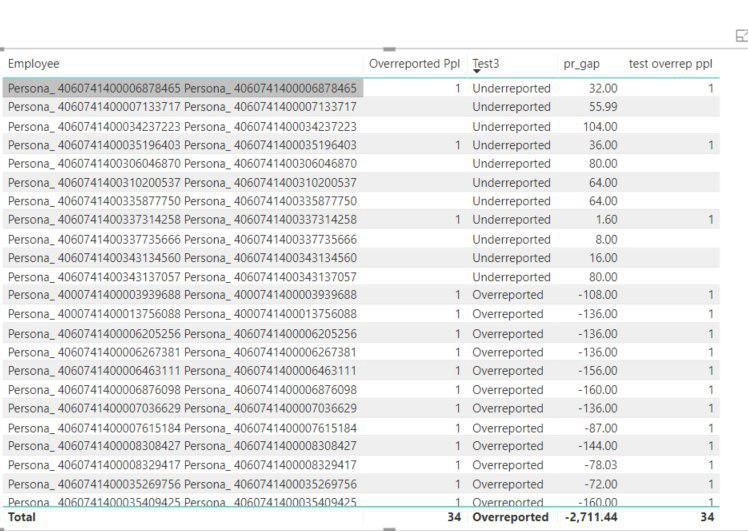
Hi @BobBI
Thanks for reply, I used exactly your formula however the same result see below, this is new column called test overrep ppl


- Mark as New
- Bookmark
- Subscribe
- Mute
- Subscribe to RSS Feed
- Permalink
- Report Inappropriate Content
Try this
"Overreported Ppl" = CALCULATE(Distinctcount ('Table_Name'[Employee]), FILTER( All('Table_Name'), 'Table_Name[Project Gap]<0))
if it solve please mark as solved, and give me your positive feedback.
- Mark as New
- Bookmark
- Subscribe
- Mute
- Subscribe to RSS Feed
- Permalink
- Report Inappropriate Content
thanks for reply, unfortunately that doesn't work, i need to count employees and this formula returns completely different value

Helpful resources

Data Days 2026
Don't miss out on Data Days, June 15 through August 7. Learn Fabric, Power BI, SQL, AI and more.

Power BI DataViz World Championships - June 2026
A new Power BI DataViz World Championship is coming this June! Don't miss out on submitting your entry.

| User | Count |
|---|---|
| 22 | |
| 22 | |
| 20 | |
| 19 | |
| 11 |


| User | Count |
|---|---|
| 65 | |
| 54 | |
| 46 | |
| 44 | |
| 31 |


