I am unable to create a calculation of how many hours a team is working on a project (based on the Cap Ex, Op Ex and Un Cat %) and therefore can't calculate cost.
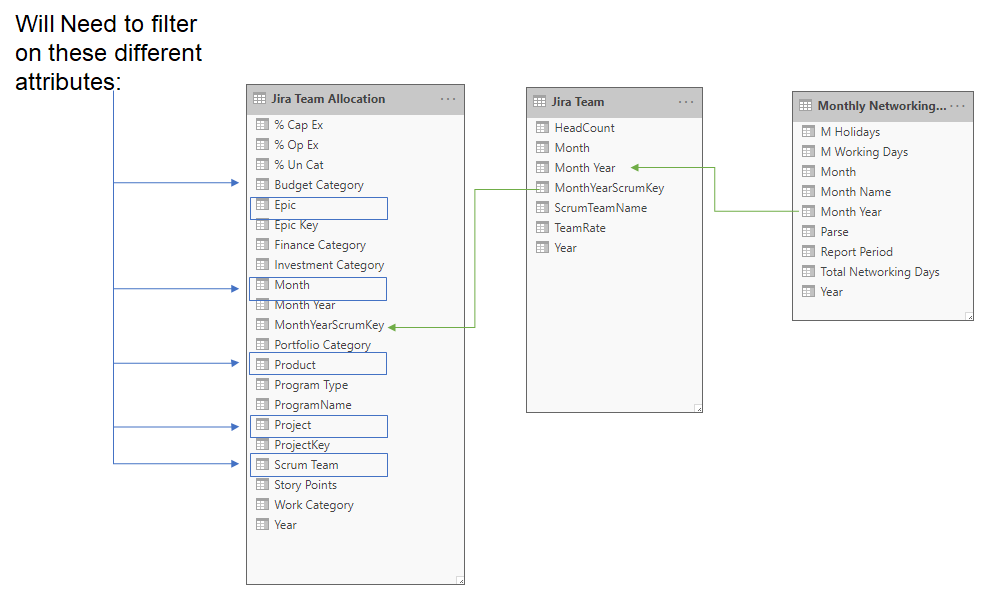
Monthly Networking allows me to get the Total Networking Days per month.
Jira Team allows me to get their headcount and team rate by month
Jira Team Allocation gives me their % of time on a Project. A Project rolls up to PRoducts and Products have tags for finance breakdowns.
The calculation is this:
Hours = CALCULATE(
(
8-(8*.123) // Hours per Day//
) *
'Monthly Networking Days'[Total Networking Days] * // Table has total days worked grouped by Month//
'Jira Team'[HeadCount] * // Table has a Scrum team head count grouped by Month//
CALCULATE(
'Jira Team Allocation'[% Cap Ex] +
'Jira Team Allocation'[% Op Ex] +
'Jira Team Allocation'[% Un Cat]
)) //Table has % by a Tag but I want the total percent. This table is itemized but does have a Month//
Everytime I try to create a measure I get these type of errors.

I am sure it is because I don't have a one to one relationship from the main attribute table Jira Team Allocation. Each month may have a scrum team allocated to several projects. Each month the Team may have a different headcount and rate in the Jira Team. And I can't use total monthly networking days because it wants to role it up for every line in the Jira Allocation table as well so if a Scrum Team has 3 projects for the month of July it will give me a total networking days of 63 instead on 21. Same goes for the team rate and head counts.


