FabCon is coming to Atlanta
Join us at FabCon Atlanta from March 16 - 20, 2026, for the ultimate Fabric, Power BI, AI and SQL community-led event. Save $200 with code FABCOMM.
Register now!- Power BI forums
- Get Help with Power BI
- Desktop
- Service
- Report Server
- Power Query
- Mobile Apps
- Developer
- DAX Commands and Tips
- Custom Visuals Development Discussion
- Health and Life Sciences
- Power BI Spanish forums
- Translated Spanish Desktop
- Training and Consulting
- Instructor Led Training
- Dashboard in a Day for Women, by Women
- Galleries
- Data Stories Gallery
- Themes Gallery
- Contests Gallery
- QuickViz Gallery
- Quick Measures Gallery
- Visual Calculations Gallery
- Notebook Gallery
- Translytical Task Flow Gallery
- TMDL Gallery
- R Script Showcase
- Webinars and Video Gallery
- Ideas
- Custom Visuals Ideas (read-only)
- Issues
- Issues
- Events
- Upcoming Events
Get Fabric Certified for FREE during Fabric Data Days. Don't miss your chance! Request now
- Power BI forums
- Forums
- Get Help with Power BI
- Desktop
- Re: Measure: how to calculate difference of filter...
- Subscribe to RSS Feed
- Mark Topic as New
- Mark Topic as Read
- Float this Topic for Current User
- Bookmark
- Subscribe
- Printer Friendly Page


- Mark as New
- Bookmark
- Subscribe
- Mute
- Subscribe to RSS Feed
- Permalink
- Report Inappropriate Content
Measure: how to calculate difference of filtered row fields shown as column in a matrix
Hello,
I have a model where I produce the following Matrix:
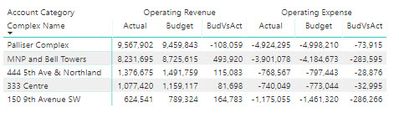
The rows, columns, values and filters are as follow:
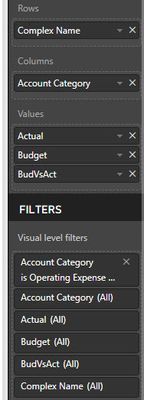
ACCOUNT CATEGORY is a column in a table, I add that field as column in the Matrix and then I filter: Operating Revenue and Operating Expense. I need to calculate the difference of those two filtered items: Operating Revenues - Operating Expenses and show it to the right.
Thanks in advance for the help!
Luis
Solved! Go to Solution.


- Mark as New
- Bookmark
- Subscribe
- Mute
- Subscribe to RSS Feed
- Permalink
- Report Inappropriate Content
Hi @lhern_ndez
Sorry for late reply.
Filter your measures for revenue and expence also - you will have to create a total of 6 measures
Actual expense = CALCULATE(sum(AspenData[Amount reporting]),FILTER(AspenData,AspenData[Accounting Book Type]="Actual"),Filter(OTHER TABLE, Account Category = ''OperatingExpense'))
Actual revenue = CALCULATE(sum(AspenData[Amount reporting]),FILTER(AspenData,AspenData[Accounting Book Type]="Actual" ,Filter(OTHER TABLE, Account Category = ''OperatingExpense'))
And then the difference
Remove anything from column property of the matrix
- Mark as New
- Bookmark
- Subscribe
- Mute
- Subscribe to RSS Feed
- Permalink
- Report Inappropriate Content
I have faced the same situation and because it is a matrix you cannot just calculate a measure and add it in values.
Because Values will be repeated for all the categories resulting in displaying difference twice, one for revenue and one for expense, which is usually not required.
Then i tried to do it in the database by calculating and union it to the actual table but it resulted in the same thing getting two difference column.

Only possible option i could find was create a measure for every column in the matrix. Eventually matrix will be gone and you will have a table.
This might not be your requirement but this was what we ended up with. I hope we get a better solution otherwise you can always use this one
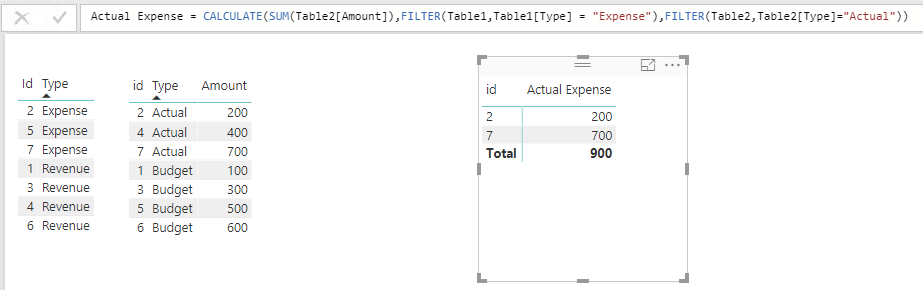
sample i created

Measures created for the above table
Actual Revenue = CALCULATE(MAX(Data[Actual]),FILTER(Data,Data[Category]="Revenue"))
Actual Expense = CALCULATE(MAX(Data[Actual]),FILTER(Data,Data[Category]="Expense"))
Actual Difference = [Actual Revenue] - [Actual Expense]
Simillarly you can create measures for other columns.
- Mark as New
- Bookmark
- Subscribe
- Mute
- Subscribe to RSS Feed
- Permalink
- Report Inappropriate Content
Hello kohlivinayak,
Thanks for your answer, the only detail is that in my case, Actual, Budget and ActVsBud are already measure (data coming from a related table, not the table that contains the column ACCOUNT CATEGORY, example as follow:
Actual = CALCULATE(sum(AspenData[Amount reporting]),FILTER(AspenData,AspenData[Accounting Book Type]="Actual"))
Thus, I see your measures are assuming the data are in the same table, is there any other possible solution?
I would like the table to look like this:

Thanks,
Luis
- Mark as New
- Bookmark
- Subscribe
- Mute
- Subscribe to RSS Feed
- Permalink
- Report Inappropriate Content
can you share your tables with sample data.
if these tables are related measure should still work.
- Mark as New
- Bookmark
- Subscribe
- Mute
- Subscribe to RSS Feed
- Permalink
- Report Inappropriate Content
Hello,
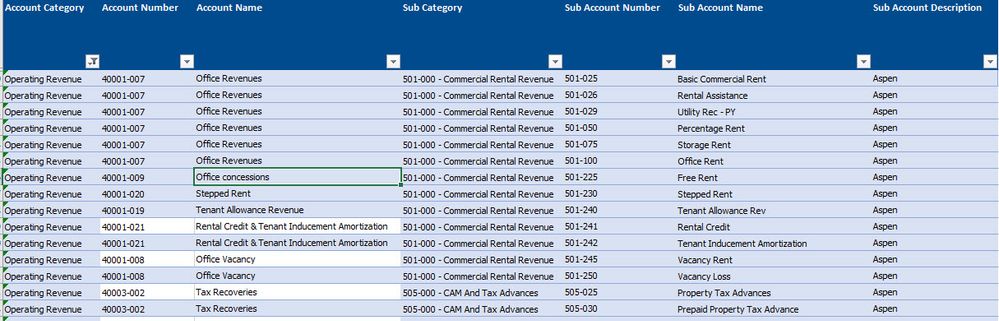
This is the an extract from the table PSPAccount, which is basically a chart of accounts, there are different categories in the column ACCOUNT CATEGORY and as you can see, the are not values:
This is an extract from the table AspenData, which are the transactions, the tables are related by the Partner Account Number, this is the table where the values (Column AMOUNT) are and the ACCOUNT CATEGORY field is not here, please note that Actual or Budget are in the column ACCOUNTING BOOK TYPE:
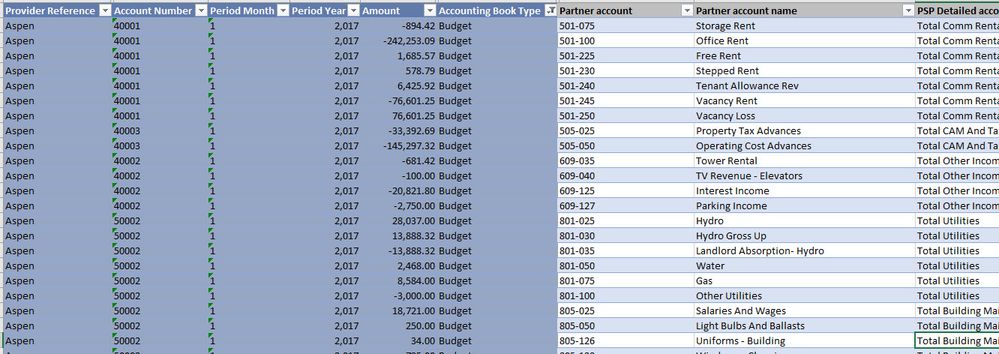
I tried your formulas but did not work as the values are in a different table, maybe you can tweak them?
Thanks for the help!
Luis
- Mark as New
- Bookmark
- Subscribe
- Mute
- Subscribe to RSS Feed
- Permalink
- Report Inappropriate Content
- Mark as New
- Bookmark
- Subscribe
- Mute
- Subscribe to RSS Feed
- Permalink
- Report Inappropriate Content
Hi @lhern_ndez
Sorry for late reply.
Filter your measures for revenue and expence also - you will have to create a total of 6 measures
Actual expense = CALCULATE(sum(AspenData[Amount reporting]),FILTER(AspenData,AspenData[Accounting Book Type]="Actual"),Filter(OTHER TABLE, Account Category = ''OperatingExpense'))
Actual revenue = CALCULATE(sum(AspenData[Amount reporting]),FILTER(AspenData,AspenData[Accounting Book Type]="Actual" ,Filter(OTHER TABLE, Account Category = ''OperatingExpense'))
And then the difference
Remove anything from column property of the matrix
- Mark as New
- Bookmark
- Subscribe
- Mute
- Subscribe to RSS Feed
- Permalink
- Report Inappropriate Content
- Mark as New
- Bookmark
- Subscribe
- Mute
- Subscribe to RSS Feed
- Permalink
- Report Inappropriate Content
- Mark as New
- Bookmark
- Subscribe
- Mute
- Subscribe to RSS Feed
- Permalink
- Report Inappropriate Content
can you share your tables with sample data.
if these tables are related measure should still work.

- Mark as New
- Bookmark
- Subscribe
- Mute
- Subscribe to RSS Feed
- Permalink
- Report Inappropriate Content
Hi @lhern_ndez,
Please share some sample data/pbix file with expected result to help us clear your requirement.
Regards,
Xiaoxin Sheng
- Mark as New
- Bookmark
- Subscribe
- Mute
- Subscribe to RSS Feed
- Permalink
- Report Inappropriate Content
Hello v-shex-msft,
Thanks for your answer, what I need is the below, see in yellow:

Where NOI should be a measure that substract Operating Revenue - Operating Expense.
Please note that Actual, Budget and BudVsAct are already measures, example as follow:
Actual = CALCULATE(sum(AspenData[Amount reporting]),FILTER(AspenData,AspenData[Accounting Book Type]="Actual"))
Thanks!
Luis
Helpful resources

Power BI Monthly Update - November 2025
Check out the November 2025 Power BI update to learn about new features.

Fabric Data Days
Advance your Data & AI career with 50 days of live learning, contests, hands-on challenges, study groups & certifications and more!

FabCon Atlanta 2026
Join us at FabCon Atlanta, March 16-20, for the ultimate Fabric, Power BI, AI and SQL community-led event. Save $200 with code FABCOMM.


