This time we’re going bigger than ever. Fabric, Power BI, SQL, AI and more. We're covering it all. You won't want to miss it.
Learn moreJoin the FabCon + SQLCon recap series. Up next: Power BI, Real-Time Intelligence, IQ and AI, and Data Factory take center stage. All sessions are available on-demand after the live show. Register now
Hi all,
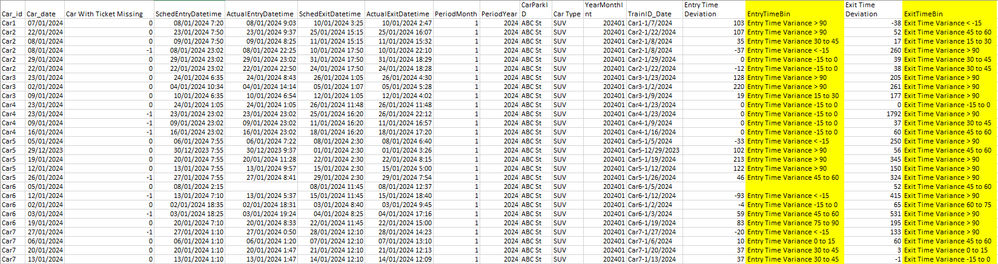
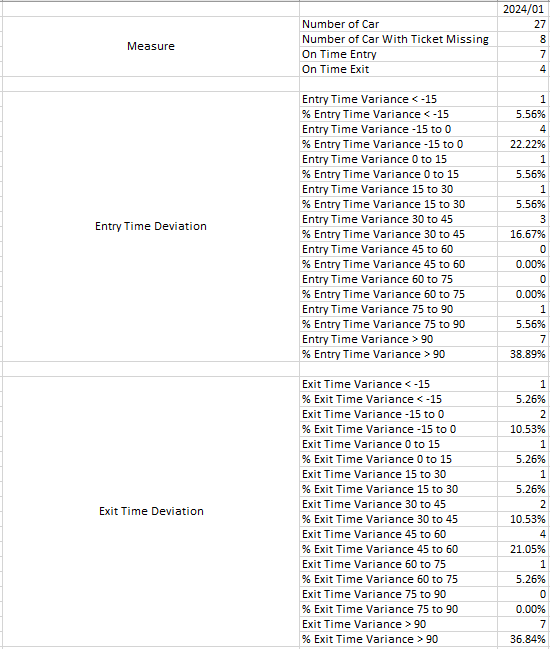
I have a data as below and column highlighted in yellow is a calculated column based on Entry Time Deviation and Exit time Deviation. I want to use this data and generate report similar to the following table. With Entry Time Deviation along, there are 18 different measure if i would go and create measure one at a time. Is there a better way to do this?
Data
Report
Thank you
Regards,
Vince
May be a little challenging to explain but ideally, you do this in power query by
Once the you have the table, you can close and join the field to the main table with the data and do the rest with DAX. Things like this are typically best done with Power query and am sure im missing a smnall step but you get the idea. if i have time i could buiold it out
Hi @datawailor
I have a go and i think i can create a separate table but not sure how to join it back to the main table with data. Can you please assist?
Thank you
Thanks for the recommendation. I will have a go.
Check out the April 2026 Power BI update to learn about new features.
If you have recently started exploring Fabric, we'd love to hear how it's going. Your feedback can help with product improvements.
A new Power BI DataViz World Championship is coming this June! Don't miss out on submitting your entry.
| User | Count |
|---|---|
| 37 | |
| 37 | |
| 31 | |
| 22 | |
| 15 |
| User | Count |
|---|---|
| 76 | |
| 59 | |
| 32 | |
| 31 | |
| 26 |