Join us at FabCon Atlanta from March 16 - 20, 2026, for the ultimate Fabric, Power BI, AI and SQL community-led event. Save $200 with code FABCOMM.
Register now!Get Fabric Certified for FREE during Fabric Data Days. Don't miss your chance! Request now
Hi, Hoping someone can help me create some measures. I'm new to BI and I'm getting circular dependency errors and not sure how to resolve.
I need to show how much time each user is spending in an application per month. A sample of my data source looks like this. The Usage time represents hours.
| User | Date | Usage Time |
A | 1/8/2022 | 1.25 |
| A | 1/12/2022 | 1.5 |
| A | 2/01/2022 | 2.5 |
| A | 2/21/2022 | 4.75 |
| B | 1/19/2022 | 3 |
| B | 2/12/2022 | 1.25 |
| B | 3/12/2022 | 1 |
| B | 3/19/2022 | 21.5 |
I tried the following measure and received a circular dependency error:
My expected outcome is:
| User | Date | Usage Time |
| A | Jan | 2.75 |
| A | Feb | 7.25 |
| B | Jan | 3 |
| B | Feb | 1.25 |
| B | Mar | 22.5 |
Solved! Go to Solution.
Hi @user900 ,
Please try:
Total Usage = CALCULATE(SUM('Table'[Usage Time]),ALLEXCEPT('Table','Table'[User],'Table'[Date].[Year],'Table'[Date].[Month]))Status =
var _2022Goal = 20
return IF(CALCULATE(SUM('Table'[Usage Time]),ALLEXCEPT('Table','Table'[User]))>=_2022Goal,"Complete","Not Complete")
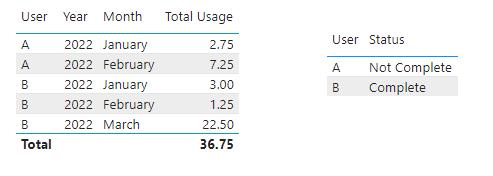
Output:
Best Regards,
Eyelyn Qin
If this post helps, then please consider Accept it as the solution to help the other members find it more quickly.
Hi @user900 ,
Please try:
Total Usage = CALCULATE(SUM('Table'[Usage Time]),ALLEXCEPT('Table','Table'[User],'Table'[Date].[Year],'Table'[Date].[Month]))Status =
var _2022Goal = 20
return IF(CALCULATE(SUM('Table'[Usage Time]),ALLEXCEPT('Table','Table'[User]))>=_2022Goal,"Complete","Not Complete")
Output:
Best Regards,
Eyelyn Qin
If this post helps, then please consider Accept it as the solution to help the other members find it more quickly.
This worked perfectly. Thank you.
@user900 , if you need data of last day of month , try like
Monthly Usage = CALCULATE(SUM('table'[Usage Time]),FILTER(ALL(table[Date]),table[Date] = EOmonth(table[Date],0)))
Check out the November 2025 Power BI update to learn about new features.
Advance your Data & AI career with 50 days of live learning, contests, hands-on challenges, study groups & certifications and more!