Join us at FabCon Atlanta from March 16 - 20, 2026, for the ultimate Fabric, Power BI, AI and SQL community-led event. Save $200 with code FABCOMM.
Register now!The Power BI Data Visualization World Championships is back! Get ahead of the game and start preparing now! Learn more
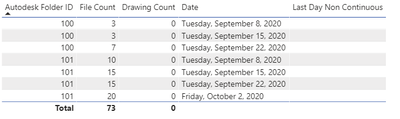
I'm currently using the 'card with states by okviz' custom visual. They have a target field which is used to compare against the current measure.
I'm looking to compare against the previous available date as my data is not continuous.
| Folder ID | File Count | Date | PreDate |
| 100 | 7 | Sept 22, 2020 | Sept 15, 2020 |
| 100 | 3 | Sept 15, 2020 | Sept 8, 2020 |
| 100 | 3 | Sept 8, 2020 | (blank) |
| 101 | 20 | Oct 2, 2020 | Sept 22, 2020 |
| 101 | 15 | Sept 22, 2020 | Sept 15, 2020 |
| 101 | 15 | Sept 15, 2020 | Sept 15, 2020 |
| 101 | 10 | Sept 8, 2020 | (blank) |
For many folders
Note: Folder 100 was deleted on Sept 23 so it no longer appears in the data
So far I've used this formula to create a column determining the previous file count.
Pre FileCount = LOOKUPVALUE('Good Data'[File Count],'Good Data'[Autodesk Folder ID],'Good Data'[Autodesk Folder ID],'Good Data'[date],'Good Data'[predate])| Folder ID | File Count | Date | PreDate | Pre FileCount |
| 100 | 0 | Oct 2, 2020 | Sept 22, 2020 | 7 |
| 100 | 7 | Sept 22, 2020 | Sept 15, 2020 | 3 |
| 100 | 3 | Sept 15, 2020 | Sept 8, 2020 | 3 |
| 100 | 3 | Sept 8, 2020 | (blank) | (blank) |
| 101 | 20 | Oct 2, 2020 | Sept 22, 2020 | 15 |
| 101 | 15 | Sept 22, 2020 | Sept 15, 2020 | 15 |
| 101 | 15 | Sept 15, 2020 | Sept 15, 2020 | 10 |
| 101 | 10 | Sept 8, 2020 | (blank) | (blank) |
Thank you,
Solved! Go to Solution.
Hi @Anonymous,
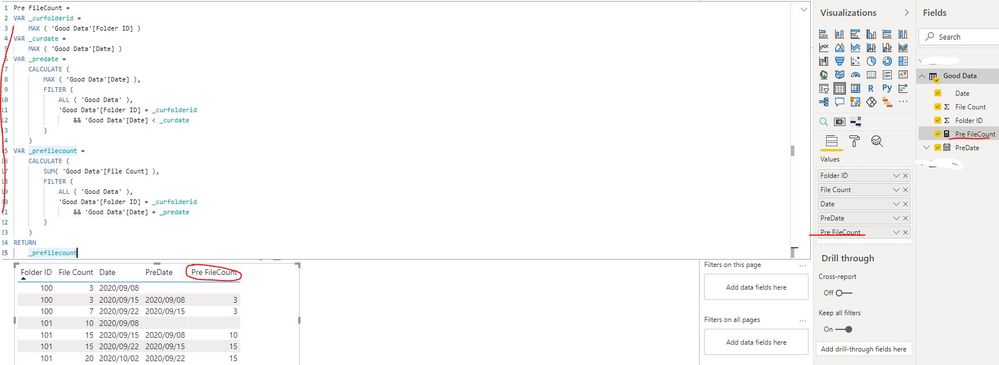
You can create a measure as below:
Pre FileCount =
VAR _curfolderid =
MAX ( 'Good Data'[Folder ID] )
VAR _curdate =
MAX ( 'Good Data'[Date] )
VAR _predate =
CALCULATE (
MAX ( 'Good Data'[Date] ),
FILTER (
ALL ( 'Good Data' ),
'Good Data'[Folder ID] = _curfolderid
&& 'Good Data'[Date] < _curdate
)
)
VAR _prefilecount =
CALCULATE (
SUM ( 'Good Data'[File Count] ),
FILTER (
ALL ( 'Good Data' ),
'Good Data'[Folder ID] = _curfolderid
&& 'Good Data'[Date] = _predate
)
)
RETURN
_prefilecountBest Regards
Rena
I’d use Power Query: Assuming you are gonna sort this thing;
Add a custom column like so: let L => each List.PositionOf([Count])-1 in
[Count]-List.Range([Count], L)
@Anonymous ,
As measure with date table
example
Last Day Non Continuous = CALCULATE([sales],filter(ALLSELECTED('Date'),'Date'[Date] =MAXX(FILTER(ALLSELECTED('Date'),'Date'[Date]<max('Date'[Date])),'Date'[Date])))
if you only need date
MAXX(FILTER(ALLSELECTED('Date'),'Date'[Date]<max('Date'[Date])),'Date'[Date])
In this blog, I have dicussed column way too
I do not fully understand your solution.
Your first example returns (blank) for all dates when I tried it with my data. Can you have another look at my question and if needed ask for clarification. Sorry if my question isn't clear enough.
using:
Hi @Anonymous,
You can create a measure as below:
Pre FileCount =
VAR _curfolderid =
MAX ( 'Good Data'[Folder ID] )
VAR _curdate =
MAX ( 'Good Data'[Date] )
VAR _predate =
CALCULATE (
MAX ( 'Good Data'[Date] ),
FILTER (
ALL ( 'Good Data' ),
'Good Data'[Folder ID] = _curfolderid
&& 'Good Data'[Date] < _curdate
)
)
VAR _prefilecount =
CALCULATE (
SUM ( 'Good Data'[File Count] ),
FILTER (
ALL ( 'Good Data' ),
'Good Data'[Folder ID] = _curfolderid
&& 'Good Data'[Date] = _predate
)
)
RETURN
_prefilecountBest Regards
Rena
The Power BI Data Visualization World Championships is back! Get ahead of the game and start preparing now!
| User | Count |
|---|---|
| 39 | |
| 37 | |
| 33 | |
| 32 | |
| 29 |
| User | Count |
|---|---|
| 133 | |
| 88 | |
| 85 | |
| 68 | |
| 64 |