Join us at FabCon Atlanta from March 16 - 20, 2026, for the ultimate Fabric, Power BI, AI and SQL community-led event. Save $200 with code FABCOMM.
Register now!The Power BI Data Visualization World Championships is back! Get ahead of the game and start preparing now! Learn more
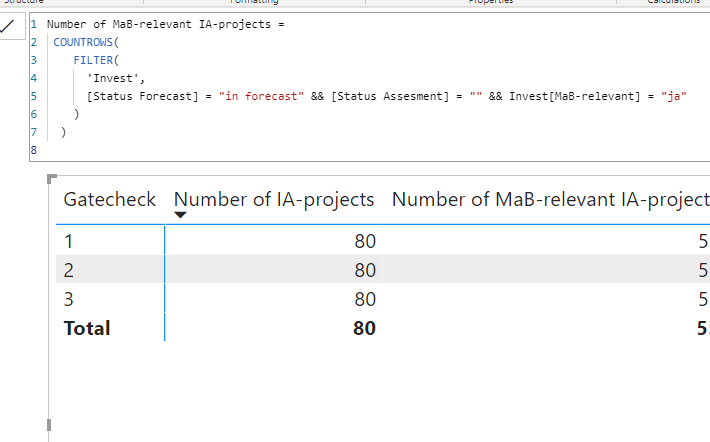
I want to create a measure, which is calculating something based on the row, which is shown on the table. So for "Gatecheck 1" I need another calculation than for "Gatecheck 2" for example. How can I differentiate?
Can I use any switch or if statement? And how?
Solved! Go to Solution.
Hey @tuncay ,
there is a switch statement that you could use.
Try it like this:
SwithcMeasure =
SWITCH(
TRUE(),
MAX( 'MyTable'[Gatecheck] ) = 1, [Measure1],
MAX( 'MyTable'[Gatecheck] ) = 2, [Measure2],
MAX( 'MyTable'[Gatecheck] ) = 3, [Measure3]
)
The idea provided by @selimovd is correct. This formula displays specific calculation results for different values of Gatecheck . Sorry, I don't know what you expected
Hey @tuncay ,
there is a switch statement that you could use.
Try it like this:
SwithcMeasure =
SWITCH(
TRUE(),
MAX( 'MyTable'[Gatecheck] ) = 1, [Measure1],
MAX( 'MyTable'[Gatecheck] ) = 2, [Measure2],
MAX( 'MyTable'[Gatecheck] ) = 3, [Measure3]
)
Can't use different measures for each column, since they have to be named differently
Hey @tuncay ,
sorry, then I didn't understand what exactly you mean.
Can you explain the desired result a little more detailed?
Best regards
Denis
The Power BI Data Visualization World Championships is back! Get ahead of the game and start preparing now!
Check out the November 2025 Power BI update to learn about new features.
| User | Count |
|---|---|
| 59 | |
| 46 | |
| 42 | |
| 23 | |
| 18 |
| User | Count |
|---|---|
| 190 | |
| 122 | |
| 96 | |
| 66 | |
| 47 |