Join us at FabCon Atlanta from March 16 - 20, 2026, for the ultimate Fabric, Power BI, AI and SQL community-led event. Save $200 with code FABCOMM.
Register now!The Power BI Data Visualization World Championships is back! It's time to submit your entry. Live now!
Hi Guys,
I have more question than a problem and I would like to understand one behavior I am facing.
1. I have very simple model as you can see:
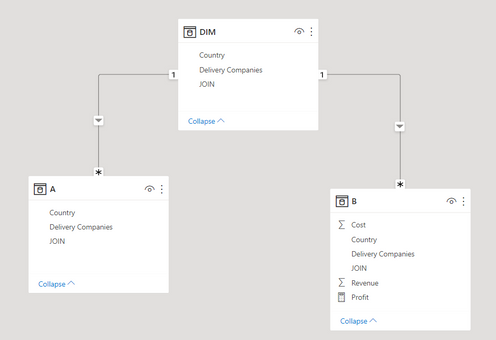
2. I also create one very simple table in my report, combining info from all three tables. This result is correct, because SK has only one Delivery Company, which is PPL:
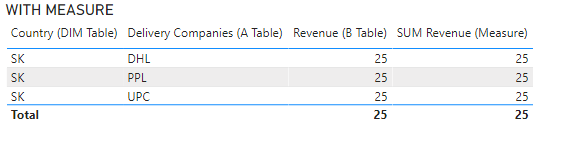
3. Problem appears when I create measure from Revene:
Suddenly I see all Delivery companies, eventhough SK has only one company.
I read the following solution:
https://community.powerbi.com/t5/Desktop/Measure-is-creating-duplicate-rows-in-a-table/td-p/1381002
And I understand what seems to be the problem. Only ONE thing I do not understand - why is the behavior of table different if I use measure and if I just simple use my numeric column.
(In First cases I have only simple sum drag-drop from my fact table, in second I create a measure and suddenly I have duplicates.) Can anyone describe me the logic?
I would really appreciate it!!
Solved! Go to Solution.
Hi @Migasuke ,
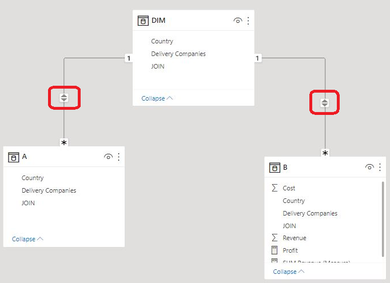
This is related to the filtering direction, you can set the filtering direction to be both.
If it is a Single direction, for example, A filters B in one direction, A can filter B, but B cannot filter A.
Here is the relevant link, I hope it will help you:
Result:
Best Regards,
Liu Yang
If this post helps, then please consider Accept it as the solution to help the other members find it more quickly.
Hi @Migasuke ,
This is related to the filtering direction, you can set the filtering direction to be both.
If it is a Single direction, for example, A filters B in one direction, A can filter B, but B cannot filter A.
Here is the relevant link, I hope it will help you:
Result:
Best Regards,
Liu Yang
If this post helps, then please consider Accept it as the solution to help the other members find it more quickly.
@Migasuke , You should also use a dimension for delivery companies. Tables A and B have no join. And Delivery company from A is need as a group by.
I think in first visual it is first of last and in second it is group by .
If this does not help
Can you share sample data and sample output in table format? Or a sample pbix after removing sensitive data.
Hi @amitchandak ,
in first visual it is not first/last. I basically create copy of the table and then just add Revenue = SUM([Revenue]). I have uploaded the file in case you want to check:
https://we.tl/t-XRxEW5W8WH
Thanks a lot for your help and curiosity.
The Power BI Data Visualization World Championships is back! It's time to submit your entry.
Check out the January 2026 Power BI update to learn about new features.
| User | Count |
|---|---|
| 66 | |
| 45 | |
| 38 | |
| 26 | |
| 23 |
| User | Count |
|---|---|
| 136 | |
| 117 | |
| 55 | |
| 36 | |
| 30 |