
Join us at FabCon Atlanta from March 16 - 20, 2026, for the ultimate Fabric, Power BI, AI and SQL community-led event. Save $200 with code FABCOMM.
Register now!Get Fabric Certified for FREE during Fabric Data Days. Don't miss your chance! Request now
Hello everyone,
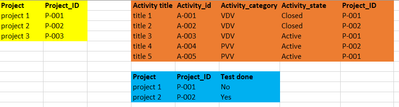
I would like to have a measure that would give me the result in the column "Test done" in blue table in my report.
Yellow and orange are data table and they are linked by the Project_ID.
I would like to measure for all my project:
If all and only activities VDV in "activity category" are closed in "activity state"
If yes I want to return "Yes" and if at least one of them is not closed I want to return "No" and if there is no VDV activities return "No VDV"
Im a trying for the moment like that but it is not working:
Can someone please help me or tell me which formula use ?
Thanks in advance.
Hi @Aikeno ,
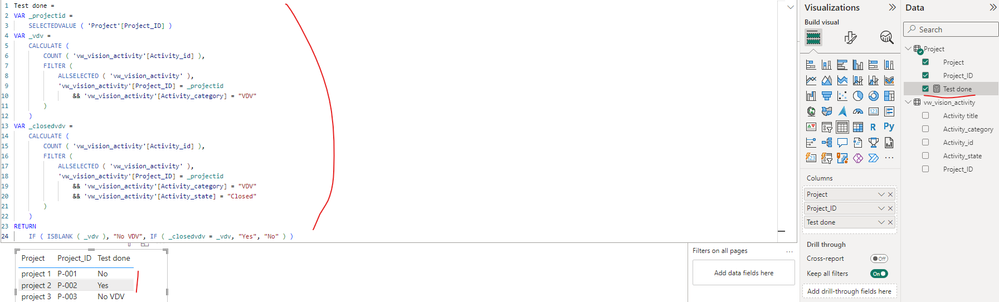
You can create a measure as below to get it, please find the details in the attachment.
Test done =
VAR _projectid =
SELECTEDVALUE ( 'Project'[Project_ID] )
VAR _vdv =
CALCULATE (
COUNT ( 'vw_vision_activity'[Activity_id] ),
FILTER (
ALLSELECTED ( 'vw_vision_activity' ),
'vw_vision_activity'[Project_ID] = _projectid
&& 'vw_vision_activity'[Activity_category] = "VDV"
)
)
VAR _closedvdv =
CALCULATE (
COUNT ( 'vw_vision_activity'[Activity_id] ),
FILTER (
ALLSELECTED ( 'vw_vision_activity' ),
'vw_vision_activity'[Project_ID] = _projectid
&& 'vw_vision_activity'[Activity_category] = "VDV"
&& 'vw_vision_activity'[Activity_state] = "Closed"
)
)
RETURN
IF ( ISBLANK ( _vdv ), "No VDV", IF ( _closedvdv = _vdv, "Yes", "No" ) )
Best Regards
Thanks for your help !
It seem to works for you but on my side it does this:
I assume that i should have only one row for each project. It is the case when I delete the measure in this table.
Hi @Aikeno ,
Could you please provide some fake data in your tables (exclude sensitive data) with Text format and your expected result with special examples and screenshots? Later I will check why the formula is not working in your side and give you a suitable solution. You can refer the following link to share the required info:
How to provide sample data in the Power BI Forum
And It is better if you can share a simplified pbix file. You can refer the following link to upload the file to the community. Thank you.
How to upload PBI in Community
Best Regards
Hello,
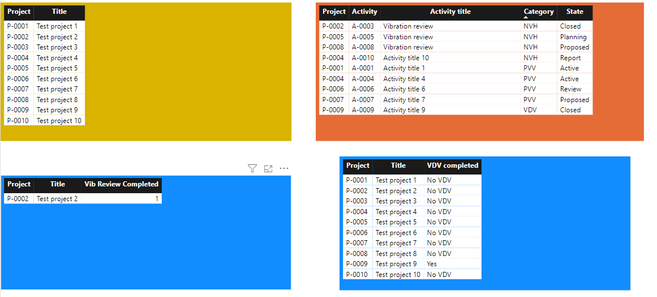
Here is the simplified data :
https://www.mediafire.com/file/skwecp8ym4f6zuz/Power+BI+with+fake+data.pbix/file
For the blue table on the left, I would like to replace my measure to display "Yes" or "No" instead of the activites count and also be able to see all the project not only the one who have a Vibration review closed.
For the blue table on the right it seems to works on this simplified data but not in my real one can't explain why.
My problem here seems to be link to my column required date and completed date because if I delete CompletedDate and for the RequiredDate I choose the most recent one instead of dont resume it works well.
No clue how I can solve this problem
@Aikeno , Try a measure
Test Done =
VAR _TotalVDV = CALCULATE(
COUNTROWS(vw_vision_activity),
vw_vision_activity[activity category] = "VDV"
)
VAR _ClosedVDV = CALCULATE(
COUNTROWS(vw_vision_activity),
vw_vision_activity[activity category] = "VDV",
vw_vision_activity[activity state] = "Closed"
)
VAR _opendVDV = CALCULATE(
COUNTROWS(vw_vision_activity),
vw_vision_activity[activity category] = "VDV",
vw_vision_activity[activity state] = "Active"
)
RETURN
Switch( true() ,
not(isblank([_opendVDV])), "No",
[_TotalVDV] > [_ClosedVDV], "Yes"
)
The information you have provided is not making the problem clear to me. Can you please explain with an example.
Appreciate your Kudos.
Check out the November 2025 Power BI update to learn about new features.
Advance your Data & AI career with 50 days of live learning, contests, hands-on challenges, study groups & certifications and more!