This time we’re going bigger than ever. Fabric, Power BI, SQL, AI and more. We're covering it all. You won't want to miss it.
Learn moreDid you hear? There's a new SQL AI Developer certification (DP-800). Start preparing now and be one of the first to get certified. Register now
Hi,
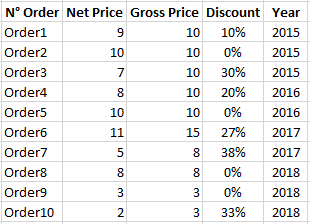
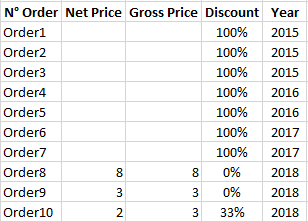
I have created a measure to calculate the discount between two values, but when I put it in a table, it shows all the record (it seems to ignore the filters), but it shows blanks in the columns that should contain the two values.
ex.:
I created the measure Discount = 1 - DIVIDE(SUM([Net Price]);SUM([Gross Price]))
Table
With filter: Year = 2018, this is the result (in a table):
Where did I go wrong?
Solved! Go to Solution.
Hi, A minor update to @Anonymous's solution.
Discount = IF(ISBLANK(SUM([Gross Price])), BLANK(), 1 - DIVIDE(SUM([Net Price]),SUM([Gross Price])))
See if that helps.
I think what's most likely happening with your measure is that after filtering, the measure still has a value of "1 - divide(blank, blank)", where the division result is blank, and "1 - blank" is just 1. Hence, every line that should be filtered out is going to have a value of 1.
Depending on the behavior you'd prefer to see and the way your data is structured, there's different ways to go about solving this, but one option would be something like this:
Discount = IF(ISBLANK([Gross Price]), BLANK(), 1 - DIVIDE(SUM([Net Price]),SUM([Gross Price])))
Which would keep your measure calculation essentially the same, but prevent it from appearing in case [Gross Price] is ever blank (such as when it's being filtered out)
I hope that solves your problem!
I tried to put a ISBLANK([gross price]) control, but it gave me an error due to the fact that a measure can't refer to a single value or something like that. I did read something about converting it from measure to column, but it would lose the function I was looking for.
I want to add a detail: in the report I'm making, I already filtered out some fields (customer and type of item sold), and the only thing that seems to not filter the measure is the "year", which is filtered from a Date table connected to the main table.
Hi, A minor update to @Anonymous's solution.
Discount = IF(ISBLANK(SUM([Gross Price])), BLANK(), 1 - DIVIDE(SUM([Net Price]),SUM([Gross Price])))
See if that helps.
Check out the April 2026 Power BI update to learn about new features.
Sign up to receive a private message when registration opens and key events begin.
If you have recently started exploring Fabric, we'd love to hear how it's going. Your feedback can help with product improvements.
| User | Count |
|---|---|
| 34 | |
| 31 | |
| 30 | |
| 21 | |
| 16 |
| User | Count |
|---|---|
| 62 | |
| 51 | |
| 31 | |
| 23 | |
| 23 |